







Definition and Purpose of the EN Payment Request Form
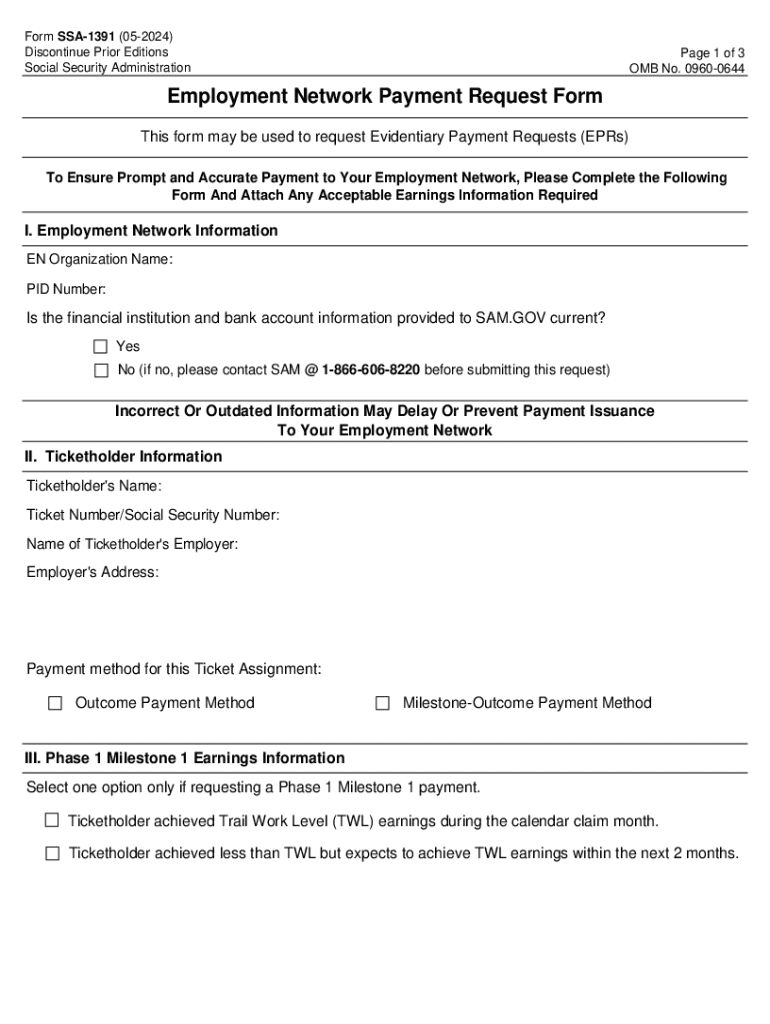
The EN Payment Request Form, formally known as SSA-1391, is designed for Employment Networks to request Evidentiary Payment Requests. This form is specific to the Social Security Administration and it facilitates the payment claiming process for services rendered under the Ticket to Work program. Employment Networks use this form to provide essential details about their organization, the ticketholder, and the type of payment being requested. It ensures that all necessary documentation is submitted in a standardized manner, which helps streamline the processing of payments and avoid delays.
How to Use the EN Payment Request Form
To effectively use the EN Payment Request Form, Employment Networks need to follow a structured approach. The form outlines specific sections where users must input information regarding their organization and the individual receiving services. The process begins with filling out the Employment Network information, followed by detailed ticketholder data. Next, users must select the payment request type, which could include outcomes or milestones achieved by the ticketholder. Careful attention is necessary when attaching required earnings documentation; failure to do so can result in processing delays.
Steps to Complete the EN Payment Request Form
- Gather Required Information: Begin by collecting all necessary details about the ticketholder and their employment, including earnings statements and other supporting documents.
- Complete Employment Network Section: Fill out your organization’s details accurately to avoid administrative errors.
- Provide Ticketholder Information: Insert personal and employment data of the ticketholder. Precision is key for accurate processing.
- Select Payment Request Type: Indicate the type of payment you’re requesting. Options typically include milestone or outcome payments within the Ticket to Work program.
- Attach Earnings Documentation: Include all relevant documents proving the ticketholder’s income as supplementary evidence.
- Review and Submit: Double-check all entries for accuracy. Submit the form through the designated channels, ensuring it adheres to the Social Security Administration’s submission criteria.
Key Elements of the EN Payment Request Form
The EN Payment Request Form is divided into several critical elements that must be completed accurately. These include:
- Employment Network Information: Includes the organization’s identification and contact details.
- Ticketholder Details: Personal data about the individual receiving services under the program.
- Payment Request Type: Specifies the nature of the claim, influencing the documentation required.
- Required Earnings Documentation: Proof of the ticketholder’s income levels that justify the payment request.
- Certification Section: A declaration by the Employment Network affirming the accuracy of the provided information.
Required Documents for the EN Payment Request Form
Submitting the EN Payment Request Form demands supporting documents to validate the request. Typical necessary documents include:
- Earnings Statements: Pay stubs or employment verification letters demonstrating the ticketholder’s income.
- Program Participation Documentation: Evidence of the ticketholder’s involvement in the Ticket to Work program.
- Employment Network Contract: A copy of the agreement between the network and the Social Security Administration confirming authorized operations.
Form Submission Methods: Online, Mail, In-Person
Employment Networks can submit the EN Payment Request Form through multiple methods:
- Online Submission: The preferred method, allowing for quick processing through the official SSA platform.
- Mail: For networks that prefer traditional methods, submitting a physical form is permitted. Ensure all documentation is securely attached.
- In-Person: Direct submission to a local SSA office, providing immediate acknowledgment of receipt.
Legal Use of the EN Payment Request Form
The EN Payment Request Form is legally binding and used specifically within the constraints of the SSA’s guidelines. It complies with federal requirements to ensure that Employment Networks accurately report and claim payments for services provided. Misrepresentation or incorrect submissions can lead to penalties, including denial of claims or legal repercussions, reinforcing the need for thoroughness and transparency in its use.
Penalties for Non-Compliance
Non-compliance with the guidelines and requirements of the EN Payment Request Form can result in significant penalties. Employment Networks may face:
- Denial of Payment Requests: Incorrect or incomplete forms without the necessary documentation will not be processed, affecting cash flow.
- Legal Consequences: Falsified information may lead to investigations and potential legal actions.
- Program Suspension: Repeated non-compliance can culminate in the suspension or termination from the Ticket to Work program.
Digital vs. Paper Version of the EN Payment Request Form
The EN Payment Request Form exists in both digital and paper versions, each suiting different needs:
- Digital Version: Offers the convenience of online submission with enhanced processing speed and built-in validation checks to minimize errors.
- Paper Version: Suits networks preferring manual submissions or with limited access to digital systems, though processing times are typically longer.
Examples of Using the EN Payment Request Form
In practice, an Employment Network serving a ticketholder who has secured partial employment under the Ticket to Work program will use the EN Payment Request Form to request a milestone payment. Accompanied by earnings statements, the form details the ticketholder’s progression and supports the claim for compensation based on the outcomes achieved.
Who Issues the EN Payment Request Form
The EN Payment Request Form is issued by the Social Security Administration as part of its management of the Ticket to Work program. The form regulates the payment processes for Employment Networks, ensuring adherence to federal guidelines and consistency in data reporting.
Eligibility Criteria for Using the EN Payment Request Form
Eligibility to use the EN Payment Request Form is centered around being an authorized Employment Network under the Ticket to Work program. Networks must have a formal agreement with the Social Security Administration and comply with program guidelines to utilize this form for claiming payments.

Software Compatibility and Integration
The digital form is compatible with various software platforms, allowing users to integrate it seamlessly into their existing workflow. Commonly used software includes document management systems that support PDF, DOC, and other formats, aligning with platforms like TurboTax or QuickBooks for financial tracking.




