Definition & Meaning
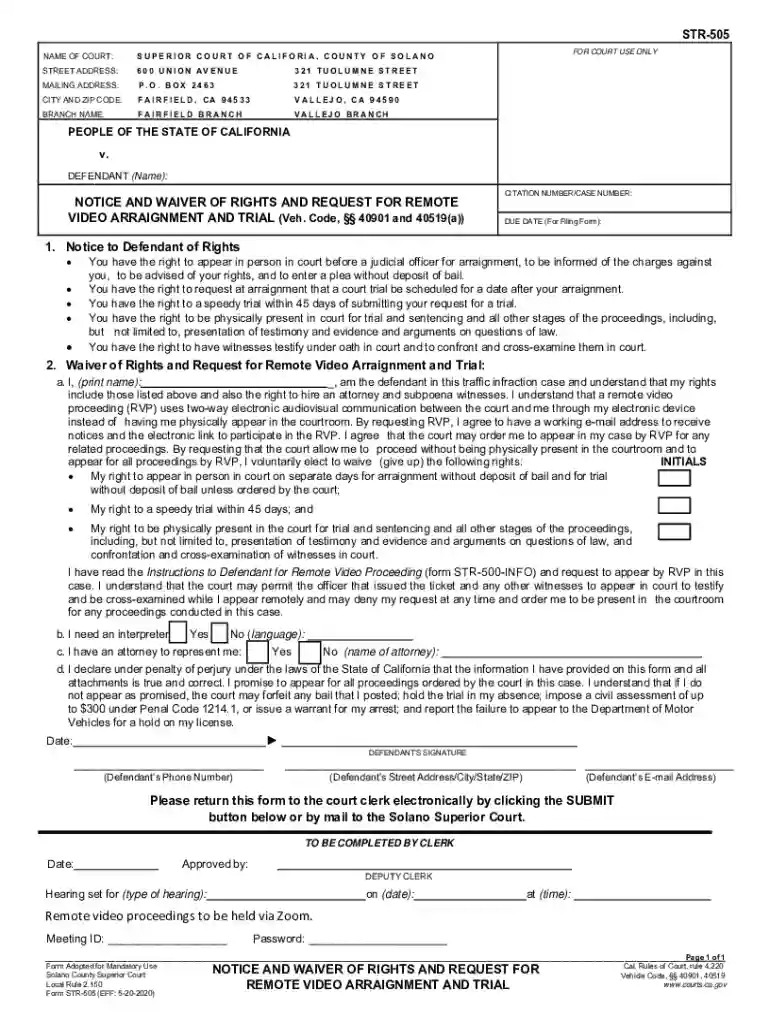
Rule 19 Remote Appearances refer to the regulations and procedures established by the Superior Court of California, County of Solano, that allow participants to appear in civil, family, and traffic cases remotely. These rules are part of a broader initiative to make court proceedings more accessible and efficient by enabling remote participation via video or telephone. The rule outlines specific types of proceedings where remote appearances are permitted and sets guidelines for conducting these appearances to ensure they adhere to legal standards.
Types of Proceedings Permitted
- Civil Cases: Includes hearings and motions where personal appearance is not critical.
- Family Cases: Certain negotiations or procedural matters that do not require in-person attendance.
- Traffic Cases: Minor traffic violations or administrative proceedings.
General Guidelines
- Participants must notify the court of their intent to appear remotely.
- Remote appearance tools must comply with court standards to maintain legal integrity.
Steps to Complete the Rule 19 Remote Appearances
Completing a Rule 19 Remote Appearance involves several steps. Participants must be proactive in ensuring they follow these procedures to avoid non-compliance and potential penalties.
- Notify the Court: Inform the court of your intention to appear remotely at least a specified period before the scheduled appearance. This can usually be done through an online portal or filing a request form.
- Ensure Technical Requirements: Confirm that your device meets the technical specifications required by the court, including video and audio capabilities.
- Receive Confirmation: Await confirmation from the court that your request has been approved, which includes necessary login credentials or access links.
- Prepare for the Hearing: Gather all necessary documents and ensure you have a stable internet connection for the duration of the hearing.
- Log In on Time: Join the remote session at the specified time. It's advisable to log in a few minutes early to troubleshoot any last-minute technical issues.
Key Elements of the Rule 19 Remote Appearances
Several key elements are crucial for the correct application and compliance with Rule 19 Remote Appearances. Understanding these elements ensures that participants are adequately prepared and that the proceedings run smoothly.
Notification Process
- A formal notice must be given to the court specifying the details and reasons for requesting a remote appearance.
Technology Standards
- Devices used for remote appearances must meet minimum technical specifications set by the court to ensure clear communication and reduce the risk of technical disruptions.
Participant Conduct
- Participants are expected to maintain courtroom decorum, which includes appropriate attire, a quiet environment, and professional behavior identical to an in-person appearance.
Legal Use of the Rule 19 Remote Appearances
The legal framework surrounding Rule 19 ensures that participants' rights are maintained and that the integrity of the judicial process is upheld even in a virtual setting.
Compliance and Guidelines
- Rule 19 mandates compliance with specific court guidelines to maintain the legality of remote appearances.
- It specifies how evidence and documents should be presented during the remote hearing.
Consequences of Non-Compliance
- Failing to adhere to Rule 19 procedures may result in the court rejecting the remote appearance request, rescheduling hearings, or even imposing penalties.
Important Terms Related to Rule 19 Remote Appearances
Understanding the terminology associated with Rule 19 is crucial for participants to navigate the process effectively.
- Remote Appearance: Participating in a court proceeding via electronic means rather than physical attendance.
- E-Filing: The process of submitting documents to the court electronically.
- Authentication: The process of verifying a participant's identity during a remote session.
State-Specific Rules for Rule 19 Remote Appearances
While Rule 19 applies broadly across California, specific counties may have additional requirements or variations to these rules.
Variations by County
- Some counties might require additional documentation or different timelines for notification.
- Technological infrastructure may vary, affecting how remote appearances are conducted.
Checking for Updates
- Participants should frequently check with their specific county's Superior Court website or legal advisory services for the most recent updates or changes to these rules.
Examples of Using the Rule 19 Remote Appearances
Real-world scenarios provide insight into how Rule 19 can be utilized effectively.
Case Study 1: Civil Case
- A client involved in a minor civil dispute uses Rule 19 to appear via video call from another state, saving travel time and expenses while maintaining the right to participate fully in the proceedings.
Case Study 2: Traffic Violation
- A driver uses Rule 19 to attend a traffic hearing virtually, submitting evidence electronically to dispute a citation while maintaining employment responsibilities.
Required Documents
Participants must have specific documents prepared and submitted in advance to ensure compliance with Rule 19.
Documentation Checklist
- Remote Appearance Request Form: To be submitted well in advance.
- Evidence Documents: Any exhibits to be presented should be converted to acceptable electronic formats.
- Identification: Valid government-issued ID may be required for authentication during the remote session.
By understanding and following the comprehensive guidelines and steps outlined for Rule 19 Remote Appearances, participants can effectively engage in judicial processes remotely, ensuring legal compliance and the efficiency of court proceedings.