
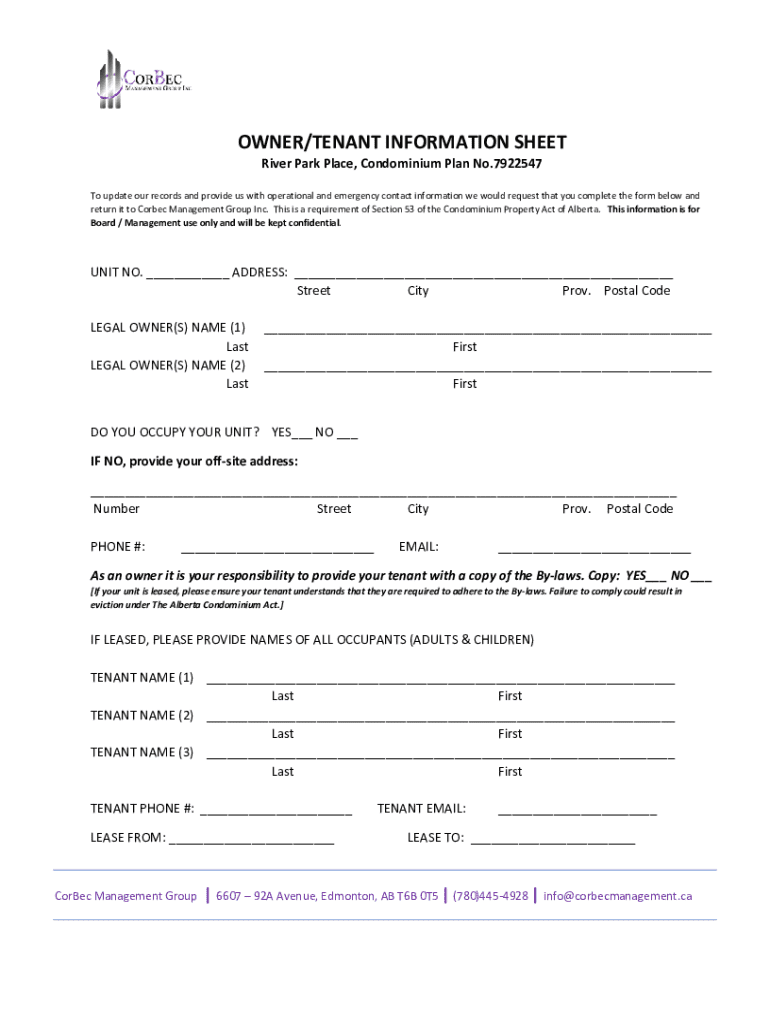







Definition and Purpose of the Owner/Tenant Information Sheet
The Owner/Tenant Information Sheet serves as a vital document designed to capture essential details about property owners and their tenants. This form is typically employed by management companies of residential complexes, such as condominium associations, to gather contact and emergency information. Its utility lies in maintaining up-to-date records of all inhabitants within a building, ensuring quick access to critical information in case of emergencies or administrative needs. The document generally includes sections for basic personal details, vehicle and pet information, and emergency contacts, all tailored to support the governance and safety of the residential community.
Key Elements of the Owner/Tenant Information Sheet
The Owner/Tenant Information Sheet is meticulously constructed to encompass all necessary data fields that a management entity might require. Key elements include:
- Owner and Tenant Details: Names, addresses, phone numbers, and email addresses ensure that both parties can be reached promptly for notifications or emergencies.
- Vehicle Information: Registration numbers and make/model details help in identifying parking violations and managing space allocations.
- Pet Information: Species, breed, and vaccination records are essential for safety and compliance with community regulations.
- Emergency Contacts: Names and contact details of individuals who should be notified in case of emergencies.
- Owner's Responsibilities: A section reminding owners to inform tenants about property bylaws and any changes therein.
Steps to Complete the Owner/Tenant Information Sheet
Filling out the Owner/Tenant Information Sheet is a straightforward process but must be undertaken with care to ensure accurate and complete information. Follow these steps:
- Locate the Document: Obtain the form from your property management office or download it from the official website, if available.
- Personal Information: Enter the full names, current address, and valid contact numbers for both the owner and the tenant.
- Vehicle and Pet Details: Accurately fill in the required sections with vehicle registration data and pet particulars, if applicable.
- Emergency Contacts: Provide comprehensive information for at least two emergency contacts.
- Review and Sign: Carefully review all provided information for accuracy and completeness before signing your section of the form.
- Submit the Form: Return the completed form either electronically, via mail, or in person to the designated collection point specified by your management office.
Legal Use of the Owner/Tenant Information Sheet
The legal implications of the Owner/Tenant Information Sheet primarily revolve around compliance with real estate regulations and property management statutes. Each completed form must adhere to confidentiality standards, ensuring that personal data is protected in accordance with privacy laws. Additionally, the information collected is typically governed by property laws applying to tenant-landlord communications and obligations within the U.S., including fair housing regulations. This adherence is crucial to safeguard both the management entity and residents against legal disputes.
State-Specific Rules for the Owner/Tenant Information Sheet
While the core content of the Owner/Tenant Information Sheet remains uniform across the United States, specific nuances may vary based on state regulations. For instance:
- California: There are particular restrictions on the type and amount of information that can be collected concerning tenant background checks.
- New York: Regulations might dictate additional sections for disclosure of lead-based paint information in older buildings.
- Florida: May require more detailed emergency preparedness plans due to weather-related risk factors, such as hurricanes.
Understanding these state-specific requirements ensures compliance and enhances the effectiveness of managing tenant records.
Who Typically Uses the Owner/Tenant Information Sheet
The primary users of the Owner/Tenant Information Sheet are property managers, real estate agents, and housing association boards. These stakeholders rely on the document to facilitate:
- Efficient Property Management: By maintaining an organized repository of resident information, managers can better navigate administrative tasks and emergency responses.
- Legal Compliance: Ensures all parties comply with residential laws and regulations, facilitating transparent owner-tenant relationships.
- Community Safety: By having readily available contact and emergency information, community safety measures can be implemented promptly.


Why the Owner/Tenant Information Sheet is Important
The importance of maintaining a comprehensive Owner/Tenant Information Sheet cannot be overstated due to several pivotal reasons:
- Emergency Readiness: Facilitates swift response in emergencies, minimizing potential harm or property damage.
- Legal Protection: Provides both owners and management entities with documentation necessary for dispute resolution and compliance verification.
- Administrative Efficiency: Streamlines communication processes, reducing the administrative burden on management bodies when dealing with tenant-related activities.
Software Compatibility for Digital Versions
Modern property management practices often necessitate digital solutions. The Owner/Tenant Information Sheet can be seamlessly integrated into various document management platforms for enhanced ease of use:
- DocHub: Allows you to fill, sign, and store the form digitally using their suite of document management tools. This enables real-time updates and easier access for multiple stakeholders.
- Google Workspace: Integration facilitates direct edits and sharing within the suite, useful for collaborative management environments.
- Other Platforms: Compatible with programs like Adobe Acrobat for PDF handling, and Microsoft Office applications for form completion and database management.
Adopting digital solutions not only advances efficiency but also bolsters data security with streamlined access control measures.




