






Definition and Meaning of Suppr 502
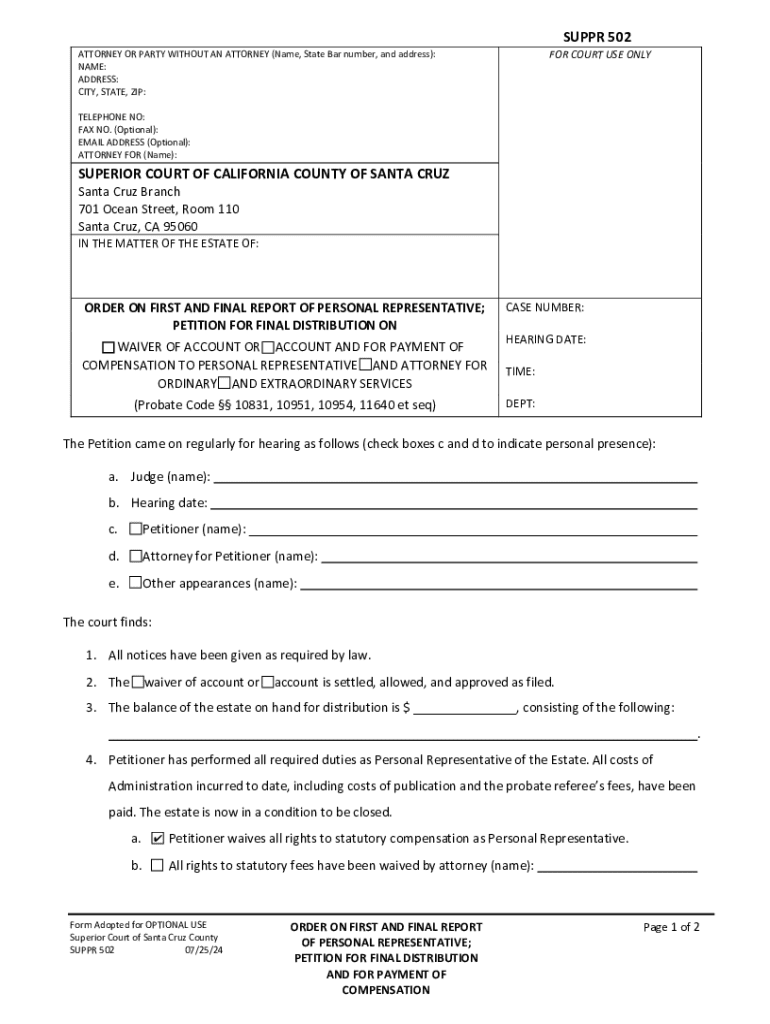
Suppr 502 is a form used specifically within a legal context, often pertaining to court orders or legal proceedings. Its primary purpose is to facilitate documentation associated with the processing and settlement of estates, ensuring that all legal requirements are met before an estate can be closed. Typically, this form is required in situations where the estate is being distributed according to the deceased's will or by court directive. Understanding Suppr 502 involves recognizing its role in managing legal obligations related to estate distribution and ensuring compliance with state-specific laws and regulations.
Steps to Complete the Suppr 502
Completing the Suppr 502 form involves a series of detailed steps that require a thorough understanding of the legal provisions surrounding estate management.
-
Gather Required Information:
- Collect all personal details of the deceased individual, including their full name, date of birth, and date of death.
- Secure information about the estate's assets and liabilities.
-
Identify Beneficiaries:
- List all heirs or beneficiaries as designated in the will or by the court.
- Include contact information and relation to the deceased.
-
Calculate Estate Values:
- Itemize the estate assets including property, financial accounts, and other significant holdings.
- Assess any outstanding debts or liabilities that need resolving.
-
Submit to the Court:
- Ensure all sections of the form are filled accurately.
- Submit the completed form to the Superior Court of California, County of Santa Cruz, or relevant jurisdiction.
This process ensures that the form is filled meticulously to avoid any legal repercussions or delays in estate distribution.
Who Typically Uses the Suppr 502
The Suppr 502 form is primarily used by personal representatives, such as executors or administrators appointed to manage the estate of a deceased person. These individuals are responsible for ensuring that the estate is settled according to the legal instructions and obligations set forth during probate proceedings. Attorneys and legal professionals may also be involved in preparing this form to ensure all legal standards are met and to provide guidance throughout the process. Beneficiaries and heirs may indirectly participate by providing necessary information to the responsible parties.


Key Elements of the Suppr 502
Understanding the critical components of the Suppr 502 form is essential for accurate completion. Key elements typically include:
- Decedent Information: Full legal name, social security number, and other identifying details.
- Estate Valuation: A comprehensive list of assets and estimated values, including real estate, accounts, and personal property.
- Beneficiary Details: Names and relations of individuals or entities designated to receive estate portions.
- Liability Statements: Detailed explanations of outstanding debts, including methods and plans for settlement.
These elements collectively ensure that the estate's management complies with legal expectations and that all parties receive their entitled shares.
Legal Use of the Suppr 502
The legal use of the Suppr 502 entails leveraging the form to fulfill probate and court directives regarding the administration of an estate. It is crucial for legally documenting the executor's actions pertaining to the settlement and distribution of assets. The form serves as a binding record, confirming that the executor or administrator has followed all court instructions, paid any outstanding obligations, and properly distributed assets to the beneficiaries. Adherence to this legal requirement is significant to avoid potential disputes or litigation.
State-Specific Rules for Suppr 502
While Suppr 502 is utilized within the jurisdiction of California, distinct rules may govern its use depending on the county. For instance, specifics like submission deadlines, additional required paperwork, and interpretation of state probate codes may vary. Executors should stay informed about local regulations and be prepared to adapt the completion process accordingly. Consulting with a legal professional acquainted with county-specific court procedures and any updates to applicable laws ensures compliance and prevents procedural mishaps.
Important Terms Related to Suppr 502
- Probate: The judicial process of validating a will and overseeing the distribution of an estate.
- Executor: A person appointed in a will to administer the deceased person's estate.
- Beneficiary: An individual or organization designated to receive assets from an estate.
- Fiduciary Duty: A legal obligation of one party to act in the best interest of another. For personal representatives, this means managing the estate with the utmost care and responsibility.
Understanding these and other related terms is integral to navigating the requirements and obligations associated with the Suppr 502 form.
Examples of Using Suppr 502
To highlight practical applications, imagine a situation where a family awaits the closure of an estate. The executor must submit a finalized Suppr 502 form, detailing asset allocation and confirming the settlement of outstanding debts. The court uses this form to ensure compliance with legal statutes before approving the estate's closure, thereby authorizing final distribution of the remaining assets to listed beneficiaries. Such real-world scenarios demonstrate the form's role in ensuring an orderly and lawful estate management process.