






Definition & Meaning
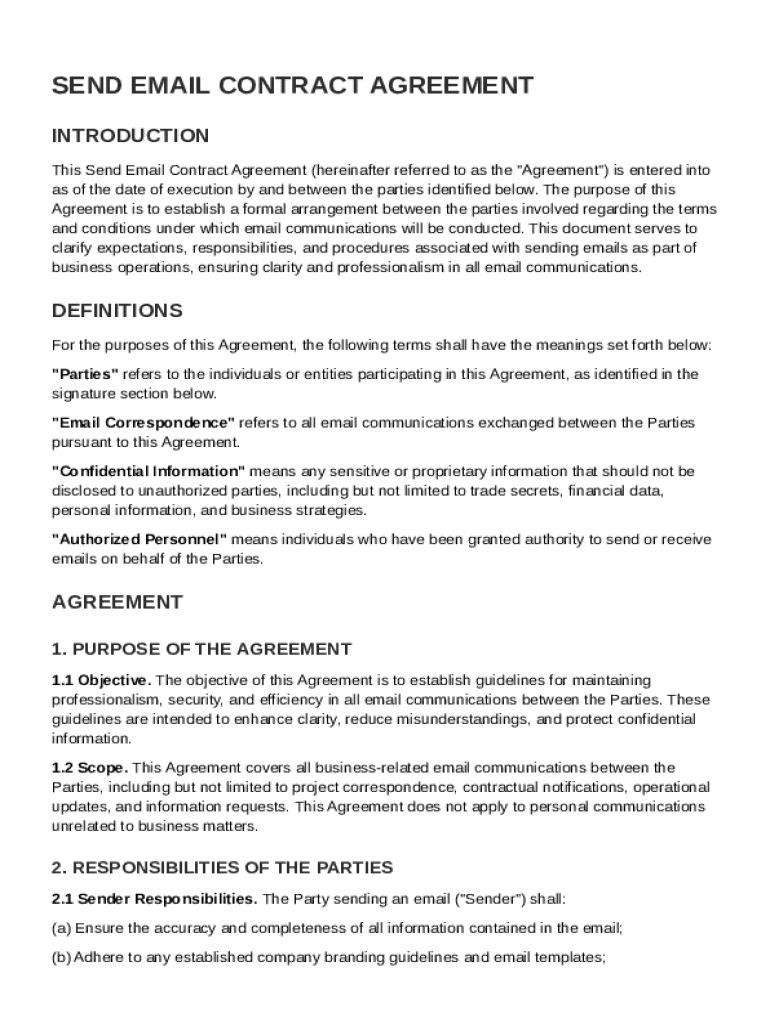
The "Send Email Contract Template" is a standardized document designed to formalize and regulate the exchange of emails between parties involved in a business communication. This template addresses essential elements such as responsibilities, confidentiality standards, and content requirements to ensure professional and secure interactions. By setting clear rules and specifications, this document helps maintain consistency and reduces misunderstandings in email-based communications.
Key Components
- Responsibilities: Outlines each party's duties in the email exchange to prevent miscommunication.
- Confidentiality Measures: Addresses how sensitive information is to be handled, ensuring data protection.
- Content Standards: Sets guidelines for the tone, structure, and format of emails to maintain professionalism.
- Legal Clauses: Includes provisions for dispute resolution, termination, and amendments to adapt to changing needs.
Key Elements of the Send Email Contract Template
The template is structured with several critical elements that make it a comprehensive tool for managing email communications.
Responsibilities
- Sender Obligations: Details what is expected from the sender, including timely responses and accuracy of the content.
- Recipient Duties: Outlines how recipients should manage and respond to received emails, emphasizing clarity and promptness.
Confidentiality & Security
- Data Protection: Provides guidelines on how information should be safeguarded to prevent unauthorized access.
- Encryption Standards: Emphasizes the use of secure email protocols, such as SSL encryption, to enhance security.
Legal & Compliance Requirements
- Dispute Resolution: Specifies procedures for resolving any disagreements that arise from email exchanges.
- Termination & Amendments: Lays out conditions under which the agreement can be modified or terminated.
How to Use the Send Email Contract Template
To effectively implement this template, users should follow a series of steps that ensure comprehensive utilization and compliance.
Step-by-Step Instructions
- Download the Template: Obtain the contract template from a reputable source or platform like DocHub.
- Customize the Document: Modify portions of the document to reflect specific organizational needs or industry standards.
- Define the Scope: Clearly state the scope of communication that the agreement covers, such as business correspondence or client interactions.
Steps to Complete the Send Email Contract Template
After obtaining the template, it is crucial to fill it out accurately to ensure its effectiveness in regulating email communications.
Detailed Completion Process
- Identify Parties Involved: Clearly list the names and roles of all parties participating in the email exchange.
- Specify Contact Information: Provide complete and updated contact details for all involved parties to facilitate seamless communication.
- Outline Communication Scope: Define the types of emails covered by the contract to avoid any ambiguity.
Important Considerations
- Authorization: Ensure that all parties have authorized representatives who can legally enter into this contract.
- Review & Revise: Regularly update the agreement to reflect any changes in business dynamics or regulatory requirements.
Legal Use of the Send Email Contract Template
This template is designed to meet legal standards required for formalizing email communications within a business context.
Ensuring Compliance
- Adherence to U.S. Laws: The use of the template must align with American legal standards for business communications.
- Legally Binding Signatures: The inclusion of signatures is necessary for the contract to be legally enforceable, leveraging electronic signature tools if necessary.
State-Specific Rules for the Send Email Contract Template
While the template provides a general framework, state-specific regulations must be considered to ensure full compliance.
Variation in State Regulations
- Confidentiality Requirements: Some states may have stricter guidelines relating to data privacy and email correspondence.
- Dispute Resolution Clauses: Differences in state laws may necessitate adjustments in how disputes are managed.
Examples of Using the Send Email Contract Template
To gain a practical understanding of this template, consider these real-world scenarios.
Practical Scenarios
- Business Partnerships: A company uses the template to formalize email interactions with a new partner, ensuring clarity on each party's expectations.
- Client Communications: Agencies deploy the template to regulate email exchanges with clients, enhancing trust and security.
Software Compatibility for Send Email Contract Template
Utilizing this template with compatible software can streamline its integration into existing business workflows.
Platforms and Tools
- DocHub: Offers comprehensive support for editing, sending, and signing the template within a cloud-based environment.
- Google Workspace Integration: Allows seamless modification and management of the template directly from Google Drive, enhancing productivity.
This structure and detailed explanation ensure that users who access or use the "Send Email Contract Template" can do so effectively and in full compliance with necessary legal standards, while also supporting streamlined communication processes.