
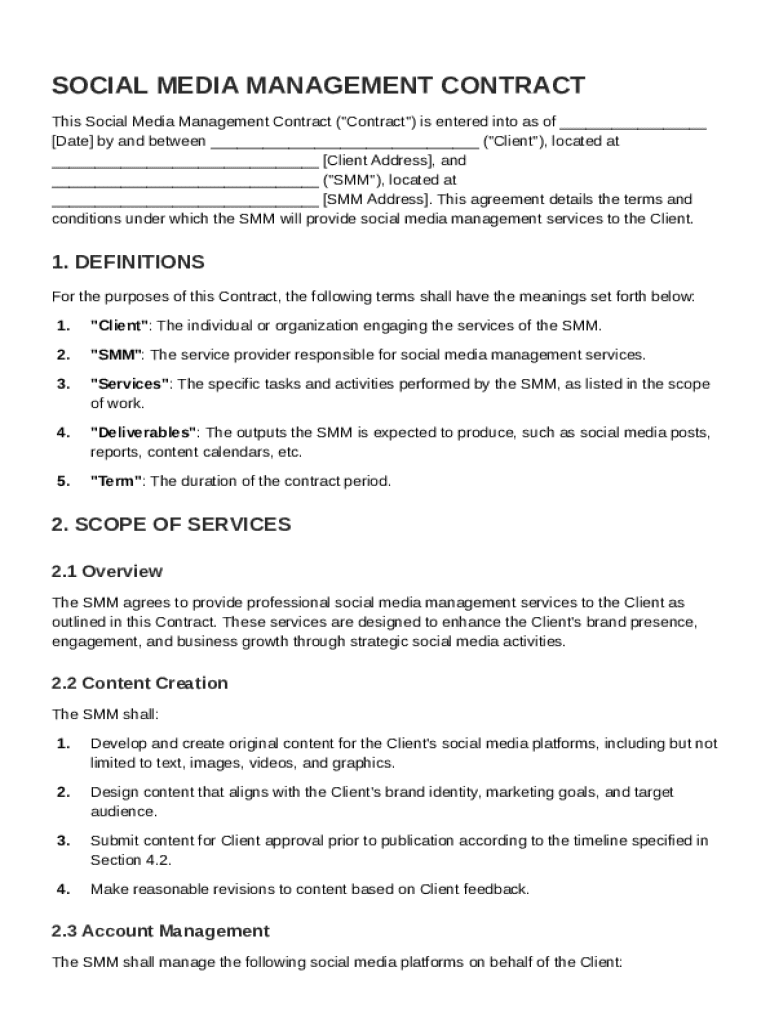







Definition and Purpose of the Smm Contract Template
An "Smm Contract Template" is a legally binding document used to formalize the relationship between a client and a social media manager. It outlines the terms and conditions under which social media management services will be provided. The contract serves multiple purposes, such as defining the scope of services, detailing compensation arrangements, and establishing responsibilities and obligations for both parties. A well-structured contract helps in preventing misunderstandings and disputes by setting clear expectations, thus fostering a professional working relationship.
The template typically includes sections on content creation, account management, and strategy implementation, which are integral to enhancing the client's brand presence on social media platforms. By addressing important elements such as confidentiality agreements and intellectual property rights, the contract ensures protection of both the client's and the manager's interests. It serves as a framework for holding parties accountable and supports achieving desired outcomes in social media campaigns.
How to Use the Smm Contract Template
Using the Smm Contract Template effectively requires a step-by-step approach to customize it according to specific project requirements. Here’s a guide to utilizing the template:
-
Identify the Parties: Clearly state the names and contact information of the client and the social media manager. This sets the stage for a clear understanding of the involved parties.
-
Define the Scope of Services: Detail the specific tasks and deliverables expected from the social media manager. This may include posting schedules, types of content to be created, and platforms to be managed.
-
Specify Compensation: Outline the payment structure, which can be fixed, hourly, or based on performance metrics. Clarify payment timelines and any contingency provisions for late or incomplete payments.
-
Set Roles and Responsibilities: Clearly demarcate the responsibilities of each party to prevent overlap or neglect of duties. This could include access to confidential information and client support in campaigns.
-
Add Legal Protections: Integrate confidentiality clauses, intellectual property rights assignments, and dispute resolution mechanisms to mitigate risks.
-
Review and Customize: Each contract should be tailored to match the specific needs of both parties. Legal counsel can be consulted to ensure completeness and compliance with relevant laws.
Once finalized, both parties should review the document thoroughly before signing to ensure full comprehension and agreement on all terms.
Key Elements of the Smm Contract Template
The Smm Contract Template is composed of several critical components, each designed to cover different aspects of social media management:
-
Scope of Services: Defines the specific actions and responsibilities of the social media manager. This may include activities like posting schedules, analytics reporting, and engagement with followers.
-
Compensation Details: Covers how and when the social media manager will be paid, including fee structures, payment due dates, and any bonuses for achieving specific goals.
-
Client Responsibilities: Outlines the support and resources that the client needs to provide, such as access to existing social media accounts, approval of content, and availability for strategy discussions.
-
Confidentiality and IP Rights: Ensures protection of sensitive information and specifies ownership of content and materials created during the contract period.
-
Liability Limitations: Provides a framework that limits the liability of either party in cases of unforeseen circumstances or errors that lead to unintended outcomes.
-
Termination Clauses: Specifies conditions under which the contract may be ended prematurely and any associated penalties or requirements for termination notice.
These elements ensure a comprehensive, clear understanding between both parties and contribute to a harmonized and effective working relationship.
Steps to Complete the Smm Contract Template
Completing the Smm Contract Template involves a structured process to ensure clarity and mutual understanding:
-
Personalize the Template: Replace placeholders with actual details of the client and manager. Include specific client goals and expectations.
-
Elaborate Scope of Work: Collaboratively define the strategy, type of content, frequency, and formats. Detail reporting requirements and metrics for success evaluation.
-
Define Payment Terms: Specify whether payment is upfront, recurring, or upon milestone completion. Consider contingencies for scope changes or extensions.
-
Outline Communication Channels: Decide on primary modes of communication, be it email, phone, or video conferences, and establish regular check-in schedules.
-
Integrate Legal Clauses: Ensure the inclusion of necessary legal protections, such as non-disclosure agreements and intellectual property terms tailored to the project’s needs.
-
Review and Approve: Both parties should review the completed contract to confirm that it aligns with their understanding and intentions. Amendments should be made if required.
-
Formalize the Agreement: Once agreed upon, both parties should sign the contract digitally or in person, and retain a copy for their records.
Completing these steps thoroughly helps in setting a solid foundation for the project.
Legal Use of the Smm Contract Template
Understanding the legal validity and enforceability of the Smm Contract Template is crucial:
-
Compliance with Laws: The contract must adhere to relevant local, state, and federal laws to ensure enforceability. Consultation with legal professionals can provide assurances of compliance.
-
Legally Binding Provisions: The template should include clauses that legitimately bind both parties, including consent to terms and the legal capacity to enter into agreements.
-
Enforcement Procedures: Outlines the steps to take in case of breaches, including mediation, arbitration, or litigation. Specifies the governing law jurisdiction for resolving disputes.
Using the template in accordance with legal standards protects both parties from future claims and disputes, ensuring a secure relationship.
Who Typically Uses the Smm Contract Template
The Smm Contract Template is versatile and can cater to a wide range of users:
-
Freelancers and Consultancies: Social media professionals seeking to formalize agreements with their clients. The template provides structure and security to freelance engagements.
-
Business Entities: Companies looking to establish or enhance their social media presence through professional management. The contracting process helps set clear terms and expectations.
-
Agencies: Marketing and advertising agencies that offer social media services as part of a broader suite. Standardized contracts help maintain consistency across numerous client interactions.
-
Small Businesses: Smaller enterprises often require tailored social media strategies. The template provides a foundation for these unique requirements.
This broad applicability ensures the template is suitable for varying needs across industries and sectors.


Important Terms Related to the Smm Contract Template
Familiarizing oneself with critical terms associated with the Smm Contract Template aids in better comprehension:
-
Deliverables: The outputs and results that the social media manager promises to deliver, such as content calendars or analytic reports.
-
Non-Disclosure Agreement: A legal agreement aimed at protecting confidential information from unauthorized disclosure.
-
Service Level Agreement (SLA): Defines the level of service expected, often linked to performance metrics and timelines.
-
KPI (Key Performance Indicators): Specific metrics used to measure the success and effectiveness of social media activities.
Understanding these terms allows both parties to enter into the contract with a well-informed perspective.
State-Specific Rules for the Smm Contract Template
State-specific rules can influence how the Smm Contract Template is utilized:
-
Governing Law and Jurisdiction: Depending on state laws, certain provisions may need adjustment to comply with local regulations. This can affect terms around non-compete clauses and dispute resolutions.
-
Tax Implications: States have varying requirements for transactions involving services, which can affect how compensation is structured and reported.
-
Enforcement: Different states have distinct legal climates and precedents that can impact contract enforcement.
Awareness of these state-specific nuances is vital for ensuring that the contract not only serves its intended purpose but also holds up under legal scrutiny in the relevant jurisdiction.
By thoroughly covering these aspects, the Smm Contract Template can be adapted and employed effectively across various contexts and jurisdictions.




