
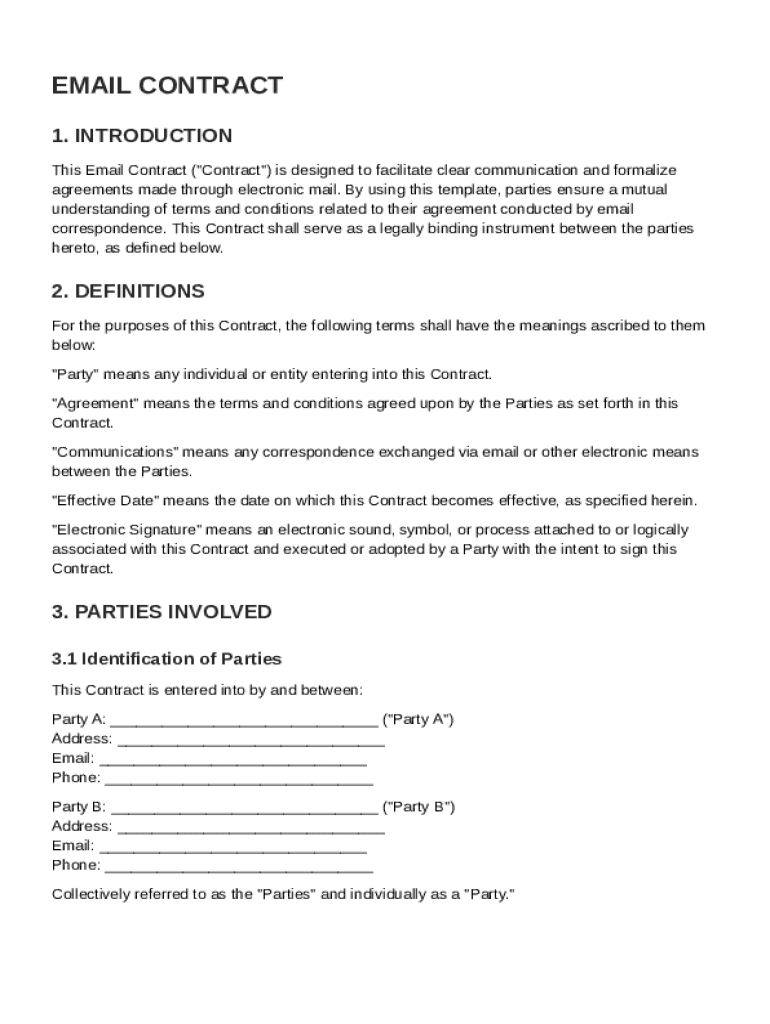







Understanding the Sign Email Contract Template
The sign email contract template is a crucial tool for formalizing communication between parties conducted via email. It is designed to ensure that both parties clearly understand and agree on the terms and conditions of their interactions. This template is especially valuable in business settings where emails often lead to agreements that require documented evidence of mutual understanding and consent.
Key Elements of the Sign Email Contract Template
A well-structured email contract template includes several critical components:
- Definitions and Parties Involved: Clarifies the identities and roles of all parties involved in the contract.
- Terms and Obligations: Outlines the specific responsibilities and duties each party agrees to fulfill.
- Payment Terms: Details any financial transactions, including amounts, due dates, and methods of payment.
- Confidentiality Clauses: Protects sensitive information shared between the parties during the contract's term.
- Dispute Resolution: Specifies the methods for resolving any disagreements that may arise.
- Governing Law: Identifies the jurisdiction under which the contract's legal matters will be interpreted.
- Amendment and Termination Conditions: Describes how the contract can be modified or terminated.
How to Use the Sign Email Contract Template
Using the email contract template involves several steps to ensure accuracy and compliance:
- Fill in the Parties' Details: Enter the names and contact information of all involved parties.
- Outline Terms and Conditions: Clearly define the terms of the agreement, including any deliverables and timelines.
- Include Confidentiality and Security Measures: Ensure both parties are aware of the confidentiality requirements.
- Specify Payment Details: Record payment schedules and methods comprehensively.
- Set a Dispute Resolution Process: Agree upon a process for handling potential conflicts.
- Finalize with Signatures: Sign the document digitally or physically, acknowledging all terms.
Who Typically Uses the Sign Email Contract Template
This template is commonly utilized by a range of users, including:
- Freelancers and Contractors: To formalize project terms and prevent miscommunications.
- Businesses Engaging in Partnerships: To ensure all parties have a clear agreement on scopes of work and responsibilities.
- Legal Professionals: To streamline contract creation and ensure clarity in verbal agreements confirmed through email.


Legal Use of the Sign Email Contract Template
This template is designed to maintain legal integrity and compliance:
- Validity of Electronic Signatures: Ensures that electronic signatures are considered legally binding under the ESIGN Act.
- Legal Precautions: Advises where and how to apply local legal norms and regulations.
- Document Trail and Transparency: Offers audit trails as proof of agreements and digital interactions.
State-Specific Rules for Email Contracts
Different states might have unique regulations affecting email contracts:
- Jurisdiction Limitations: Some states may impose specific requirements on electronic contracts.
- Signature Guidelines: The acceptance of electronic versus handwritten signatures might vary.
- Governing Law: Contracts might be subject to state laws that influence enforcement and compliance.
Steps to Complete the Sign Email Contract Template
Completing the sign email contract involves thorough attention to detail:
- Prepare Necessary Information: Gather all relevant information required for the contract.
- Draft the Contract: Use the template to draft an initial version, focusing on accuracy and detail.
- Review and Collaborate: Share the draft with all involved parties for feedback and amendments.
- Finalize and Sign: Once all parties have agreed, finalize the document and obtain signatures.
- Store Securely: Safeguard the signed document, both digitally and physically, ensuring secure access.
Digital vs. Paper Version
Choosing between digital and paper versions depends on several factors:
- Efficiency: Digital contracts streamline the signing and distribution process.
- Security: Offers encryption and password protection for online documents.
- Customization: Easier to modify and update than paper versions.
Important Terms Related to the Template
Understanding these terms is essential for effective contract management:
- Parties: Refers to all involved stakeholders in the contract.
- Consideration: What each party expects to receive, often in goods, services, or payment.
- Force Majeure: Clause that frees both parties from liability or obligations when extraordinary events occur.
- Waiver: Agreement to forego certain rights by either party within the contract scope.
Examples of Using the Sign Email Contract Template
Real-world scenarios illustrating template usage:
- Case Study - Freelancing Agreement: A freelancer signs a contract with a client to ensure clear deliverables, payments, and project timelines.
- Illustration - Partnership Terms: Two companies use the template to define each other's roles in a joint venture, clarifying responsibilities and profit-sharing models.
Facilitating Compliance with the Sign Email Contract Template
Ensuring compliance involves understanding both local and federal regulations:
- Adherence to ESIGN Act: Must ensure electronic agreements comply with U.S. standards for digital signatures.
- Record Keeping: Maintain records as evidence in disputes or audits.
- Periodic Reviews: Regularly review contract terms to ensure ongoing compliance with evolving laws.
The sign email contract template serves as a vital resource for formalizing email communications in a legally sound and organized manner, promoting clear understanding and agreement among all parties involved.




