Definition and Meaning of the Clinical Trial Contract Template
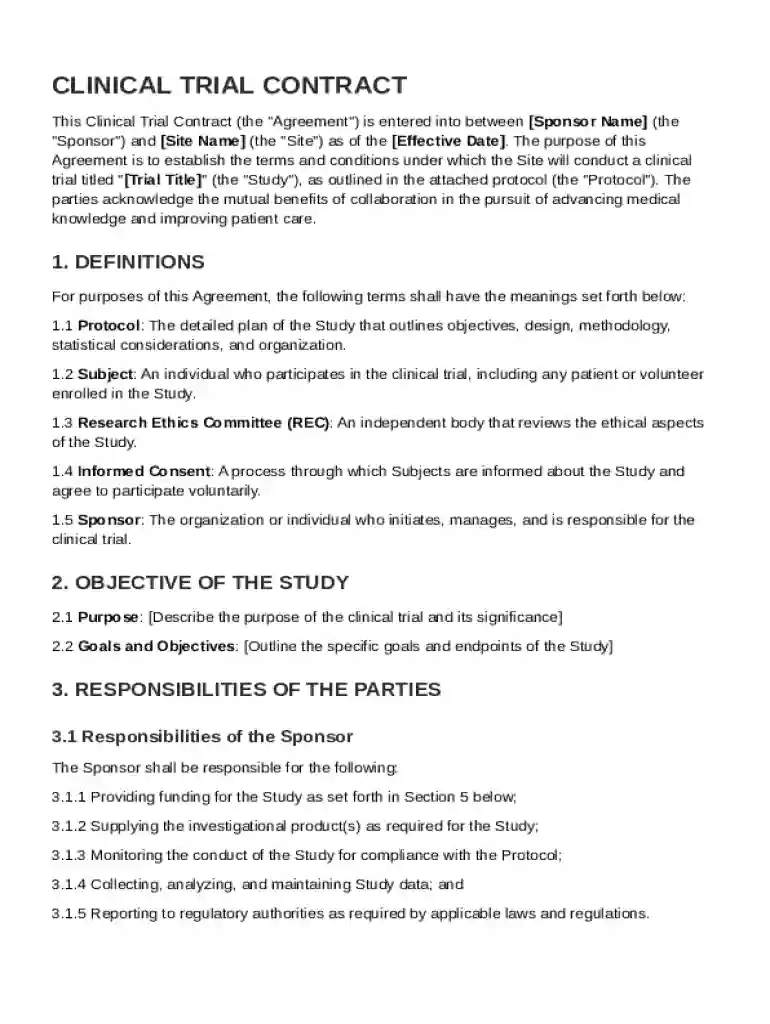
A Clinical Trial Contract Template is an essential document used to formalize agreements between sponsors—often pharmaceutical or biotechnology companies—and clinical trial sites, such as hospitals or research institutions. This template is crucial as it outlines the responsibilities of each party involved in a clinical trial, including financial arrangements, intellectual property rights, confidentiality obligations, ethical considerations, and termination conditions. The contractual agreement ensures the smooth execution of clinical trials while maintaining compliance with legal and ethical standards. By utilizing a structured template, sponsors and sites provide clarity and establish a legal framework to advance medical research collaboratively.
Key Elements of the Clinical Trial Contract Template
The Clinical Trial Contract Template comprises several critical sections that define and guide the collaboration between the trial sponsor and the site. These elements include:
- Roles and Responsibilities: Details specific duties for both sponsors and trial sites, ensuring clarity in the operational aspects of the trial.
- Financial Terms: Covers payment structures, budgeting, and the management of funds to ensure transparent financial dealings.
- Intellectual Property Rights: Defines the ownership and sharing of any innovations or findings resulting from the clinical trial.
- Confidentiality Clauses: Ensures sensitive data and research findings remain protected, outlining how information is shared and disclosed.
- Termination Conditions: Specifies the grounds on which the agreement can be ended prematurely, including failure to meet objectives or legal breaches.
How to Use the Clinical Trial Contract Template
Using the Clinical Trial Contract Template effectively involves several steps to ensure a thorough and legally sound agreement:
- Download or Access the Template: Obtain the template from a reliable source such as DocHub.
- Customize the Template: Adjust sections to fit the specific needs of the trial, including tailoring the financial terms and responsibilities.
- Review with Legal Experts: Work with legal professionals to ensure all obligations and terms comply with current laws and industry standards.
- Collaborate with Stakeholders: Ensure both the sponsor and site representatives agree to and understand the outlined terms.
- Implement and Monitor: Once signed, maintain adherence to the contract and monitor compliance throughout the trial's duration.
Steps to Complete the Clinical Trial Contract Template
Completing the Clinical Trial Contract Template requires precision and cooperation between sponsoring entities and trial sites. Follow these steps:
- Populate Parties' Information: Input the names and contact details of all parties involved.
- Define the Scope of Work: Clearly outline the objectives, expectations, and protocols for the trial.
- Detail Financial Arrangements: Specify budget allocations, payment schedules, and reimbursement policies.
- Establish IP and Data Management Plans: Agree on how intellectual property and trial data will be handled and shared.
- Set Confidentiality and Termination Terms: Draft these sections carefully to protect both parties' interests.
- Finalize and Sign: Ensure all parties sign the document, securing agreement and establishing the contract's enforceability.
Why Use the Clinical Trial Contract Template
The Clinical Trial Contract Template is invaluable for numerous reasons:
- Efficiency: Provides a structured approach to quickly draft a comprehensive agreement.
- Legal Compliance: Ensures all aspects of the trial agreement adhere to relevant laws and regulations.
- Clarity and Transparency: Clarifies roles, responsibilities, and expectations, reducing potential disputes.
- Risk Mitigation: Protects against potential liabilities by clearly defining terms and conditions.
- Streamlined Collaboration: Facilitates smoother interaction and clearer communication between sponsors and trial sites.
Important Terms Related to the Clinical Trial Contract Template
Understanding key terms within the Clinical Trial Contract Template is critical. These terms include:
- Sponsor: The entity that funds and oversees the clinical trial.
- Site: The location, typically a hospital or research center, where the trial occurs.
- Principal Investigator: The researcher responsible for conducting the trial at the site.
- Informed Consent: A process ensuring participants understand the trial and agree to partake willingly.
- GCP (Good Clinical Practice): International ethical and scientific quality standards for designing and conducting trials.
Legal Use of the Clinical Trial Contract Template
The legal use of the Clinical Trial Contract Template involves ensuring the document adheres to various regulations and industry standards. Key legal considerations include:
- FDA Regulations: Compliance with U.S. Food and Drug Administration requirements for clinical trials.
- HIPAA Compliance: Ensuring participant data protection under the Health Insurance Portability and Accountability Act.
- Ethical Standards: Adherence to ethical guidelines to protect participant rights and well-being.
- Contract Law: Alignment with general contract law principles to ensure enforceability and validity.
Examples of Using the Clinical Trial Contract Template
Clinicians, researchers, and sponsors might use the Clinical Trial Contract Template in the following scenarios:
- Pharmaceutical Trials: Large pharmaceutical companies may employ this contract to initiate trials for new medications.
- University Research: Academic institutions might use the template for internal trials or collaborations with private sector partners.
- Biotech Collaborations: Biotech startups could rely on the template to formalize partnerships with research hospitals aiming to test new technologies or treatments.
Software Compatibility with the Clinical Trial Contract Template
The Clinical Trial Contract Template is compatible with various document management platforms and software tools:
- DocHub Integration: Seamlessly edit, sign, and manage documents within DocHub’s platform.
- Cloud Storage Access: Use with Google Drive, OneDrive, or Dropbox for easy access and sharing.
- Document Formats: Compatible with PDF, DOC, and other common file formats for flexibility in document creation and modification.