
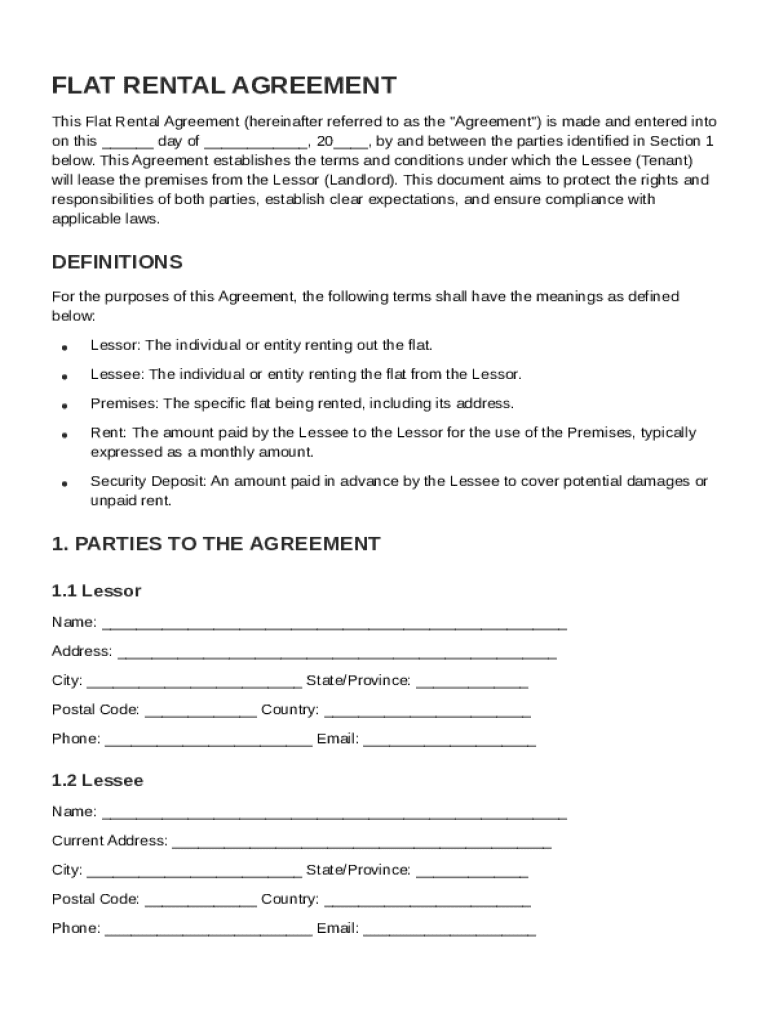







Definition & Meaning
A Flat Contract Template is a standardized legal document that outlines the terms and conditions for renting a residential flat. It serves to formalize the relationship between the Lessor (landlord) and the Lessee (tenant), providing clarity and legal protection for both parties. The template typically includes sections such as rent amount, payment schedule, lease duration, and responsibilities of each party. By using a standardized template, landlords and tenants ensure that they have addressed all critical aspects of the rental agreement, helping to prevent misunderstandings and disputes.
Key Components
- Lease Details: Specifies the duration of the lease, commencement and termination dates, and renewal options.
- Rent Provisions: Outlines the amount of rent, due dates, and acceptable payment methods.
- Security Deposit: Defines the amount required as a security deposit, the conditions for its return, and how it will be maintained.
- Maintenance: Details the responsibilities for property upkeep, including repairs and regular maintenance.
- Utilities: Indicates which utilities are the tenant's responsibility and whether they are included in the rent.
How to Use the Flat Contract Template
Using a Flat Contract Template involves several essential steps to ensure that the document serves its intended purpose. The landlord or property manager initiates the process by selecting a comprehensive template that fits the specific needs of the rental property.
Step-by-Step Instructions
- Select an Appropriate Template: Choose a template that aligns with local legal requirements and covers all necessary legal elements.
- Customize the Template: Fill in specific details about the property, landlord, and tenant.
- Review Legal Compliance: Ensure the completed contract complies with local and state laws.
- Obtain Signatures: Both parties must sign the contract to make it legally binding.
Practical Tips
- Accuracy: Double-check all entered information for correctness to avoid future conflicts.
- Consultation: Seek legal advice if unsure about any provisions within the template.
Key Elements of the Flat Contract Template
The Flat Contract Template should include crucial elements to ensure comprehensive coverage of the rental agreement's terms. These components serve to protect both parties by clearly defining their rights and obligations.
Essential Elements
- Property Description: A clear description of the premises, including address and amenities.
- Tenant and Landlord Information: Full legal names and contact information for all parties involved.
- Lease Term: Specifies whether the lease is short-term or long-term, with start and end dates.
- Policies on Guests and Pets: Any restrictions or permissions regarding guests and pets.
- Termination Clause: Details the process required to terminate the lease early.
Additional Clauses
- Access to Premises: Rules for the landlord's right to enter the property.
- Prohibited Activities: Activities that are not allowed on the premises.
- Alterations and Modifications: Regulations about making changes to the rented space.
Important Terms Related to Flat Contract Template
Understanding the terminology used in a Flat Contract Template is crucial for both landlords and tenants to ensure clarity and avoid misinterpretation.
Key Terms
- Lessor and Lessee: The landlord (lessor) and the tenant (lessee) involved in the agreement.
- Premises: The property being rented, including any inclusions like parking spaces and storage areas.
- Default: Failure by either party to adhere to the agreement, typically leading to penalties or eviction.
- Subletting: The process of leasing part or all of the property to another individual.
Examples
- Rent Abatement: A provision allowing reduced rent in specific circumstances, such as repairs significantly impacting living conditions.
- Security Interest: Landlord's claim on the security deposit to cover unpaid rent or damages.
Legal Use of the Flat Contract Template
The legal enforceability of the Flat Contract Template ensures that it protects the rights and responsibilities of both the landlord and the tenant. The agreement must comply with relevant laws and regulations to be valid in a court of law.
Compliance Requirements
- State Laws: Each state has unique landlord-tenant laws that must be incorporated into the contract.
- Fair Housing Act: Protects against discrimination based on race, color, national origin, religion, sex, familial status, or disability.
- Local Ordinances: Additional rules that may affect lease provisions, such as rent control or safety regulations.
Legal Considerations
- Modification: Any changes to the contract must be agreed upon in writing by both parties.
- Court Enforceability: Clearly defined terms help ensure the agreement is upheld in legal proceedings.
State-Specific Rules for the Flat Contract Template
Different states have distinct rules and regulations regarding residential leases, impacting the terms and conditions that must be included in a Flat Contract Template.
Variations by State
- Security Deposit Limits: Varying limits on the amount a landlord can charge as a security deposit.
- Notice Requirements: Different timelines for notice before rent increases or termination.
Examples of State-Specific Requirements
- California: Specific regulations concerning disclosures related to lead paint and mold.
- New York: Rent-stabilized apartments require adherence to particular renewal guidelines and increases.
Examples of Using the Flat Contract Template
Real-world use cases of the Flat Contract Template can demonstrate how various parties utilize these documents to manage rental agreements effectively.
Case Studies
- Scenario One: A single-family home lease where the landlord requires additional clauses for property maintenance and noise restrictions.
- Scenario Two: A high-rise apartment agreement that includes provisions for shared community amenities like gyms and pools.
Common Situations
- Shared Residencies: Templates adapted for multiple tenants sharing common spaces.
- Pet-Friendly Rentals: Contracts that include specific terms related to pet deposits and responsibilities.
Digital vs. Paper Version
The transition from paper-based to digital Flat Contract Templates offers several advantages, including enhanced accessibility and security.
Benefits of Digital Versions
- Accessibility: Easily shareable via email or cloud services, reducing the need for physical exchanges.
- Editing and Collaboration: Use digital platforms like DocHub to allow both parties to edit and comment inline.
Considerations for Paper Versions
- Traditional Method: Preferred by some for legal or comfort reasons.
- Record Keeping: Requires secure storage to avoid loss or damage.
In summary, utilizing a Flat Contract Template involves understanding its components and legal implications, ensuring compliance with state-specific laws, and leveraging digital tools for efficient management.




