
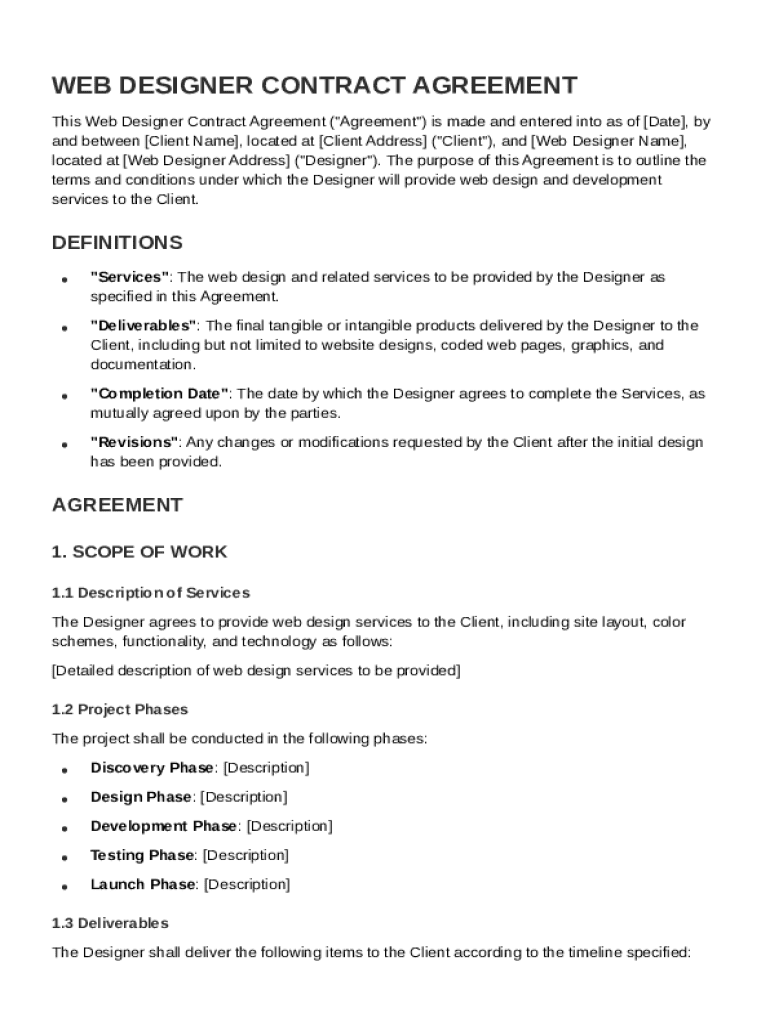







Definition and Overview of the Web Designer Contract Template
The Web Designer Contract Template is a comprehensive legal document that formalizes the agreement between a client and a web designer. This template outlines the specific terms and conditions for providing web design services. Key elements typically included are definitions of important terms, the scope of work, payment terms, timelines, ownership rights, revision protocols, confidentiality clauses, termination conditions, liability limitations, and applicable law. The primary purpose of this contract is to ensure clarity and mutual understanding concerning each party's responsibilities and expectations in a web design project.
Steps to Complete the Web Designer Contract Template
- Review the Initial Sections: Begin with carefully reviewing the definitions and scope of work to ensure all terms and commitments are clearly understood.
- Specify the Scope of Work: Outline detailed deliverables to be produced by the web designer, including design specifications, goals, objectives, and milestones.
- Set Payment Terms: Define the payment structure, including rates, schedules, deposits, and any potential penalties for late payment.
- Establish a Project Timeline: Clearly state deadlines for phases of work and final delivery, along with provisions for extensions if necessary.
- Address Ownership and Rights: Clarify who will own the final product and any derivative works, including intellectual property rights.
- Draft Confidentiality Agreements: Include any nondisclosure terms pertinent to your business and project confidentiality.
- Incorporate Termination Conditions: Identify scenarios where the contract may be prematurely terminated and any consequences thereof.
- Include Governing Law Specifications: Specify which state's laws will govern the contract terms to ensure legal clarity.
How to Use the Web Designer Contract Template Effectively
To optimize the utility of the Web Designer Contract Template, ensure that every aspect of your agreement is detailed and customized specifically to your project needs. This template acts as a foundational document, to which specific elements can be added or adjusted to reflect the unique aspects of each contract. It is advisable to consult a legal professional to review the contract for compliance with all relevant local and federal laws. Using it consistently across all projects can maintain standardization in business processes and enhance professional relationships by establishing clear expectations upfront.
Key Elements to Include in the Web Designer Contract Template
- Definitions of Terminology: Essential for ensuring all parties have a mutual understanding of the agreement's vocabulary.
- Detailed Scope of Work: List all design tasks, deliverables, and project objectives to avoid potential misunderstandings.
- Payment Structure: Fee arrangements, including total costs, installment plans, deposits, and payment due dates.
- Project Timelines: Deadlines for drafts, revisions, and final delivery to manage time expectations.
- Ownership Rights: Define clearly who retains the rights to the designs and final products.
- Revision Policies: Set the ground rules for revisions, change requests, and their impact on timelines and costs.
- Legal Framework: Reference state-specific laws applicable to the contract to secure its enforceability.
Who Typically Uses the Web Designer Contract Template
The Web Designer Contract Template is utilized by freelance web designers, web design agencies, and businesses hiring design services. This contract serves as a crucial tool for ensuring that the rights and responsibilities of both the designer and the client are explicitly represented and agreed upon. It is particularly valuable for protecting both parties from potential legal conflicts by providing a written summary of all agreed arrangements. Additionally, it is an essential document for project managers and business professionals overseeing design projects to ensure compliance and project success.


Legal Use of the Web Designer Contract Template
Legal use of the Web Designer Contract Template involves utilizing the document to define the professional relationship between the designer and client within the bounds of the law. The contract should be tailored to include specific provisions relevant to the jurisdiction in which the services are provided. Legal endorsement of this document is paramount for its enforceability and includes ensuring it’s signed by authorized representatives of both parties. Periodic legal review can also ensure compliance with any new regulations affecting design contracts.
Important Terms Related to the Web Designer Contract Template
Understanding the following terms is imperative when preparing a Web Designer Contract Template:
- Scope of Work: Detailed description of the tasks and deliverables expected from the web designer.
- Payment Terms: Agreement on how, when, and how much the web designer will be paid.
- Confidentiality: Obligations related to non-disclosure of sensitive information shared during the project.
- Ownership: Terms defining intellectual property rights and entitlements to project deliverables.
- Revisions: Policy regarding changes or updates that the client can request once initial deliverables have been presented.
Examples of Using the Web Designer Contract Template
- Startup Company: A startup employing a web designer to develop its website uses the contract to outline job details, payment schedules, and deliverable timelines.
- Freelance Designer: A freelance designer incorporates the template into their standard operation procedure to ensure continuity and legal protection across multiple projects.
- Web Design Agency: An agency engaging with various clients standardizes this template to ensure consistent terms across all projects, effectively mitigating any potential disputes related to scope, payment, or revisions.
State-Specific Rules for the Web Designer Contract Template
While the template provides a general guideline, it's important to be aware of state-specific rules that may impact contract enforcement. Different states may have nuances in laws regarding business contracts, such as requiring certain disclosures or adopting specific arbitration clauses. For example, states like California have unique requirements concerning non-compete clauses and confidentiality agreements. Therefore, adapting the contract to align with local legal stipulations ensures that it is comprehensive and legally binding within the relevant jurisdiction.




