
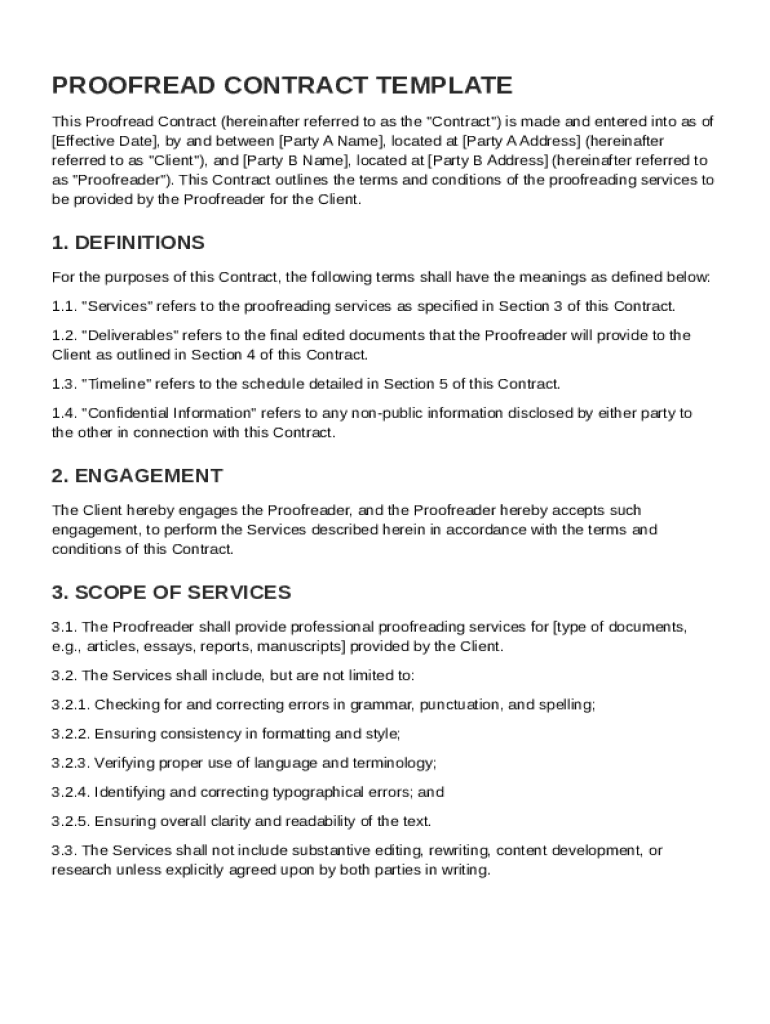







Definition and Purpose of the Proofread Contract Template
The "Proofread Contract Template" is a formal document that outlines the specific terms and conditions agreed upon between a client and a proofreader. This template serves to systematically define the relationship, including key responsibilities like the scope of proofreading services, compensation, and deadlines. It establishes legal parameters that both parties must adhere to, ensuring clarity and minimizing disputes. Such a contract is crucial in establishing expectations, clarifying terms, and protecting the interests of both the client and the proofreader. Through detailed sections, this template helps articulate mutual understanding and provides a basis for resolving any potential conflicts.
How to Use the Proofread Contract Template
To effectively use the Proofread Contract Template, it is important to follow a structured approach. Start by familiarizing yourself with each section of the contract, understanding how it pertains to your specific agreement. Then, customize the template by filling in the necessary details:
-
Contact Information: Begin by accurately entering the names and contact details of both parties. This ensures that all legal communications are directed correctly.
-
Service Description: Clearly delineate the type of documents to be proofread and the scope of the work. Specify whether you're proofreading for grammar, style, punctuation, or flow.
-
Compensation Terms: Outline the payment structure, including the rate, payment schedule, and any conditions for invoices. This should be explicitly mutual to avoid misunderstandings.
-
Timing and Deadlines: Set firm deadlines for when the proofreading tasks need to be finalized and delivered. Incorporate any milestones that both parties agree on for partial submissions.
-
Signatures: Finally, ensure that authorized representatives from both parties sign the document to validate the contract legally.
By carefully completing each section, both the client and proofreader align their expectations and create a binding agreement tailored to their needs.
Key Elements of the Proofread Contract Template
The Proofread Contract Template comprises several key components that define the contractual obligations:
-
Scope of Services: This outlines the specific tasks involved, such as spelling checks, grammar verification, or style consistency. It's essential for setting clear boundaries on what the project entails.
-
Confidentiality Obligations: Details on how confidential information and intellectual property will be handled. This section ensures that proprietary content is safeguarded during the proofreading process.
-
Compensation and Invoicing: It specifies how and when the proofreader will be paid, covering rates, invoicing procedures, and payment terms. This clarity helps avoid financial disputes.
-
Deadlines and Timing: Clearly defined timelines for work completion and any stages of review or feedback that must occur. This aspect ensures timely delivery of services.
-
Termination Clauses: Conditions under which the contract can be prematurely terminated by either party. This includes consequences of termination, such as compensation for completed work.
These elements ensure that all issues pertinent to the proofreading agreement are covered, creating a robust foundation for service delivery.
Important Terms Related to Proofread Contract Template
Understanding the terminology within the Proofread Contract Template is crucial for effective use:
-
"Client": The individual or entity that commissions the proofreading services.
-
"Proofreader": The person or organization tasked with reviewing and correcting the document.
-
"Deliverables": The final results required, which include all corrected documents, sent per the agreement.
-
"Independent Contractor": This indicates the proofreader operates independently and not as an employee, influencing tax and legal obligations.
-
"Governing Law": The jurisdiction's legal standards that apply to interpreting the contract, often chosen by the location of the client or proofreader.
Clear comprehension of these terms aids in navigating the contract and guarantees proper application of its provisions.
Legal Use of the Proofread Contract Template
Utilizing a Proofread Contract Template requires adherence to legal parameters to ensure enforceability:
-
Compliance with Contract Laws: The template must meet state contract law requirements, encapsulating offer, acceptance, consideration, and mutual consent.
-
Incorporating Amendments: The contract should have provisions that allow for modifications in writing, with signatures by both parties, to accommodate unforeseen changes.
-
Liability Limitations: Standard clauses should define the extent of liability for each party to protect against potential legal challenges.
Adhering to these legal aspects ensures the contract remains valid and that either party can seek enforcement if disputes arise.
Examples of Using the Proofread Contract Template
Real-world scenarios illustrate the template's adaptability:
-
Academic Institutions: Universities may use these contracts to hire proofreaders to ensure academic papers meet publication standards.
-
Publishing Houses: A publisher might use the template when contracting freelancers to proofread manuscripts before printing.
-
Corporate Settings: Businesses might deploy such contracts for proofreading internal documents, ensuring corporate communications are polished.
In each scenario, the template provides a framework that facilitates clear communication, detailed service expectations, and legal recourse if necessary.
State-Specific Rules for the Proofread Contract Template
The applicability of the Proofread Contract Template can vary significantly across different U.S. states, each boasting its own contract law nuances:
-
Governing Law Clauses: Modify these to align with the applicable state laws, as different states might enforce contracts differently.
-
State Tax Requirements: For independent contractors, ensure the contract addresses state-specific tax obligations and reporting requirements.
-
Legal Dispute Resolutions: Include clauses covering state-specific arbitration or mediation requirements as an alternative to court.
By adjusting the template according to state requirements, you assure compliance and facilitate smoother legal processes.
Digital vs. Paper Version of the Proofread Contract Template
Choosing between digital and paper formats for the template depends on practical needs:
-
Digital Version: Offers the advantage of easy access, modification, and electronic signing for quick execution and storage. It supports environmentally friendly practices and enables remote collaboration.
-
Paper Version: Some parties may prefer physical contracts for traditional filing, with handwritten signatures for a more formalized, tangible assurance.
Both formats can serve distinct purposes, influenced by the preferences of the contracting parties and logistical considerations. Opt for the version that best complements the necessary workflow and archive capabilities.
Steps to Complete the Proofread Contract Template
Filling out the template involves a straightforward process:
-
Initial Meeting: Both parties must discuss terms to determine each other’s needs and limitations.
-
Customization: Fill in client and proofreader details, outline project-specific requirements, and detail compensation.
-
Review: Both parties should carefully review the completed contract for any discrepancies or ambiguous terms.
-
Finalize and Sign: Once both parties agree to the terms, the contract should be signed by authorized individuals from each side.
-
Distribution: Distribute copies to both parties for their records, ensuring each has the finalized version.
Following these steps ensures timely execution of the contract and sets a strong operational foundation for the proofreading relationship.




