
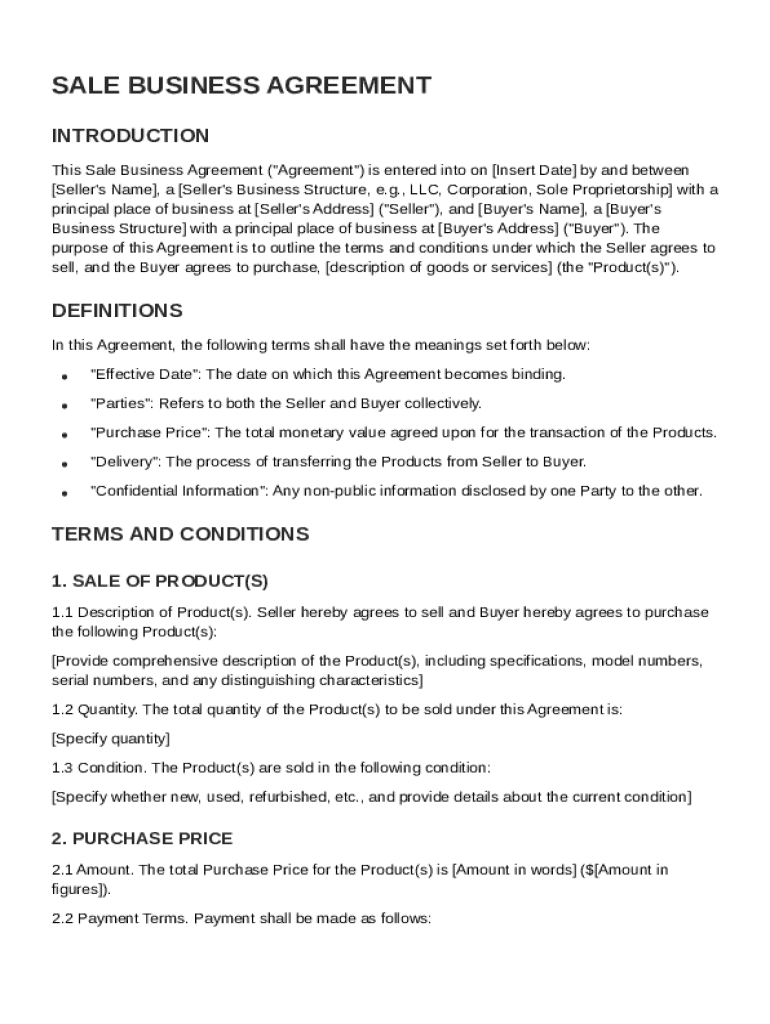







Definition of Sale Business Agreement Template
A Sale Business Agreement Template is a standardized document that outlines the terms and conditions involved in a sale transaction between a buyer and a seller. This agreement typically covers aspects such as the description of goods or services, the purchase price, payment terms, delivery conditions, and any warranties or representations made by either party. It aims to provide clarity and protect the legal interests of both parties involved in the transaction. The template simplifies the process of creating legally sound agreements by offering a ready-made structure that can be customized to fit specific business needs.
Key Elements of the Sale Business Agreement Template
The Sale Business Agreement Template contains critical components to ensure the agreement's legality and efficacy. These components include:
- Product Details: This section provides a comprehensive description of the goods or services being sold, including specifications, quantities, and any relevant identification numbers.
- Price and Payment Terms: Clearly outlines the total purchase price, any applicable taxes, payment methods, and a schedule for payments if applicable.
- Delivery Conditions: Specifies how and when the goods or services will be delivered, including shipping methods and risk of loss provisions.
- Warranties and Representations: Includes any guarantees about the goods or services, addressing quality, functionality, or compliance with specific standards.
- Confidentiality Obligations: Protects sensitive information shared during the transaction, detailing the scope of information covered and the duration of confidentiality.
- Indemnification Clauses: Details the responsibilities of each party in the event of legal claims arising from the transaction.
- Governing Law and Jurisdiction: Specifies the applicable legal framework and the location where disputes will be resolved.
Steps to Complete the Sale Business Agreement Template
- Review Template Components: Familiarize yourself with each section of the template to understand what information is required.
- Customize Agreement Details: Modify sections such as product details, pricing, and delivery terms to reflect the specifics of your sale.
- Add Parties' Information: Include names, addresses, and contact details for both buyer and seller to ensure both parties are clearly identified.
- Clarify Payment Terms: Detail the total purchase price, payment schedule, and accepted payment methods.
- Define Warranties and Indemnities: Adjust the warranties and indemnity clauses to reflect any specific guarantees and legal protections desired.
- Outline Governing Laws: Specify which jurisdiction’s laws will govern the agreement and where disputes will be settled.
- Review and Sign: Ensure both parties thoroughly review the completed agreement for accuracy before signing.
Who Typically Uses the Sale Business Agreement Template
The Sale Business Agreement Template is commonly used by businesses of all sizes, from small startups to large corporations, engaged in selling products or services. It is especially beneficial for:
- Retail Businesses: Helpful for transactions involving consumer goods.
- Manufacturers and Distributors: Ensures clarity in agreements related to bulk sales and repeated transactions.
- Service Providers: Useful for detailing the terms of service agreements.
- Independent Contractors and Freelancers: When formalizing sales of intellectual property, digital products, or consultancy services.

Legal Use of the Sale Business Agreement Template
The Sale Business Agreement Template ensures that the transaction complies with legal standards, safeguarding both parties' interests. By outlining responsibilities and expectations, it reduces the risk of disputes and provides recourse in case of a breach. The template aligns with the Uniform Commercial Code (UCC) provisions, which govern commercial transactions in the United States, making it particularly relevant for U.S.-based agreements.
Important Terms Related to Sale Business Agreement Template
The agreement includes essential legal terminology that reinforces the contract's binding nature:
- "Consideration": Denotes the value exchanged between parties, typically the price paid for goods or services.
- "Breach of Contract": Describes a situation where one party fails to fulfill their contractual obligations.
- "Force Majeure": Refers to unforeseen events preventing contract performance, such as natural disasters, which may excuse parties from liability.
- "Liquidated Damages": Predetermined damages specified in the contract in cases of breach.
State-Specific Rules for the Sale Business Agreement Template
While this template is generally applicable across the United States, it’s crucial to consider state-specific regulations that may impact the agreement:
- Sales Tax Compliance: Different states have varying requirements for sales tax collection and reporting.
- Consumer Protection Laws: State laws may impose additional obligations on sellers, particularly relating to warranties and returns.
- Contract Enforcement: Variations in state laws may influence how agreements are interpreted and enforced, especially regarding dispute resolution procedures.
Digital vs. Paper Version of the Sale Business Agreement Template
In the digital age, agreements can be managed both electronically and on paper:
- Digital Version: Offers convenience with tools like DocHub for editing and signing online. Enhances accessibility, allowing parties to manage agreements from various devices and locations.
- Paper Version: Some parties might prefer physical copies for ease of review or archiving, initially recording signatures in ink for subsequent digital filing.
Both versions maintain the agreement’s integrity and enforceability, with electronic signatures recognized as legally binding under the ESIGN Act.




