






Definition and Meaning
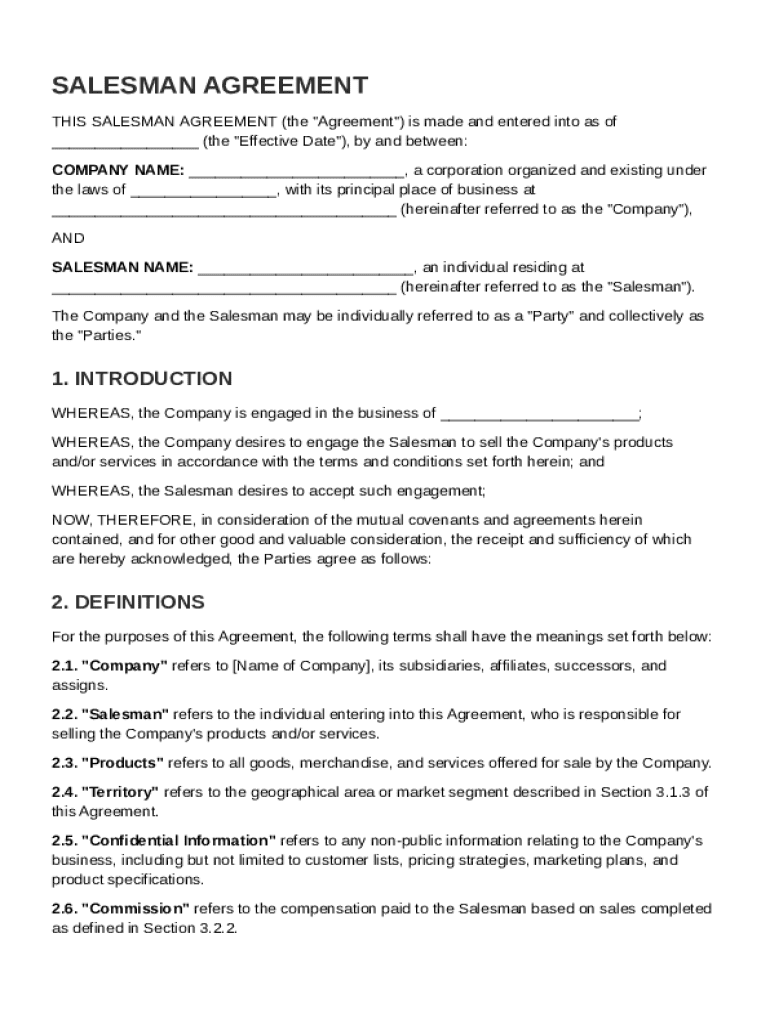
A Salesman Agreement Template serves as an essential legal document between a company and an individual salesman, defining the professional relationship for selling the company's products and services. This agreement delineates the rights and obligations of each party, ensuring clarity in the contractual arrangement. It typically details the roles and responsibilities of the salesman, compensation structures including base salary and commissions, confidentiality requirements, non-compete clauses, and termination conditions. By establishing these terms, the document sets a clear framework for the professional engagement, aiding in the management of expectations and reducing potential conflicts.
Key Elements of the Salesman Agreement Template
The comprehensive nature of a Salesman Agreement Template makes it crucial for both parties to understand its core components:
- Roles and Responsibilities: Clearly defines the duties expected of the salesman, including sales targets, performance metrics, and reporting responsibilities.
- Compensation Structure: Outlines the base salary and commission details, providing transparency on the compensation method and frequency.
- Confidentiality Obligations: Protects sensitive company information from being disclosed, ensuring that proprietary knowledge remains secure.
- Non-Compete Clauses: Restricts the salesman from entering into competitive businesses that might harm the original company's interests after the agreement ends.
- Termination Conditions: Specifies the circumstances under which the agreement may be terminated, including misconduct or poor performance.
How to Use the Salesman Agreement Template
Utilizing the Salesman Agreement Template effectively requires a few strategic steps:
- Download and Review: Obtain the template from a reliable source and carefully review it to ensure it meets your business needs.
- Customize: Tailor the document to reflect specific business requirements, adjusting roles, compensation, and other terms as necessary.
- Consult Legal Experts: Have a legal expert review the customized template to ensure compliance with relevant laws and regulations.
- Negotiate Terms: Discuss the agreement with the salesman, negotiating any terms that require mutual consent.
- Finalize and Sign: Once both parties agree on the terms, sign the document to formally establish the contractual relationship.
Steps to Complete the Salesman Agreement Template
Completing the Salesman Agreement Template involves a structured approach to ensure all necessary details are captured:
- Fill in Company and Salesman Details: Start by providing the names and contact information for both parties.
- Define Job Role: Clearly outline the specific duties and expectations of the salesman.
- Detail Compensation: Specify the salary and commission structure, including payment intervals.
- Include Legal Provisions: Insert confidentiality, non-compete, and termination clauses to protect business interests.
- Attach Signatures: Include signature lines and ensure both parties sign and date the agreement to validate it.
Legal Use of the Salesman Agreement Template
The Salesman Agreement Template is designed to ensure that the contractual relationship adheres to legal standards. It aligns with U.S. employment laws and the ESIGN Act, with provisions to secure both parties' interests legally. This includes clarity around the independent contractor status of the salesman, mitigating risks related to employment classification issues. Legal review is recommended to ensure the template complies with specific state laws and industry regulations.
Who Typically Uses the Salesman Agreement Template
This agreement is predominantly used by businesses engaging individual salespersons as independent contractors. It is vital for companies that rely heavily on sales teams and need to formalize their engagement terms. Businesses across industries such as retail, pharmaceuticals, technology, and financial services commonly utilize this template to manage their sales workforce effectively.

State-Specific Rules for the Salesman Agreement Template
While the template serves as a general framework, modifications may be necessary to comply with state-specific regulations. For example, non-compete clauses can vary significantly between states in terms of enforceability and scope. Thus, it's crucial to adjust the agreement based on the state laws where the business operates and where the salesman will conduct business activities.
State-by-State Differences
State laws can influence multiple aspects of the Salesman Agreement Template:
- Non-Compete Enforceability: Some states have strict limitations on non-compete clauses, impacting their inclusion.
- Compensation Regulations: States may have different requirements for minimum wage and commission agreements.
- Termination Notices: Notice period requirements prior to termination can vary and should be adjusted according to local mandates.
Digital vs. Paper Version
The Salesman Agreement Template can be executed in both digital and paper formats. Digital versions offer the advantage of electronic signatures, which are legally binding under the ESIGN Act. This increases efficiency by allowing quick exchanges of signed documents, as opposed to handling physical papers. Both formats should be securely stored to ensure legal compliance and easy accessibility when needed.
Software Compatibility
The flexibility of the Salesman Agreement Template extends to its compatibility with various document management software. Platforms like DocHub facilitate editing, signing, and sharing the agreement online without needing conversion, streamlining the workflow for both parties. These digital tools allow for real-time collaboration, ensuring that any changes are synchronized across all versions.