






Definition and Meaning of the Signature Contract Template
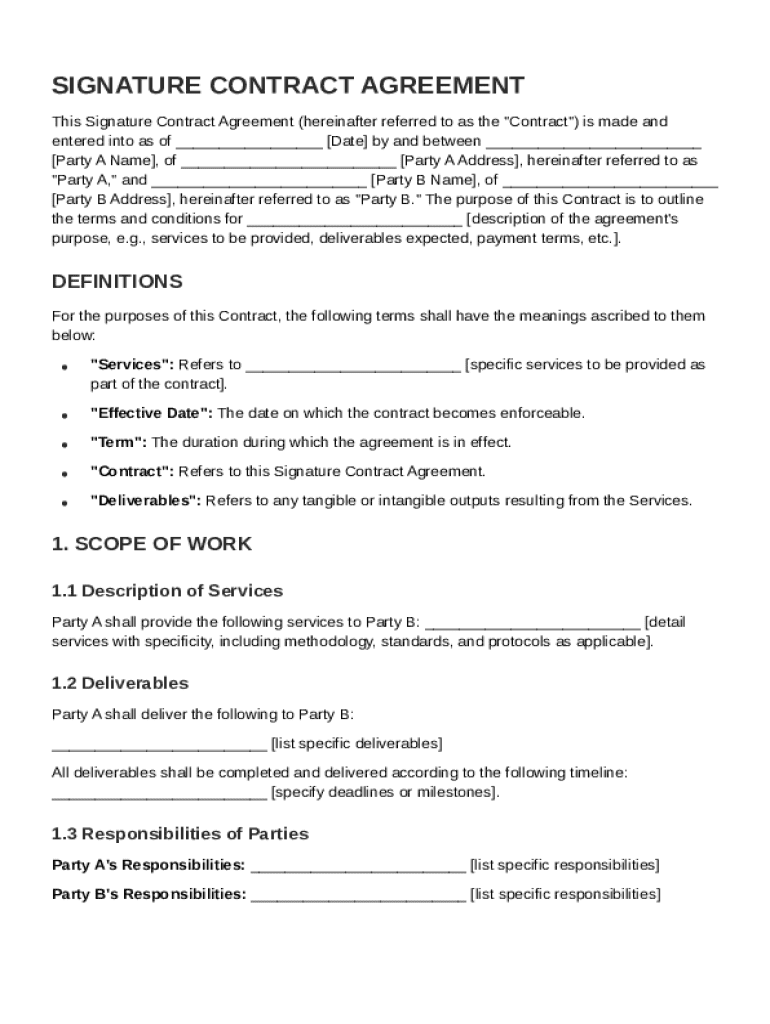
A Signature Contract Template is a preformatted document designed to facilitate the creation of legally binding agreements between two or more parties. These templates are structured to include essential components such as definitions, scope of work, compensation details, confidentiality obligations, liability and indemnification clauses, dispute resolution procedures, and miscellaneous provisions. The primary purpose is to ensure clarity and mutual understanding of the responsibilities, rights, and expectations involved in a contractual relationship.
Components and Structure
- Definitions: Clearly defines terms used throughout the contract to avoid ambiguity.
- Scope of Work: Outlines the specific services or products to be delivered.
- Compensation: Details payment terms, including amounts, schedules, and conditions.
- Confidentiality: Establishes obligations to protect sensitive information exchanged.
- Liability and Indemnification: Sets the limits of responsibility and conditions for indemnity.
- Dispute Resolution: Provides mechanisms for resolving disagreements, like arbitration.
- Miscellaneous Provisions: Additional clauses such as termination conditions and amendments.
How to Use the Signature Contract Template
Using a Signature Contract Template involves various steps to customize it according to the specific agreement requirements. The process typically involves the identification of relevant sections, completion of required fields, and review for accuracy and completeness.
Step-by-Step Completion Guide
- Review the Entire Template: Understand the structure and requirements before filling it out.
- Fill Out Basic Information: Include the names and contact information of involved parties.
- Detail the Scope of Work: Clearly define what is being agreed upon in precise terms.
- Set Compensation Terms: Specify payment schedules and method of payment.
- Agree on Confidentiality Terms: Establish what information must remain confidential.
- Define Dispute Resolution Process: Agree on how disputes will be handled if they arise.
- Finalize with Signatures: Ensure all parties sign the agreement, either electronically or in print.
Key Elements of the Signature Contract Template
The Signature Contract Template contains several key elements that make it an effective tool for creating legal contracts. Each element serves a distinct purpose and contributes to the overall efficacy of the contract.
Essential Elements
- Contact Information: Captures essential details of all parties involved.
- Effective Dates: Specifies when the contract goes into effect and its duration.
- Signature Fields: Allows parties to provide consent and agreement to terms.
- Clauses and Terms: Include any specific legal clauses required by the particular context.
Customizability
The template can be modified to fit various scenarios and business needs, accommodating a wide range of services and compensation models.
Legal Use of the Signature Contract Template
The Signature Contract Template is designed to comply with legal standards, ensuring all agreements formed are binding and enforceable under the law. This compliance is crucial for the protection of all parties involved.
Legal Considerations
- Compliance with the ESIGN Act: Ensures electronic signatures within the template are legally binding.
- Standard Legal Clauses: Incorporates universally accepted legal provisions to support enforceability.
- Customization for Jurisdictions: Allows adaptation to state-specific legal requirements if necessary.
Important Terms Related to Signature Contract Template
Understanding the jargon and terms associated with Signature Contract Templates is crucial for effectively tailoring contracts to specific needs.
Common Terms and Their Implications
- Indemnity: A legal promise to compensate for loss or damage.
- Breach: A violation of a contractual obligation.
- Arbitration: A method of dispute resolution outside of court, often included as a clause.
- Confidentiality: The requirement to maintain secrecy about shared information.
State-Specific Rules for the Signature Contract Template
Different states may have specific regulations or requirements that must be addressed when using a Signature Contract Template. Awareness and compliance with these rules help ensure that the contract is valid and enforceable.
Navigating State Regulations
- Varying Notary Requirements: Some states require contracts to be notarized.
- Differing Enforceability Standards: State statutes may affect how contract terms are interpreted.
- Local Business Norms: Contracts might need adaptation to align with regional business practices.
Examples of Using the Signature Contract Template
Signature Contract Templates can be used in a variety of contexts, from simple service agreements to complex business partnerships.
Practical Scenarios
- Freelance Services: Using the template to define deliverables and payment structures.
- Business Partnerships: Establishing roles, responsibilities, and dispute resolution methods.
- Confidentiality Agreements: Protecting sensitive information during business dealings.
Who Typically Uses the Signature Contract Template
The flexibility of the Signature Contract Template makes it useful for a broad audience, ranging from individual freelancers to large corporations.


Key Users
- Small Business Owners: For crafting custom agreements with clients and vendors.
- Freelancers and Consultants: To manage client expectations and compensation clearly.
- Corporate Legal Teams: For standardized use across different departments and transactions.
This comprehensive coverage of the Signature Contract Template ensures that users are well-equipped to draft, understand, and execute legally binding agreements efficiently and effectively. By providing structure and clarity, these templates support successful business transactions across various industries.