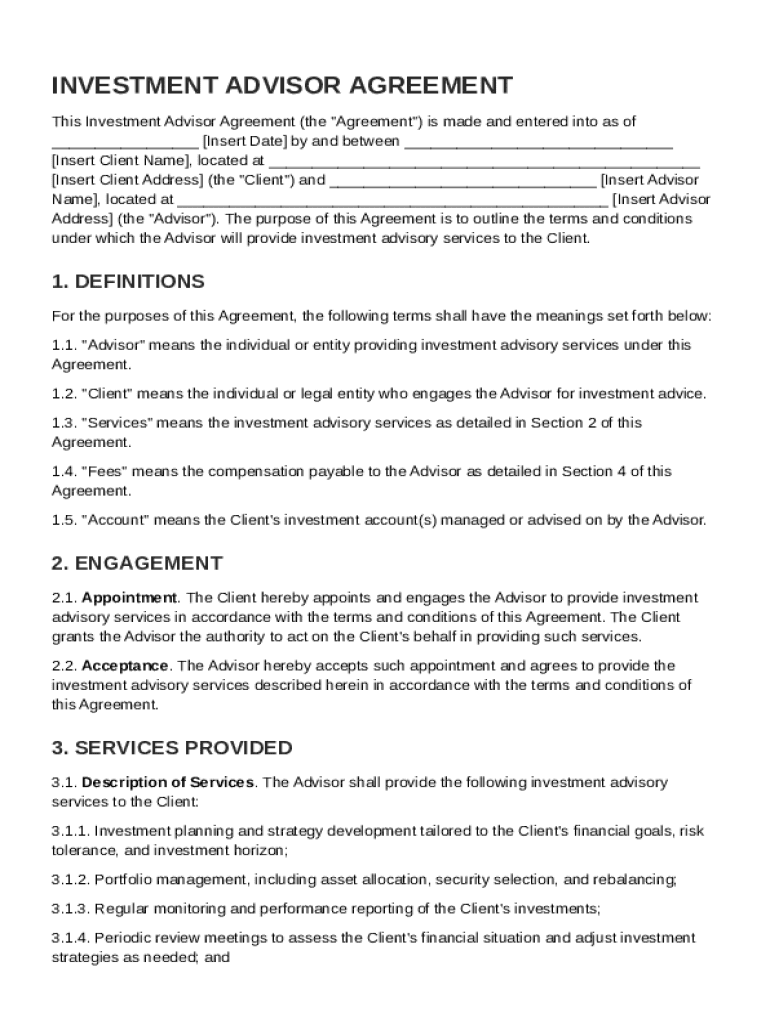







Definition & Meaning
The Investment Advisor Contract Template is a formal document used to establish a legal agreement between an investment advisor and their client. It lays out the foundational terms and conditions under which investment advisory services will be rendered. These templates generally include definitions of key terms related to the investment process, detail the scope of services to be provided, stipulate the responsibilities of both parties, and outline the fee structure. In addition to these elements, the contract often contains confidentiality obligations, indemnification and liability clauses, and a reference to the governing law that applies to the agreement. By specifying these details, the template ensures that both parties understand and agree to the rules and expectations governing their professional relationship.
Key Elements of the Investment Advisor Contract Template
-
Scope of Services: This section outlines the specific services that the investment advisor will provide. It gives clarity to the client about what to expect from the advisory relationship. Whether it involves portfolio management, financial planning, or advisory on specific financial products, defining the scope is crucial to minimizing misunderstanding.
-
Fee Structure: Here, the terms regarding compensation for services rendered are detailed. This may involve retainer agreements, percentage of assets under management fees, or performance-based compensation. Transparency in fees helps build trust and ensures compliance with regulatory standards.
-
Responsibilities of the Client and Advisor: The contract delineates the duties and responsibilities of both parties. It ensures that the advisor acts in the best interest of the client and provides guidance aligned with the client's financial goals. Conversely, it may outline the client's duty to furnish the advisor with accurate and relevant information.
-
Confidentiality and Data Protection: Confidentiality obligations protect sensitive client information. The agreement should specify the advisor's commitments regarding data security and privacy, following relevant laws and guidelines, such as the Gramm-Leach-Bliley Act and SEC data protection requirements.
-
Indemnification and Liability: This clause specifies the extent of liability both parties hold in the event of a dispute or claim. It often includes provisions for indemnifying one party against losses that arise due to the other's actions, thus offering a safeguard against potential legal disputes.
Steps to Complete the Investment Advisor Contract Template
-
Review the Template: Carefully read through the entire template to familiarize yourself with its sections and terminology. Ensure that it aligns with the specific needs of your advisory relationship.
-
Customize Terms: Modify the template to reflect the unique terms of the engagement. This involves specifying the exact services to be provided, the fee structure, and any special clauses needed.
-
Consult with Legal Counsel: It is advisable to have a legal professional review the customized contract to ensure compliance with applicable laws and regulations, as well as to ensure that your interests are adequately protected.
-
Review with Client: Before finalizing, discuss the terms with the client to ensure mutual understanding and agreement. This includes clarifying any complex terms and ensuring that the client is comfortable with all aspects of the contract.
-
Sign and Secure the Document: Once both parties agree on the terms, sign the document. Utilize secure methods for storing the signed contract, ensuring access is limited to authorized individuals only.
Why Use the Investment Advisor Contract Template
Using an Investment Advisor Contract Template offers several benefits. Primarily, it provides a structured and clear framework for detailing the advisory relationship, thereby reducing the possibility of future conflicts. By explicitly outlining the terms and conditions, both parties can be confident in their mutual understanding and expectations. Additionally, a well-crafted contract template ensures legal compliance, protecting both the advisor and client legally and financially. This template also enhances professionalism by demonstrating the advisor's commitment to transparency and accountability. Lastly, the use of a standardized template streamlines the process, saving time when drafting and negotiating contract terms.
Legal Use of the Investment Advisor Contract Template
The legal use of an Investment Advisor Contract Template involves ensuring that all aspects of the contract comply with applicable state and federal laws. Advisors must be aware of the Investment Advisers Act of 1940, which regulates how investment advisory contracts can be structured, and follow guidelines set forth by the Securities and Exchange Commission (SEC). This includes adhering to the fiduciary duty owed to clients, which mandates acting in their best interests. Advisors should ensure the contract accurately represents their services and fees to avoid legal repercussions. Consulting legal counsel during the contract drafting process helps safeguard against potential compliance issues.
Examples of Using the Investment Advisor Contract Template
This template can be invaluable in various scenarios:
-
Portfolio Management Services: Establish terms for managing an individual's investment portfolio, including investment strategies and rebalancing criteria.
-
Financial Planning: Outline the advisory process for developing a comprehensive financial plan, covering aspects such as retirement, estate planning, and tax advice.
-
Specific Product Advice: Define the advisor's role in recommending particular investment products, such as mutual funds or annuities, and any accompanying research responsibilities.
Such examples illustrate the versatility of the contract template, which can accommodate a range of services within the investment advisory field.
Important Terms Related to Investment Advisor Contract Template
Understanding the terminology within an Investment Advisor Contract Template is crucial for both the advisor and the client. Some key terms include:
-
Fiduciary Duty: A legal obligation for advisors to act in their clients' best interests.
-
Asset Under Management (AUM): The total market value of the investments that an advisor manages on behalf of their clients.
-
Fee Schedule: An outline of the charges applicable for the services provided, including any contingencies.
These terms are essential for navigating the contract and understanding the advisory relationship, thus ensuring informed consent and agreement by all parties involved.
Eligibility Criteria
Before engaging with the Investment Advisor Contract Template, it's vital to assess eligibility to enter into this type of agreement. Generally, the criteria include:
-
Licensed Advisory Services: Ensuring the advisor holds the necessary licenses and registrations to offer investment advice legally.
-
Relevant Client Information: Clients must disclose relevant financial information to tailor advice appropriately.
-
Regulatory Compliance: Adhering to specific financial and legal standards, such as SEC guidelines, is crucial for both parties.
Meeting these eligibility criteria ensures a valid, enforceable, and mutually beneficial agreement is established.