Type text, add images, blackout confidential details, add comments, highlights and more.
02. Sign it in a few clicks
Draw your signature, type it, upload its image, or use your mobile device as a signature pad.
03. Share your form with others
Send it via email, link, or fax. You can also download it, export it or print it out.
How to use or fill out bill of sale nm with our platform
Ease of Setup
DocHub User Ratings on G2
Ease of Use
DocHub User Ratings on G2
Click ‘Get Form’ to open the bill of sale nm in the editor.
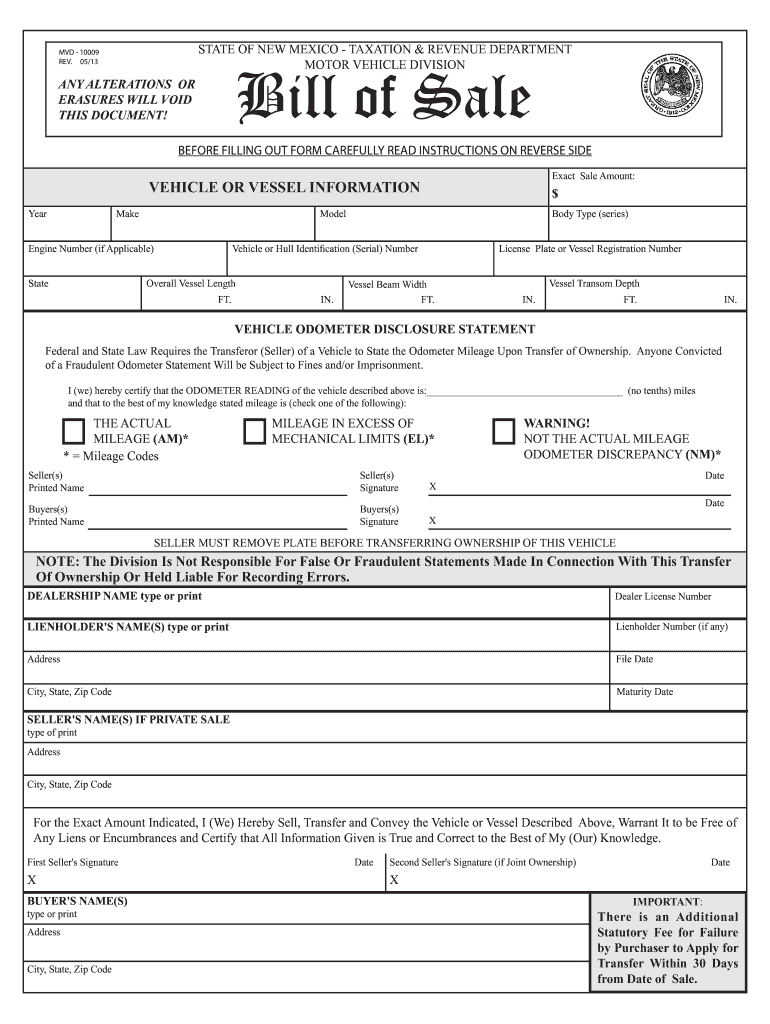
Begin by entering the exact sale amount in the designated field. This is crucial for both parties to agree on the transaction value.
Fill out the vehicle or vessel information, including year, make, model, body type, and identification numbers. Ensure accuracy as this information is vital for registration.
Complete the odometer disclosure statement by certifying the mileage. Choose whether it reflects actual mileage or if there are discrepancies.
Have both seller(s) and buyer(s) print their names and sign where indicated. This step finalizes the agreement and confirms all details are correct.
Review all entries for completeness before saving your document. Once satisfied, you can easily download or share it directly from our platform.
Start using our editor today to streamline your bill of sale nm process for free!
Printable bill of sale nmBill of sale nm pdfFree bill of sale nmBill of sale nm onlineNew Mexico Bill of sale for mobile homeHow to fill out a New Mexico Bill of saleMVD bill of SaleNew mexico bill of sale for rv
Security and compliance
At DocHub, your data security is our priority. We follow HIPAA, SOC2, GDPR, and other standards, so you can work on your documents with confidence.
Jan 26, 2017 Use the basis of property to figure depreciation, amortization, depletion, and casualty losses. Also use it to figure gain or loss on the saleRead more
N.M. Admin. Code 19.2.9.11 - BID LEASE | State Regulations
A notice of the lease sale shall be published once each week for ten (10) consecutive weeks in a newspaper of general circulation published in Santa Fe, and inRead more
Buyer must take the completed form MVD-10009 Bill of Sale, the form MVD-10030 Certificate of Title and/or form MVD-10032 Boat Certificate of Title and/or otherRead more
Cookie consent notice
This site uses cookies to enhance site navigation and personalize your experience.
By using this site you agree to our use of cookies as described in our Privacy Notice.
You can modify your selections by visiting our Cookie and Advertising Notice.