






Key Elements of the Website Maintenance Service Level Agreement Template
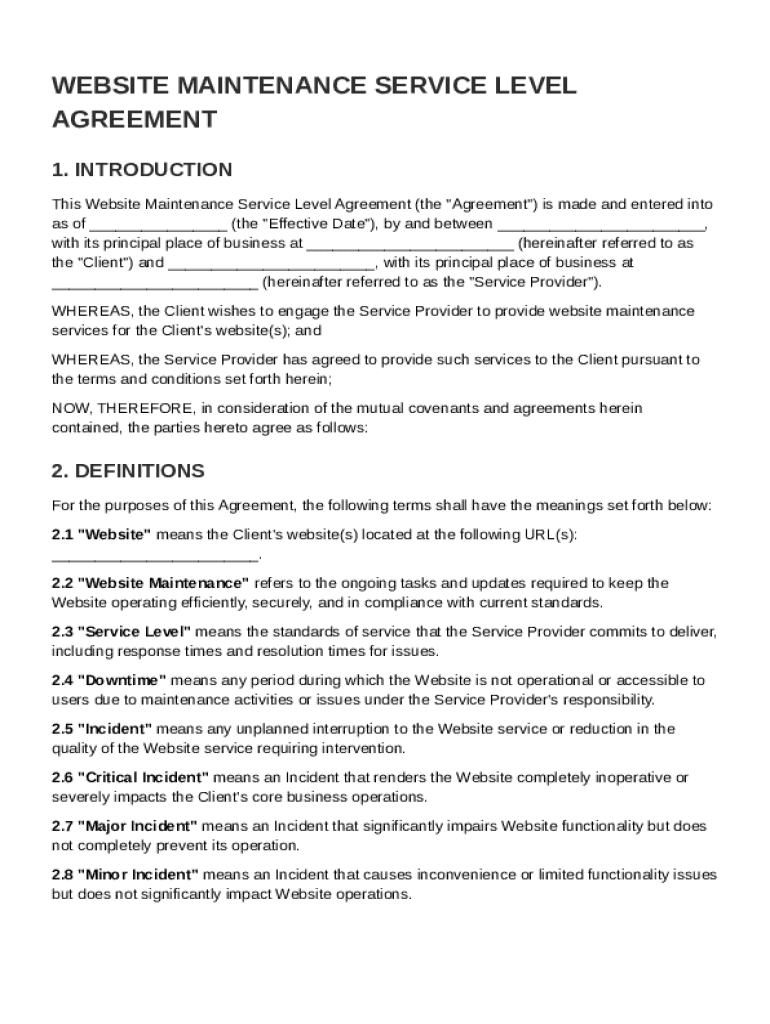
A Website Maintenance Service Level Agreement (SLA) template outlines the essential components of a formal agreement between a client and a service provider. Understanding these elements is crucial for ensuring clear communication and setting expectations for both parties involved in website maintenance services.
-
Services Provided: Describes the range of maintenance tasks the provider will perform, such as software updates, security checks, and technical support.
-
Response and Resolution Times: Establishes timelines for the provider's response to incidents and resolution of issues, ensuring prompt attention to the client's needs.
-
Client Responsibilities: Details the obligations of the client, including providing access to the website and timely payment of fees.
-
Communication Procedures: Defines the methods of communication between parties, including regular meetings and progress updates.
-
Confidentiality and Security: Specifies measures for protecting sensitive information shared between the two parties.
Steps to Complete the Website Maintenance Service Level Agreement Template
To effectively utilize the Website Maintenance Service Level Agreement template, follow these detailed steps:
-
Review the Template: Begin by reading through the entire template to understand its structure and content. Familiarize yourself with the sections and language used.
-
Customize Details: Input specific information about the client and service provider, including names, contact information, and the specific website being maintained.
-
Define Services and Terms: Clearly outline the services to be provided, the duration of the agreement, and any service-level targets.
-
Set Payment Terms: Specify the fee structure, payment schedule, and any penalties for late payment.
-
Finalize and Sign: Once all sections are completed and agreed upon, both parties should sign the document to make it legally binding.
Legal Use of the Website Maintenance Service Level Agreement Template
Using a Website Maintenance SLA template involves certain legal considerations to ensure compliance and enforceability.
-
Compliance with Laws: Ensure the agreement adheres to relevant local, state, and federal laws in the United States concerning contracts and data protection.
-
Legal Language: Use clear and precise legal language to avoid misinterpretations that could lead to disputes.
-
Amendment Procedures: Include a section specifying how the agreement can be amended, ensuring any changes are documented and mutually agreed upon.
Who Typically Uses the Website Maintenance Service Level Agreement Template
This type of service agreement is utilized by a diverse range of entities involved in maintaining websites.
-
Web Development Agencies: Use SLAs to establish clear maintenance terms with their clients.
-
Freelance Web Developers: Provide a formal agreement to set expectations for ongoing support and updates.
-
Corporate IT Departments: Formalize arrangements with external vendors for specialized site maintenance.


Important Terms Related to Website Maintenance Service Level Agreement Template
Understanding key terms within the SLA template is crucial for accurate interpretation and execution.
-
Incident: An unplanned interruption to a service or a reduction in its quality.
-
Uptime: The time a system or service is operational and available for use.
-
Downtime: Periods when the website is not operational.
-
Escalation Procedures: Steps to follow if an issue cannot be resolved within a designated time frame.
Examples of Using the Website Maintenance Service Level Agreement Template
Practical application of the SLA template can be illustrated through various scenarios:
-
Startup Company: A technology startup utilizes the SLA to manage its website's technical updates and security monitoring through a third-party provider.
-
E-commerce Platform: An online retail platform employs an SLA to stipulate performance metrics and incident response times with its IT service provider.
-
Non-Profit Organization: A non-profit entering a maintenance contract uses an SLA to ensure transparency and accountability in website upkeep.
Business Types That Benefit Most from Website Maintenance Service Level Agreement Template
Certain industries and business models gain more from adopting a Website Maintenance SLA template:
-
E-commerce Companies: Ensure seamless online transactions and customer interactions.
-
Educational Institutions: Maintain up-to-date portals for students, faculty, and staff.
-
Financial Services: Protect sensitive information and provide consistent online access to clients.
Software Compatibility
While creating or utilizing a Website Maintenance SLA, considering software compatibility is essential as it affects the implementation of the terms.
-
Document Editors: Use tools like Microsoft Word, Google Docs, or DocHub for drafting and editing the SLA template.
-
Project Management Tools: Consider integrating with software like Asana or Trello to manage tasks specified in the SLA.
-
Version Control Systems: Implement systems like Git for tracking changes and updates to the SLA.
Through a comprehensive understanding and application of these elements, the Website Maintenance Service Level Agreement Template becomes a critical tool in managing and executing website maintenance services effectively.