Definition & Meaning
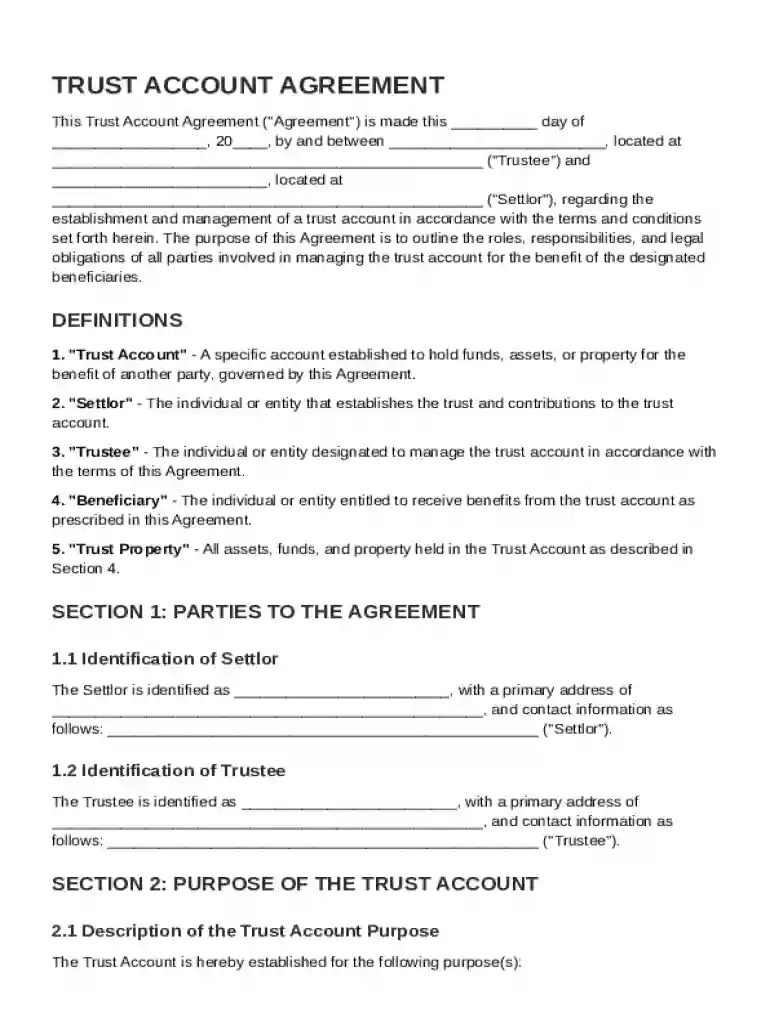
The Trust Account Agreement Template is a comprehensive legal document designed to establish a trust account between two primary parties: the Trustee and the Settlor. This agreement outlines their roles, responsibilities, and legal obligations in managing the trust for designated beneficiaries. A trust account is a fiduciary relationship where one party holds property for the benefit of another, and this document serves as the foundation of that relationship. It details the terms under which the trust is managed, including the allocation of assets, management of funds, and distribution to beneficiaries.
Key Characteristics of a Trust Account
- Fiduciary Duty: The Trustee, who manages the trust, must act in the best interests of the beneficiaries, maintaining a high standard of care and loyalty.
- Settlor's Intent: The document captures the Settlor's intentions for how the trust assets are to be managed and utilized.
- Beneficiaries' Rights: Specifies the rights and entitlements of the beneficiaries, ensuring that their interests are protected.
Key Elements of the Trust Account Agreement Template
The Trust Account Agreement Template typically includes several critical components that ensure clarity, enforceability, and ease of administration.
Roles and Responsibilities
- Trustee's Powers: Outlines the specific powers and limitations of the Trustee in managing the trust assets, including investment decisions and distribution of funds.
- Settlor's Rights: Details any retained rights or controls the Settlor may have over the trust, including revocation or amendment powers.
Provisions and Clauses
- Dispute Resolution: Includes mechanisms for resolving disputes between parties, such as mediation or arbitration, to avoid prolonged litigation.
- Termination Conditions: Specifies under what conditions the trust can be dissolved, ensuring that parties understand the process for winding down the trust.
Steps to Complete the Trust Account Agreement Template
Completing the Trust Account Agreement Template requires careful attention to detail to ensure that it accurately reflects the intentions of the Settlor and protects the interests of the beneficiaries.
- Identify Parties Involved: Clearly designate the Trustee, Settlor, and Beneficiaries, including their roles and contact information.
- Define Trust Purpose: State the specific purpose of the trust to guide its administration.
- Detail Assets: List all assets that will be included in the trust, providing clear descriptions and valuations.
- Specify Distributions: Outline how and when distributions to beneficiaries should occur, including any contingencies or conditions.
- Include Necessary Signatures: Obtain the signatures of all parties to validate and formalize the agreement.
Practical Tips
- Seek Legal Advice: Consult with a legal professional to ensure the document complies with relevant laws and accurately reflects the parties' intentions.
- Review for Accuracy: Double-check names, dates, and figures to prevent errors that could invalidate the agreement.
Legal Use of the Trust Account Agreement Template
The legal use of the Trust Account Agreement Template is governed by state and federal laws. It serves as a binding contract that is recognized in legal settings.
Compliance with Laws
- State Laws: Ensure the template adheres to specific state regulations governing trust agreements, which can vary widely.
- Federal Regulations: Compliance with federal laws, such as tax regulations for trust income, is essential.
Enforceability
- Legal Binding: Once executed, the agreement is legally binding and enforceable, making it crucial for all parties to understand their commitments fully.
- Amendments: Establish clear guidelines for how the agreement can be amended without breaching its terms.
State-Specific Rules for the Trust Account Agreement Template
State-specific rules can significantly impact the formation and administration of a trust account. It is essential to consider these variations when completing the template.
Examples of State-Specific Requirements
- Trustee Qualifications: Some states have specific qualifications or restrictions on who may serve as a trustee, such as age, residency, or licensing requirements.
- Reporting Obligations: Differences in state law may affect annual reporting or accounting requirements to beneficiaries and state agencies.
Importance of Local Legal Advice
- Consult Local Attorneys: Engage a local attorney to ensure the agreement complies with state laws and to receive guidance on any unique provisions required by your jurisdiction.
Use Case Scenarios
- Estate Planning: Ensures a smooth transition of assets upon the Settlor’s passing while minimizing tax liabilities.
- Asset Protection: Shields assets from creditors or legal judgments, safeguarding the beneficiaries’ inheritance.
How to Obtain the Trust Account Agreement Template
Securing a high-quality Trust Account Agreement Template is crucial for ensuring its legal robustness and practical applicability.
Sources
- Legal Professionals: Attorneys who specialize in estate planning or trust law often provide customized templates.
- Online Platforms: Trusted document service providers like DocHub offer accessible and customizable templates.
Considerations When Obtaining a Template
- Customization: Ensure the template can be tailored to meet specific requirements and legal standards.
- Reputation: Choose providers known for their reliability and industry expertise to avoid outdated or non-compliant forms.
Software Compatibility (e.g., DocHub)
Working with Trust Account Agreement Templates digitally requires compatibility with various software platforms to simplify editing and collaboration.
Enhancing Document Workflow
- DocHub Integration: DocHub supports seamless editing and signing of trust account agreements directly within its platform, reducing the need for additional software.
- Cloud Storage Compatibility: Easily import and export documents to and from cloud services like Google Drive, ensuring quick access and saving changes in real time.
Collaboration Features
- Real-Time Editing: Multiple users can collaborate on a single document, making modifications instantly visible to all parties involved.
- Security Considerations: Documents edited on platforms like DocHub are protected with advanced encryption, safeguarding sensitive data against unauthorized access.
Incorporating these blocks provides a comprehensive overview of the Trust Account Agreement Template, addressing its legal significance, practical application, and utility for various users.