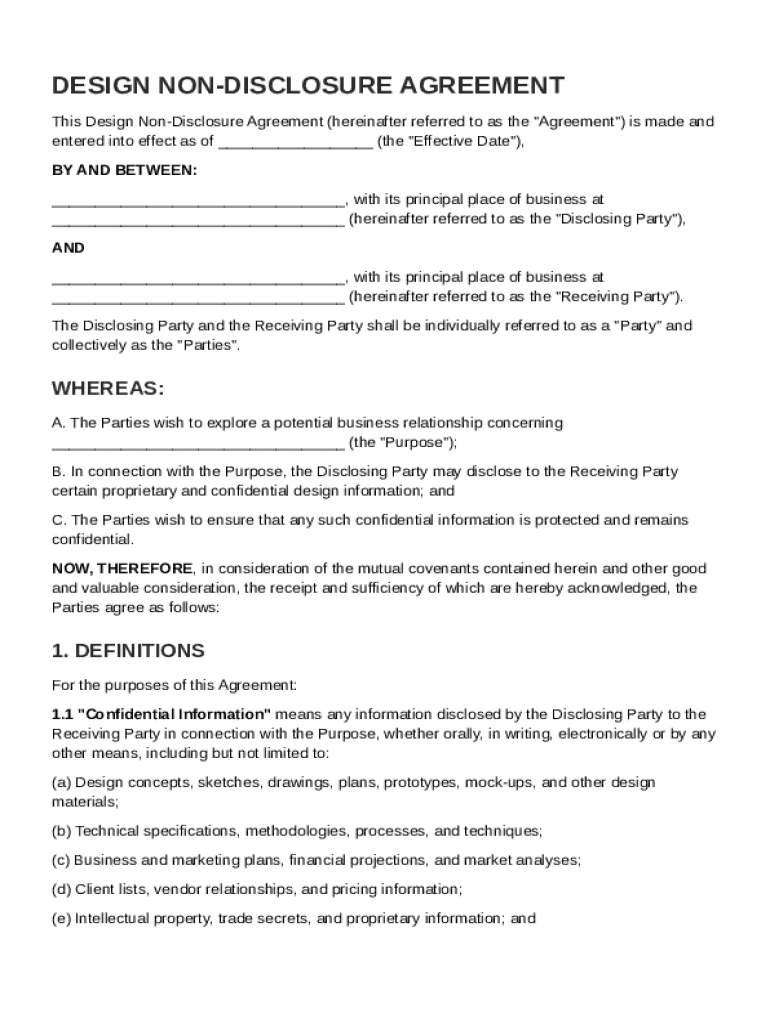







Definition and Meaning
A Design Non-Disclosure Agreement (NDA) is a legally binding contract designed to protect confidential design information exchanged during discussions or collaborations between parties. This involves two main entities: the Disclosing Party, which shares the proprietary information, and the Receiving Party, which is bound to keep this information confidential. The NDA outlines what constitutes confidential information, the obligations of the Receiving Party, permitted disclosures, and conditions for returning or destroying the shared information if the relationship is terminated.
- Confidential Information: Typically includes design ideas, sketches, prototypes, and any non-public information that provides a business with a competitive advantage.
- Obligations: The Receiving Party must take all reasonable measures to protect the confidentiality of the information, ensuring it is not disclosed to unauthorized third parties.
- Terms and Conditions: Encompass the duration of confidentiality, duties after the agreement ends, and potential consequences for breaches.
Key Elements of the Design Non-Disclosure Agreement Template
The Design NDA Template includes several critical components that ensure the agreement is clear, comprehensive, and enforceable.
- Definitions: Clearly define all relevant terms, such as "Confidential Information" and "Receiving Party", to avoid any ambiguity.
- Scope of Confidentiality: Outline the extent of confidentiality, detailing what information is covered by the NDA.
- Duration of the Agreement: Specify how long the confidentiality obligations remain in effect, which may extend beyond the termination of the business relationship.
- Exclusions from Confidentiality: Identify any information not covered by the NDA, such as publicly known details or information independently developed by the Receiving Party.
- Return of Materials: Include a clause for the return or destruction of confidential materials upon request by the Disclosing Party.
How to Use the Design Non-Disclosure Agreement Template
Using a Design NDA Template involves several stages, each critical to ensuring the document's legal validity and effectiveness.
- Customization: Tailor the template to reflect the specific relationship between parties, ensuring all industry-specific information is covered.
- Completion: Fill out all sections carefully, ensuring no blank spaces that could lead to misinterpretation.
- Review by Legal Counsel: Have the document reviewed by a legal professional to ensure it complies with relevant laws and covers all potential vulnerabilities.
- Execution: Both parties must sign the agreement for it to become legally binding.
Steps to Complete the Design Non-Disclosure Agreement Template
Completing a Design NDA involves a series of deliberate steps to achieve a balanced and enforceable document.
- Input Party Details: Enter specific details of the Disclosing and Receiving Parties, including names and contact information.
- Define Confidential Information: Clearly outline what types of information are deemed confidential.
- Set Agreement Terms: State the duration of the NDA, including specific start and end dates.
- Outline Responsibilities: Include responsibilities and obligations of each party regarding the protection of confidential information.
Legal Use of the Design Non-Disclosure Agreement Template
A Design NDA must be constructed within the legal framework to be enforceable. This involves understanding its legal standing and following relevant compliance guidelines.
- Legal Framework: NDAs must comply with local, state, and federal laws. In the U.S., they adhere to the Uniform Trade Secrets Act, which provides a baseline for what constitutes a trade secret.
- Legal Jurisdiction: The agreement should declare which legal jurisdiction will govern any disputes arising out of the NDA's breach.
- Amendments: Parties should understand how amendments to the NDA can be made and agree on procedures to proactively address any potential changes.
State-Specific Rules for the Design Non-Disclosure Agreement Template
While NDAs generally follow federal guidelines, state-specific laws might impose additional requirements or exceptions that need attention during drafting and execution.
- Variations by State: Some states might have stricter requirements for what is considered proprietary or confidential.
- Non-compete Enforceability: In many states, components like non-compete clauses may not be fully enforceable and require careful wording.
Examples of Using the Design Non-Disclosure Agreement Template
The application of a Design NDA can vary widely depending on the context. Some common scenarios include:
- Collaborative Design Projects: When two companies collaborate on developing a new product or service, an NDA ensures that designs and proprietary processes remain secure.
- Freelance Designer Engagements: Businesses hiring freelance designers can use NDAs to protect from possible leaks of sensitive design information.
- Investor Meetings: Entrepreneurs may require investors to sign an NDA before discussing innovative design concepts to prevent unauthorized use.
Who Typically Uses the Design Non-Disclosure Agreement Template
Different entities use Design NDAs to protect their interests and maintain competitive integrity.
- Startups: Often leverage NDAs to protect innovative concepts from larger competitors.
- Design Companies: Ensure that freelance collaborations do not compromise their intellectual property.
- Large Corporations: Frequently use NDAs when outsourcing parts of their design process to third-party firms to safeguard proprietary methodologies.