






Definition & Meaning
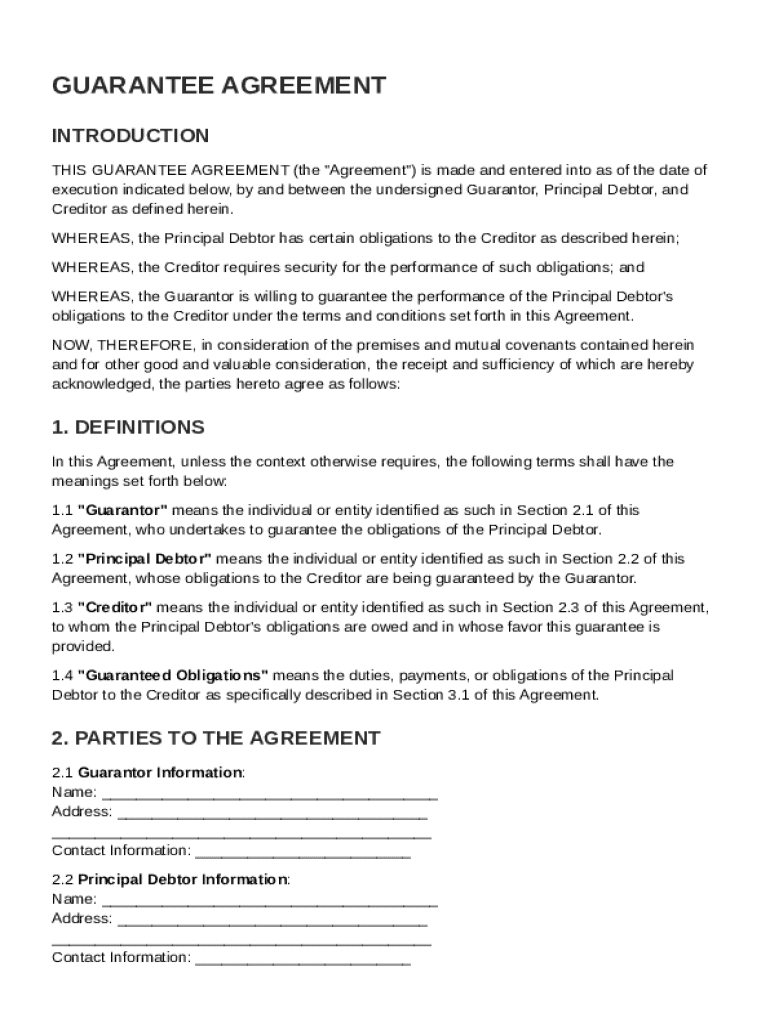
A Guarantee Agreement Template is a legal document that outlines the terms and conditions under which a Guarantor pledges to fulfill the obligations of a Principal Debtor to a Creditor. This agreement delineates critical aspects such as the parties involved—namely the Guarantor, Principal Debtor, and Creditor—alongside the specific obligations that are guaranteed. It is an essential tool for ensuring that creditors have a means of recourse if the Principal Debtor defaults on their obligations. The template provides a structured framework, setting clearly defined terms required for legal enforcement.
Key Elements of the Guarantee Agreement Template
The template comprises several crucial elements that must be carefully reviewed and completed. These elements include:
- Parties Involved: Identifies the Guarantor, Principal Debtor, and Creditor.
- Guaranteed Obligations: Specifies the exact financial or performance obligations that are being guaranteed.
- Duration of Obligation: Details how long the guarantee is in effect.
- Rights of the Creditor: Defines the rights of the creditor under the agreement.
- Representations and Warranties: Statements made by the Guarantor to ensure the enforceability of the guarantee.
- Governing Law: Indicates which state laws will govern the agreement.
- Miscellaneous Provisions: Covers other essential clauses like amendment processes and notices.
These elements ensure each party understands their responsibilities, rights, and the circumstances under which the agreement can be invoked.
Steps to Complete the Guarantee Agreement Template
Filling out a Guarantee Agreement requires careful attention to ensure all details are accurately captured. Here’s a step-by-step guide:
- Identify the Parties: Enter the full legal names and addresses of the Guarantor, Principal Debtor, and Creditor.
- Describe the Obligations: Specify what obligations are being guaranteed.
- Set the Duration: Clearly define the timeline for which the guarantee is valid.
- Insert Representations and Warranties: Capture any promises or assurances made by the Guarantor regarding their capacity and willingness to guarantee.
- Detail the Governing Law: Specify which jurisdiction's laws will apply.
- Review and Customize Miscellaneous Provisions: Adjust clauses that handle defaults, amendments, and notices.
- Sign and Date: Ensure all parties legally acknowledge the document with their signatures.
Completing these steps thoroughly will provide a solid legal foundation and protect the interests of all parties involved.
Legal Use of the Guarantee Agreement Template
Guarantee Agreements are used to legally bind the Guarantor to cover obligations in the event of default by the Principal Debtor. This template serves as a vital legal instrument to establish accountability, reducing risks for lenders and investors. Proper use of this agreement minimizes uncertainties around debt recovery, offering a layer of protection that can be legally enforced. Importantly, parties must ensure compliance with state laws and potential federal regulations that could impact the enforceability of specific guarantee terms.
Who Typically Uses the Guarantee Agreement Template
This template is widely used by various individuals and entities such as:
- Lenders and Creditors: To secure loan repayments.
- Landlords: Ensuring payment of rent by a tenant.
- Business Partners: Where one party secures obligations on behalf of another.
- Family Members: To back loans or financial obligations taken by relatives.
- Financial Institutions: As part of structured finance transactions.
These users seek to mitigate risk exposure by creating enforceable assurance of obligation fulfillment should the Principal Debtor default.


State-Specific Rules for the Guarantee Agreement Template
While Guarantee Agreements are broadly similar, state-specific rules can impact their formulation and enforcement. For example, some states might have particular statutes on the limitations of guarantees, notice requirements, or penalties for default. An agreement valid in one state might require adjustments to conform to another's legal requirements. Therefore, it is crucial for users to consider legal advice specific to their state to address any unique requirements or restrictions.
Examples of Using the Guarantee Agreement Template
Consider the following scenarios to understand practical applications:
- Real Estate Lease: A parent might use the agreement to guarantee their child’s lease obligations.
- Business Loan: A partner could act as a guarantor on behalf of a startup business to secure additional funding.
- Equipment Financing: A company director might guarantee equipment lease payments on behalf of their corporation.
These examples highlight the template's versatility in securing a wide range of obligations across different fields.
Enhanced Document Security Features
When managing Guarantee Agreements, especially in digital formats, ensuring document security is paramount. Platforms like DocHub provide enhanced security features to protect sensitive information:
- 256-bit SSL Encryption: Safeguards data during transfer and storage.
- Authentication Protocols: OAuth 2.0 ensures secure access to documents.
- Password Protection: Adds an extra security layer before sharing files.
These features exemplify the level of security required to protect a Guarantee Agreement in digital formats and maintain confidentiality.
Software Compatibility with Guarantee Agreement Templates
Guarantee Agreement Templates can be integrated into various document management systems for ease of use and accessibility. Platforms like DocHub offer compatibility with numerous file formats beyond PDFs, including DOC, PPT, XLS, and TXT. This flexibility allows users to import, edit, and manage their documents seamlessly without the need for conversions. Moreover, integration with cloud storage services like Google Drive ensures that templates are easily accessible and editable from any location, supporting both desktop and mobile environments.