






Definition & Meaning
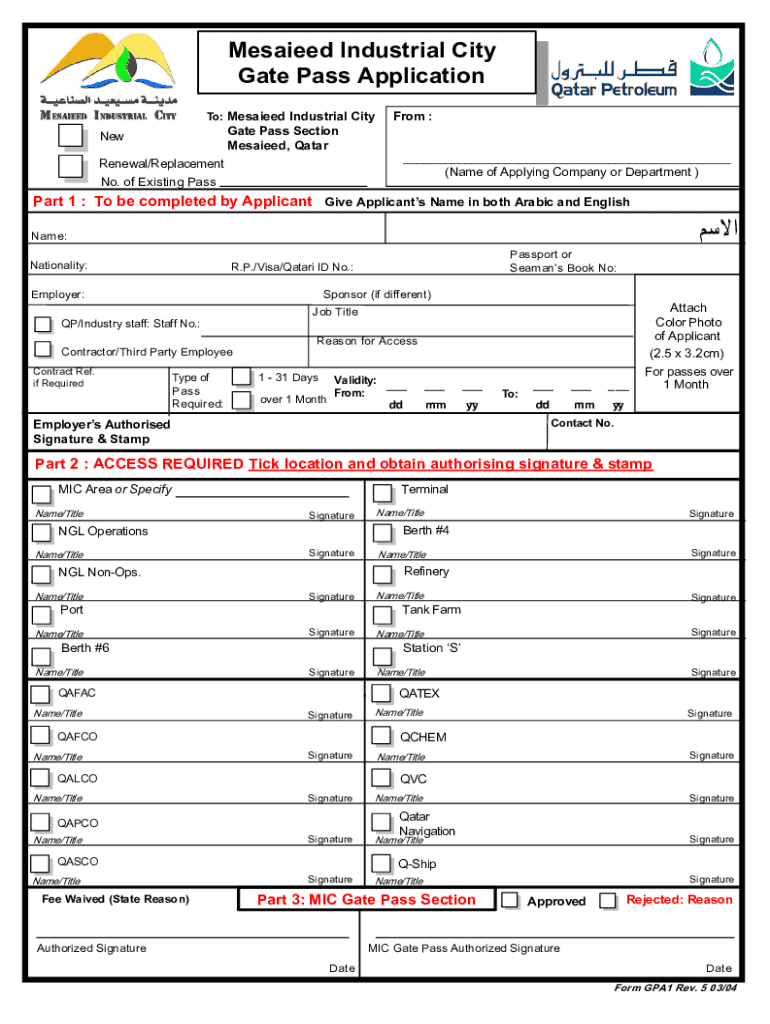
A gate pass format is a structured document essential for managing and tracking the movement of people or goods within a specific area, such as a business facility, warehouse, or secure environment. The format typically includes details like the date and time of entry, the purpose of the visit or transport, personal identification of the holder, and the authorization granted for access. This document ensures security, accountability, and compliance with any regulations governing restricted areas.
How to Use the Gate Pass Format
To effectively use a gate pass format, first determine the specific requirements of your organization or the issuing authority, as formats can vary. Generally, the process involves filling out the necessary fields with accurate information such as the visitor’s name, the company they represent, the purpose of the visit, and the duration. The gate pass should then be signed or stamped by an authorized personnel. It is crucial to ensure clarity and completeness to avoid any disruptions or security breaches. Once issued, the pass becomes a part of the access control procedure.
Steps to Complete the Gate Pass Format
Completing a gate pass format involves several key steps:
-
Gather Required Information: Collect all necessary details such as the visitor's full name, contact information, the purpose of their visit, and the department or individual they are meeting.
-
Fill Out Identification Details: Include identification numbers or badges if applicable, to ensure precise tracking and verification.
-
Specify Dates and Times: Clearly note the date and time of entry and exit to track access duration accurately.
-
Authorization: Secure the required signatures or stamps from authorized personnel to validate the pass.
-
Review and Submit: Double-check all entered information for accuracy before submitting the form to the security desk or relevant department.
Key Elements of the Gate Pass Format
- Visitor Information: Full name, company or affiliation, and contact details.
- Purpose: A detailed description of the visit’s objective.
- Entry and Exit Times: Scheduled times for arrival and departure.
- Authorized Signature: Approval from a manager or security officer.
- Unique Identifier: Serial numbers or barcodes for tracking.
These elements ensure that the gate pass is comprehensive and meets the security protocols in place.
Legal Use of the Gate Pass Format
The legal use of a gate pass format involves complying with organizational policies as well as any municipal or federal laws applicable. Companies must ensure their formats respect privacy laws and data protection regulations. Sharing information recorded in gate passes must be handled confidentially and only used for authorized business purposes. Failure to comply can result in penalties or legal action.
Who Typically Uses the Gate Pass Format
The gate pass format is commonly utilized by security personnel, administrative staff, and logistics coordinators. Businesses with complex operations such as manufacturing plants, data centers, and high-security areas often rely on this format to control access and maintain records. Additionally, schools and residential communities may use a simplified version to manage visitors.


Forms of the Gate Pass Format
There are different variations of the gate pass format accessible depending on security levels and organizational needs.
- Temporary Passes for one-time visitors.
- Daily Passes for regular employees without permanent access.
- Delivery Passes specific to logistics and supply chain operations.
Each form serves a unique purpose and is designed to enhance the security protocol.
Examples of Using the Gate Pass Format
Consider a manufacturing plant that issues delivery passes to track inbound and outbound shipments. Security staff use the gate pass to verify driver credentials and shipment details against scheduled deliveries. In another scenario, a corporate office utilizes visitor passes for contractors performing maintenance work, ensuring they log in and out of the facility with each visit. These examples demonstrate the versatility and importance of a well-designed gate pass format in various operational contexts.