






Definition and Purpose of the Membership Application Form
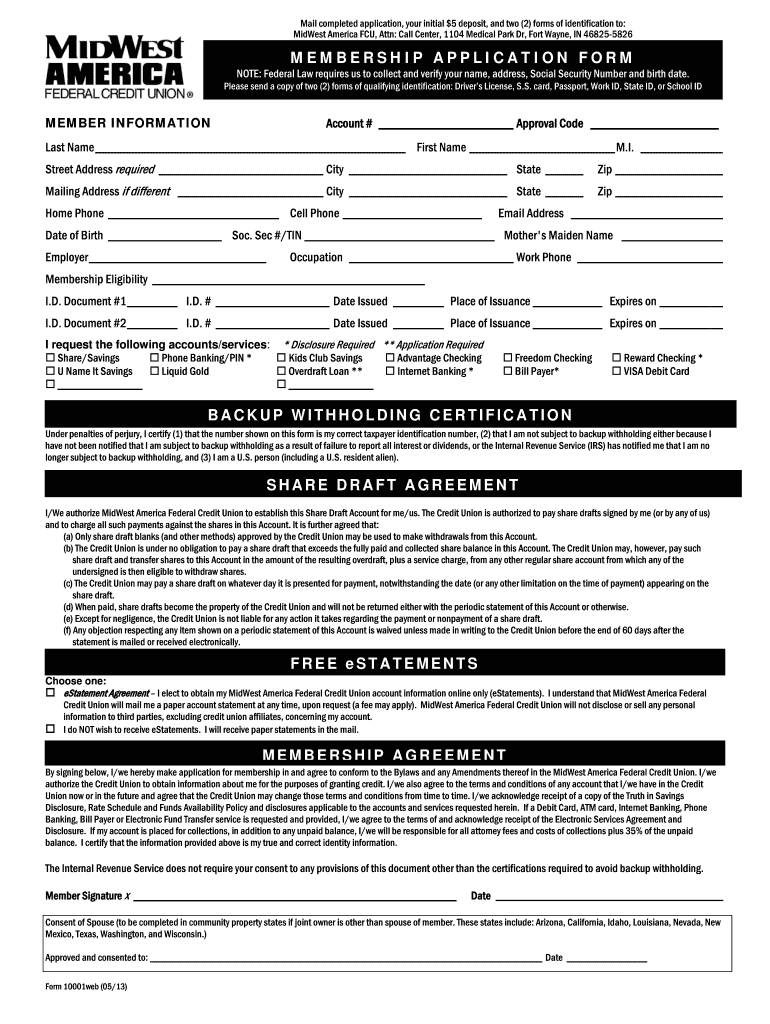
A Membership Application Form is a crucial document used by organizations such as credit unions, clubs, or other member-based entities. Its primary function is to collect personal information and authenticate individuals who wish to join. For MidWest America Federal Credit Union, this form requires applicants to submit various details like personal identification and an initial deposit. This serves to formally initiate their membership and outline their account options. If an application is approved, it establishes the terms of membership and sets the foundation for the applicant's interactions with the organization.
Steps to Complete the Membership Application Form
Filling out the Membership Application Form involves several essential steps to ensure all necessary details are captured accurately:
-
Personal Information: Begin by entering basic personal details, such as name, address, phone numbers, and email. Ensure accuracy as errors can delay processing.
-
Identification Documents: The form may request the inclusion of identification documentation. Common examples include a driver's license or a government-issued ID. It's vital to verify that the identification is current and valid.
-
Initial Deposit Requirements: Specify the amount you are depositing initially. This step may vary depending on the type of account you wish to open.
-
Account Selection: Choose the type of account you wish to open from the available options, such as savings, checking, or a specialized account.
-
Signature: A signature is required for authentication. Sign in the designated section, and if using the DocHub platform, utilize its signature tools to create or upload your signature.
Required Documents for a Membership Application Form
Submitting a Membership Application Form requires several key documents to verify identity and fulfill application criteria:
- Government-Issued ID: Typically, a driver's license or passport is needed to authenticate identity.
- Proof of Address: Recent utility bills or bank statements may be required to verify residency.
- Social Security Number: Often needed for background checks and identity verification.
- Initial Deposit Proof: Documentation showing the source of the initial deposit, if necessary.
Ensure all documents are current and valid to facilitate a smooth application process.
Key Elements of the Membership Application Form
The form encompasses several critical components:
- Applicant Information Section: Captures essential data about the individual wishing to join, such as full name and contact information.
- Identification Verification: Requests copies of IDs or other documentation to confirm identity.
- Financial Information: Details the initial deposit and account preferences.
- Terms and Agreements: Outlines the rights and responsibilities of both the member and the institution.
- Beneficiary Designation: Provides options to specify beneficiaries in case of account holder's death.
Each section plays an integral role in establishing membership eligibility and the parameters for interaction with the organization.
Eligibility Criteria for the Membership Application Form
To ensure that applicants meet the requirements for becoming members, specific eligibility criteria must be met. Generally, this includes:
- Age Requirements: Usually, applicants must be at least 18 years old.
- Residency: Proof of residence within the service area of the organization is often required.
- Relationship to Current Members: Some institutions allow potential members who have relatives already part of the organization.
- Initial Deposit Amount: A specified minimum deposit is needed to activate the account.
Verifying these criteria before application can improve the likelihood of a successful submission.


How to Obtain the Membership Application Form
Accessing the Membership Application Form varies between organizations:
-
Online Platforms: Many institutions, like MidWest America Federal Credit Union, offer forms on their websites for download or completion through digital document services like DocHub. Using an online system facilitates easy submission and tracking.
-
In-Person at Branch Locations: Physical copies may be available at the organization’s locations, allowing applicants to fill them manually.
-
Request by Mail: Some institutions offer the option to send forms by mail upon request.
Select the method that aligns best with your preferences and capabilities for efficient processing.
Submission Methods for the Membership Application Form
Several ways exist to submit the completed Membership Application Form, each with its own advantages:
- Online Submission: This is the most convenient method, enabling instant submission via systems like DocHub. It allows for quick verification and processing.
- In-Person Submission: Applicants can visit branch locations to submit forms directly to a representative, which may provide immediate feedback or additional assistance.
- Mail Submission: Sending forms through postal services remains an option, though it usually involves a longer processing time.
Choose a method based on your urgency and access to resources.
Legal Use of the Membership Application Form
The Membership Application Form must adhere to legal standards to ensure trust and compliance:
- Privacy Laws: Forms must comply with data protection regulations to safeguard personal information.
- Terms of Membership: Any agreements within the form should be legally binding and clear, outlining the terms, conditions, and expectations.
- Signature Authenticity: Whether electronic or physical, signatures must meet legal standards. Platforms like DocHub adhere to regulations such as the ESIGN Act to maintain the legality of digital signatures.
Compliance is crucial to avoid legal complications and foster a secure member relationship.