




01. Edit your form online
Type text, add images, blackout confidential details, add comments, highlights and more.

Type text, add images, blackout confidential details, add comments, highlights and more.

Draw your signature, type it, upload its image, or use your mobile device as a signature pad.

Send it via email, link, or fax. You can also download it, export it or print it out.
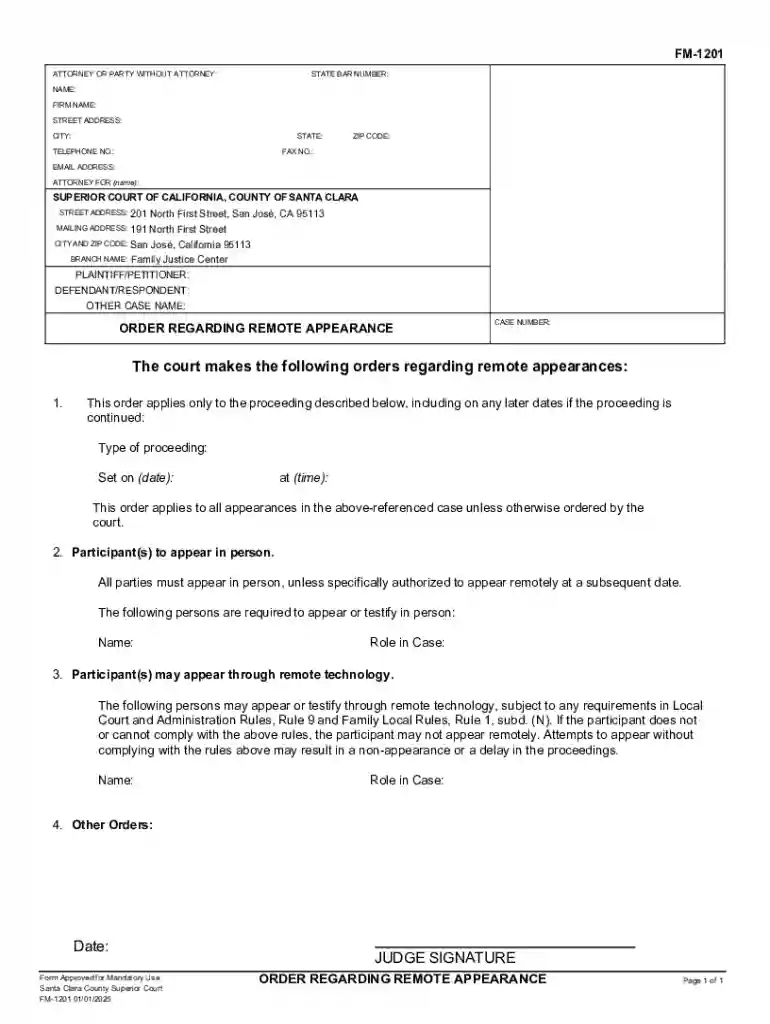
The Fm-1201 form is an order issued by the Superior Court of California, County of Santa Clara. This document specifically addresses the requirements for participants in court proceedings to appear either in person or via remote technology. The form sets out clear guidelines on who needs to be physically present and who may attend remotely, along with the compliance rules applicable to these proceedings. This ensures that all parties involved understand their obligations and the options available to them for appearance.
Completing the Fm-1201 requires attention to detail to ensure compliance with court requirements.
Acquiring the Fm-1201 form is straightforward.
The Fm-1201 is primarily used by participants in legal proceedings within the Superior Court of California, County of Santa Clara. This includes:


The Fm-1201 serves as a legally binding document dictating court appearance procedures.
Critical components of the Fm-1201 include:
Failing to comply with the Fm-1201 can result in legal repercussions.
While primarily relevant to California, the specific rules and applicability of the Fm-1201 are dictated by the Superior Court of California, County of Santa Clara. It is crucial to understand that other counties may have different forms or requirements for similar proceedings.
By understanding these key aspects, individuals can ensure they are adequately prepared and compliant with the requirements of the Fm-1201 form during legal proceedings.
We've got more versions of the Fm-1201 form. Select the right Fm-1201 version from the list and start editing it straight away!
At DocHub, your data security is our priority. We follow HIPAA, SOC2, GDPR, and other standards, so you can work on your documents with confidence.




Santa Clara County Superior Court FM-1201 01/01/2025. All parties must appear in person, to appear remotely at a subsequent date. 201 North First Street, San
Aug 24, 2026 NAME: Moss Lake VFD, Inc. ; PRIMARY COUNTY: Cooke ; PHYSICAL ADDRESS: 166 FM 1201 Ext Gainesville, 76240 ; MAIL ADDRESS: 7480 FM 1201. Gainesville,Read more
SBT1201K. Silicon Rectifier. From Marconi. Status, Discontinued. @I(FM) (A) (Test Condition), 210. @Temp (C) (Test Condition), 85. @Temp. (C) (Test Condition)


