Type text, add images, blackout confidential details, add comments, highlights and more.
02. Sign it in a few clicks
Draw your signature, type it, upload its image, or use your mobile device as a signature pad.
03. Share your form with others
Send it via email, link, or fax. You can also download it, export it or print it out.
How to use or fill out 2011 Adult Softball Team Registration with our platform
Ease of Setup
DocHub User Ratings on G2
Ease of Use
DocHub User Ratings on G2
Click ‘Get Form’ to open the 2011 Adult Softball Team Registration in the editor.
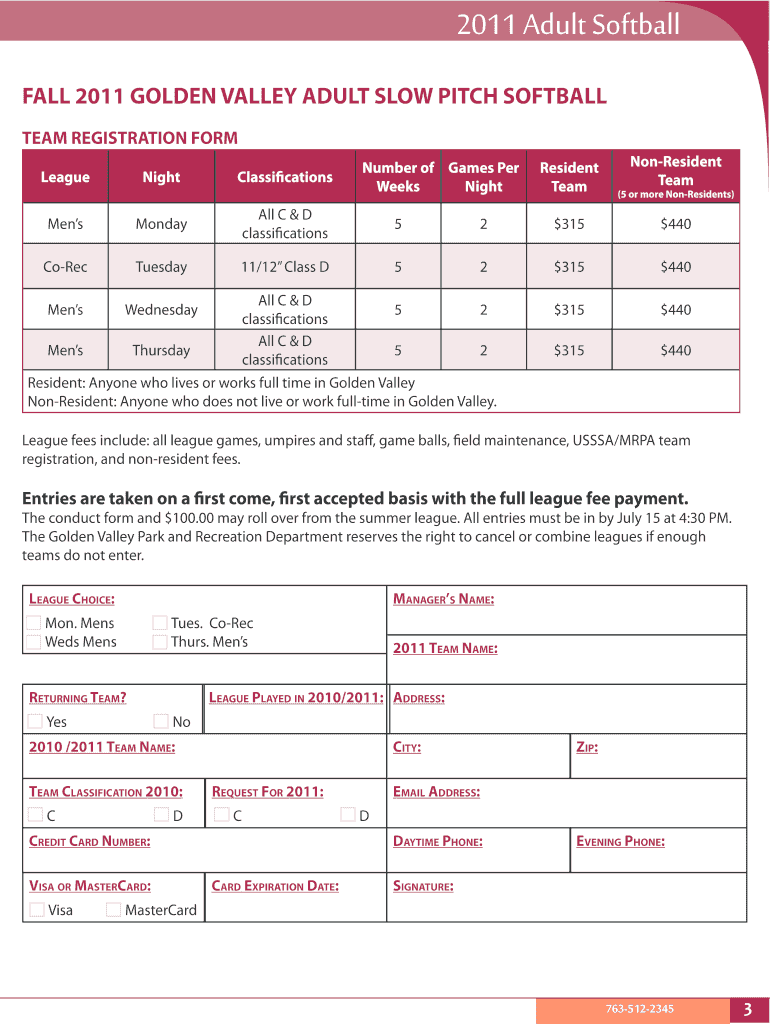
Begin by filling in the Team Registration Form completely. Ensure you provide accurate details for your team name, manager’s name, and contact information.
Select your league choice and indicate whether your team is a resident or non-resident team. This will determine the applicable fees.
Complete the payment section by entering your credit card information or indicating that you will submit a check. Remember, full payment is required before registration is confirmed.
Fill out the Eligibility/Conduct Verification form, ensuring all necessary signatures are included. This form must be submitted alongside your registration.
Lastly, complete the roster form with player names and their contact details. This does not require individual signatures but must be filled out completely.
Start using our platform today to streamline your registration process for free!
Fill out 2011 Adult Softball Team Registration online It's free
The Skill Registration System and the From-To Program for Passing On Core Production Skills As of June 30, 2011, the Yamaha Group had acquired certification
Intramural Sports Registration | University Recreation
#everyoneplays, no experience is necessary! Registration for all intramural sports and events is free, but classic and modern sports will require a forfeit fee
Adult Softball Registration Begins. Monday, August 15, 2011. Fall League Registration: Aug. 15-Sept. 2; Mens Softball Season: Sept. 14-Nov. 2, Wednesdays, 6
Cookie consent notice
This site uses cookies to enhance site navigation and personalize your experience.
By using this site you agree to our use of cookies as described in our Privacy Notice.
You can modify your selections by visiting our Cookie and Advertising Notice.