
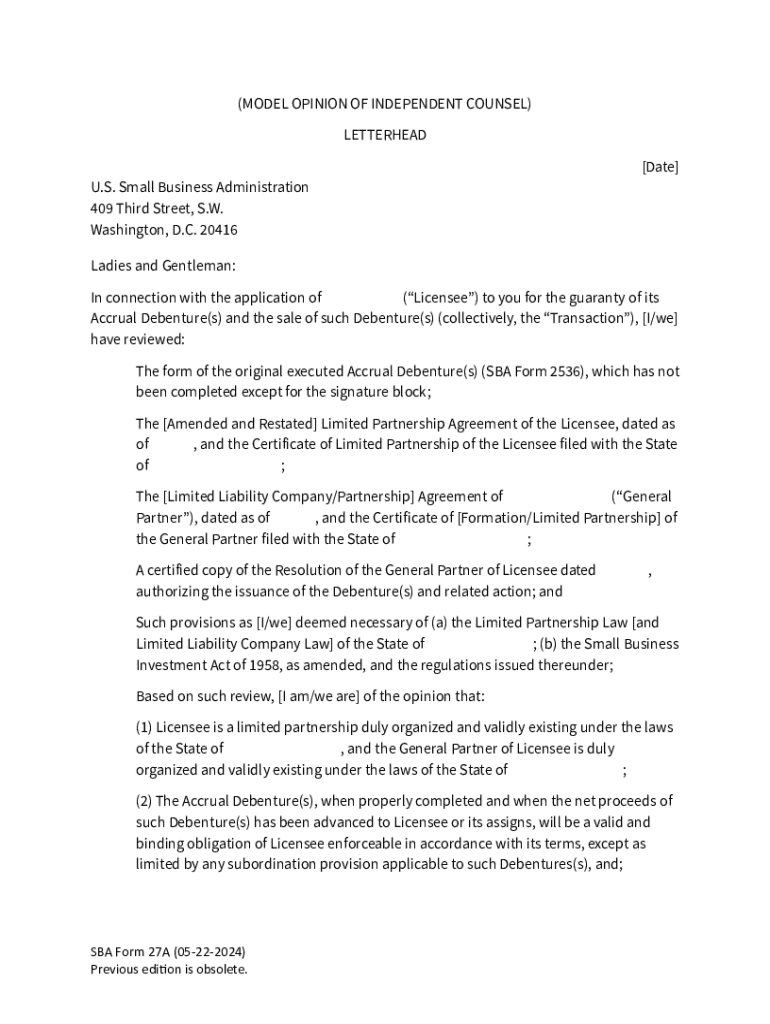







Definition and Meaning
The "Accrual Model Opinion of Counsel - Form 27A" is a standardized document provided by the U.S. Small Business Administration (SBA). It is used by independent legal counsel to express their professional opinion on matters relating to accrual debentures. This form is essential for documenting the legal standing and compliance of Small Business Investment Companies (SBICs) when seeking to draw against commitments from the SBA.
How to Use the Accrual Model Opinion of Counsel - Form 27A
To effectively utilize Form 27A, legal counsel must thoroughly assess the elements required by the SBA. These include ensuring all legal structures and arrangements of the SBIC comply with relevant regulations. The form must be filled out with precision and submitted as part of the application process for obtaining funds against accrual debentures.
- Review Legal Requirements: Understand the legal criteria associated with SBA debenture commitments.
- Gather Supporting Information: Collect necessary documentation about the SBIC’s structure and operations.
- Complete Form 27A: Carefully fill out each section, ensuring accuracy and clarity.
- Submit for Review: Provide the completed form to the appropriate SBA contacts for evaluation.
Steps to Complete the Accrual Model Opinion of Counsel - Form 27A
- Access the Form: Obtain Form 27A from the official SBA sources or request it from the SBIC.
- Provide Legal Information: Fill in details regarding the SBIC’s legal status, compliance measures, and any relevant licenses.
- Outline Opinion Specifics: Clearly express the legal opinion, focusing on the compliance of the SBIC with SBA regulations.
- Include Necessary Attachments: Attach pertinent documentation that supports the expressed legal opinion.
- Review and Finalize: Double-check all entries for accuracy before submitting.
Key Elements of the Accrual Model Opinion of Counsel - Form 27A
- Legal Compliance: Verification that the SBIC operates within the legal bounds set by relevant laws and regulations.
- Independent Counsel Affiliation: Confirmation that the opinion is issued by independent counsel, unaffiliated with the SBIC.
- Structural Details: Details about the corporate structure, licensing, and authorization of the SBIC.
- Specific Compliance Areas: Addressing particular legal concerns pertinent to accrual debenture processes.
Who Typically Uses the Accrual Model Opinion of Counsel - Form 27A
- Independent Legal Counsel: Legal professionals tasked with the responsibility of evaluating legal compliance for SBICs.
- SBICs Seeking SBA Funds: Small Business Investment Companies that require official opinions to support their applications for accrual debenture draws.
- SBA Officials: Officials evaluating the compliance and eligibility of SBICs for funding against commitments.


Examples of Using the Accrual Model Opinion of Counsel - Form 27A
- New Funding Applications: SBICs applying for the first time require a valid Opinion of Counsel to establish trust and compliance.
- Annual Compliance Reviews: Legal opinions periodically submitted to demonstrate ongoing compliance with SBA standards.
- Loan or Grant Applications: Enhanced credibility of SBICs when applying for additional financial support.
Important Terms Related to Accrual Model Opinion of Counsel - Form 27A
- SBIC: Small Business Investment Companies that partner with the SBA to support small businesses.
- Accrual Debenture: A financial instrument used by SBICs to obtain funds that involve accumulating interest payable over time.
- Legal Opinion: A formal statement by an attorney regarding the application of law to specific facts, in this case, connected with SBA regulations.
State-Specific Rules for the Accrual Model Opinion of Counsel - Form 27A
While the SBA provides overarching guidelines, state-specific rules might affect the completion and submission of Form 27A. Legal counsel must account for local regulations that could impact the interpretation or execution of the opinion.
- State Licensing Requirements: Variations in legal licensing procedures can require additional documentation.
- Jurisdictional Compliance: Adapting the form to comply with state-specific legal frameworks governing SBIC operations.
Legal Use of the Accrual Model Opinion of Counsel - Form 27A
The legal opinion expressed in Form 27A holds critical importance in verifying the legal compliance of SBICs. By serving as a documented assurance, it provides the SBA with confidence in the company's adherence to legal standards necessary for financial transactions involving accrual debentures.
Penalties for Non-Compliance
Failing to properly complete or submit Form 27A can result in significant drawbacks for SBICs, including:
- Rejection of Funding Applications: Without a valid opinion, the SBA may decline financial requests.
- Legal Repercussions: Inaccurate legal opinions can lead to legal challenges or penalties.
- Financial Strain: Delays or refusals of funding can affect the financial health of SBICs.
Who Issues the Form
Form 27A is issued by the U.S. Small Business Administration and must be completed by qualified legal counsel. The form's issuance and subsequent use are regulated by SBA guidelines to ensure legal integrity and compliance.




