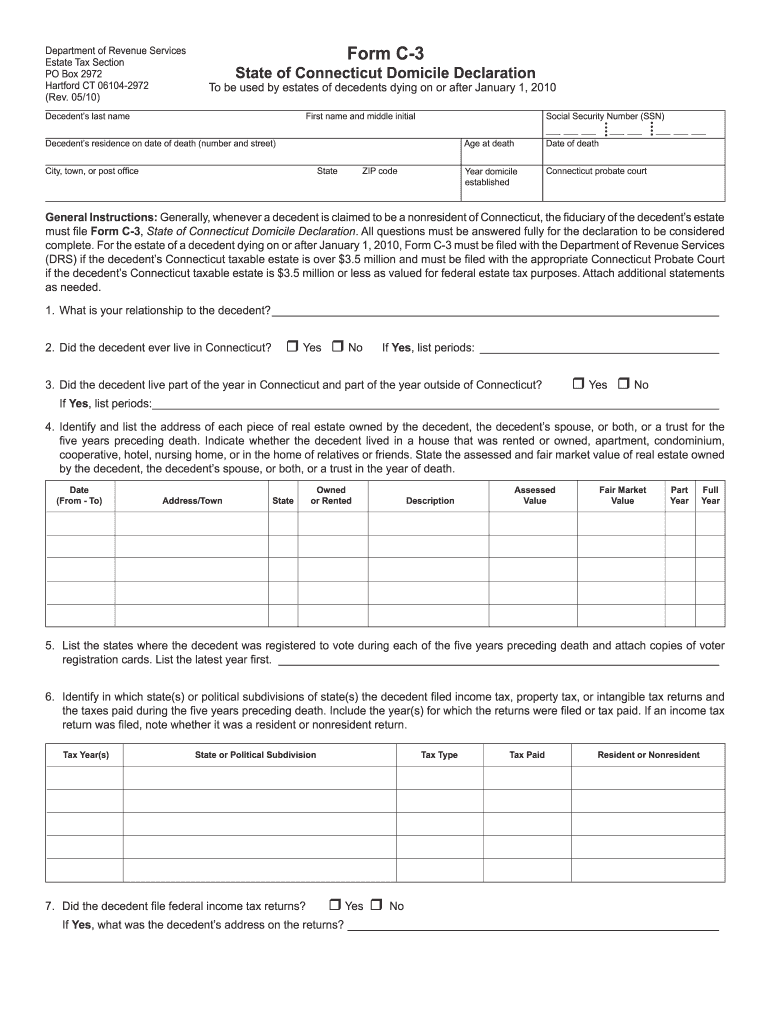
Connecticut domicile 2010 form-2026

Get Form
domicile form online Preview on Page 1

Here's how it works

01. Edit your domicile form online online
Type text, add images, blackout confidential details, add comments, highlights and more.
02. Sign it in a few clicks
Draw your signature, type it, upload its image, or use your mobile device as a signature pad.
03. Share your form with others
Send it via email, link, or fax. You can also download it, export it or print it out.

How to use or fill out Connecticut Domicile 2010 Form with DocHub

Form edit decoration
9.5
Ease of Setup
DocHub User Ratings on G2
9.0
Ease of Use
DocHub User Ratings on G2
  1. Click ‘Get Form’ to open the Connecticut Domicile 2010 form in our editor.
  2. Begin by entering the decedent's last name, first name, and middle initial in the designated fields at the top of the form.
  3. Fill in the decedent’s residence address on the date of death, including city, state, and ZIP code. Ensure accuracy as this information is crucial for tax purposes.
  4. Complete sections regarding the decedent's age at death and Social Security Number (SSN). This information helps establish identity and residency status.
  5. Answer all questions regarding the decedent's relationship to Connecticut. Indicate if they lived in Connecticut and provide details about their real estate ownership over the past five years.
  6. Continue filling out sections related to voting registration, tax filings, employment history, and any legal documents executed by the decedent. Attach additional statements if necessary.
  7. Finally, ensure that you sign and date the declaration section at the end of the form before submitting it through our platform.

Start using our editor today for free to complete your Connecticut Domicile 2010 form efficiently!

See more connecticut domicile 2010 form versions

We've got more versions of the connecticut domicile 2010 form form. Select the right connecticut domicile 2010 form version from the list and start editing it straight away!
Versions Form popularity Fillable & printable
2011 4.9 Satisfied (40 Votes)
2010 4.4 Satisfied (621 Votes)
2008 4.4 Satisfied (56 Votes)
2005 4.3 Satisfied (47 Votes)
be ready to get more

Complete this form in 5 minutes or less

Get form

Got questions?

We have answers to the most popular questions from our customers. If you can't find an answer to your question, please contact us.
Contact us
The first $2 million is tax free. For example, the Connecticut estate tax for a $2 million estate is zero. A $3 million estate is taxed $72,000 (7.2 percent of $1 million). An estate of $5 million would pay a Connecticut estate tax of $252,000 (8.4 percent of $3 million).
A Connecticut Resident is an individual that is domiciled in Connecticut for the entire tax year. If you maintained a permanent place of abode in Connecticut and spent more than 183 days in the state, you are also considered to be a resident.
You are a resident for the current taxable year if: Connecticut was your domicile (permanent legal residence) for the entire taxable year; or. You maintained a permanent place of abode in Connecticut during the entire taxable year and spent a total of more than 183 days in Connecticut during the taxable year.
Form CT-706 NT, Connecticut Estate Tax Return (for Nontaxable Estates), is required to be filed by the executor or administrator of a decedents estate where the amount of the decedents Connecticut taxable estate is less than or equal to the Connecticut estate tax exemption amount.
Hardly any of us use the term domicile in our day-to-day conversations, but its an important term in the tax world. Legally, you can have multiple residences in multiple states, but only one domicile.

Security and compliance

At DocHub, your data security is our priority. We follow HIPAA, SOC2, GDPR, and other standards, so you can work on your documents with confidence.

Learn more
ccpa2
pci-dss
gdpr-compliance
hipaa
soc-compliance
be ready to get more

Complete this form in 5 minutes or less

Get form

People also ask

Form CT-706 NT EXT is used to request a six-month extension to file Form CT-706 NT (Connecticut Estate Tax Return for Nontaxable Estates) with the Probate Court.
Residency is physically living somewhere. Domicile is physically living somewhere (or lived somewhere) and intent to remain (or intent to return if youre military). You CANNOT have a domicile for a state you have never lived in. You must have physically resided in a certain state to gain its benefits and protections.
(3) Domicile is not dependent on citizenship; that is, an immigrant who has permanently established his or her home in Connecticut is domiciled here regardless of whether such individual has become a United States citizen or has applied for citizenship.

Related links