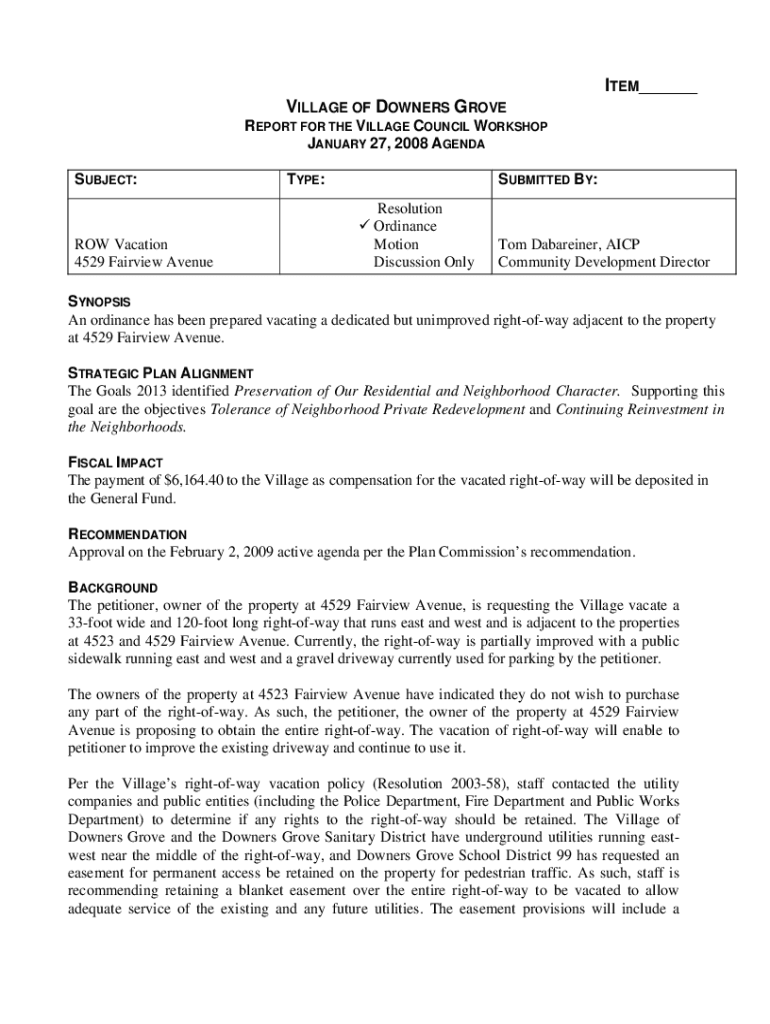
PC 28-08 - Manager Memo doc 2025

Get Form
PC 28-08 - Manager Memo doc Preview on Page 1

Here's how it works

01. Edit your form online
Type text, add images, blackout confidential details, add comments, highlights and more.
02. Sign it in a few clicks
Draw your signature, type it, upload its image, or use your mobile device as a signature pad.
03. Share your form with others
Send it via email, link, or fax. You can also download it, export it or print it out.

How to use or fill out PC 28-08 - Manager Memo doc with our platform

Form edit decoration
9.5
Ease of Setup
DocHub User Ratings on G2
9.0
Ease of Use
DocHub User Ratings on G2
  1. Click ‘Get Form’ to open the PC 28-08 - Manager Memo document in the editor.
  2. Begin by filling in the 'ITEM' section at the top of the form, ensuring you provide a clear and concise title for your memo.
  3. In the 'SUBJECT' field, specify the main topic of your memo, such as 'ROW Vacation' for clarity.
  4. Complete the 'TYPE' section by selecting from options like Resolution, Ordinance, or Motion based on your needs.
  5. Fill in the 'SUBMITTED BY' field with your name and title to identify yourself as the author of this memo.
  6. In the 'SYNOPSIS' area, summarize key points about the ordinance or discussion topic to provide context for readers.
  7. Review all sections for accuracy and completeness before saving or sharing your completed document using our platform's features.

Start editing your PC 28-08 - Manager Memo today for free and streamline your document processes!

be ready to get more

Complete this form in 5 minutes or less

Get form
be ready to get more

Complete this form in 5 minutes or less

Get form