




Here's how it works

01. Edit your tp584 online
Type text, add images, blackout confidential details, add comments, highlights and more.

02. Sign it in a few clicks
Draw your signature, type it, upload its image, or use your mobile device as a signature pad.

03. Share your form with others
Send tax tp new printable via email, link, or fax. You can also download it, export it or print it out.
How to use or fill out tp584 with our platform

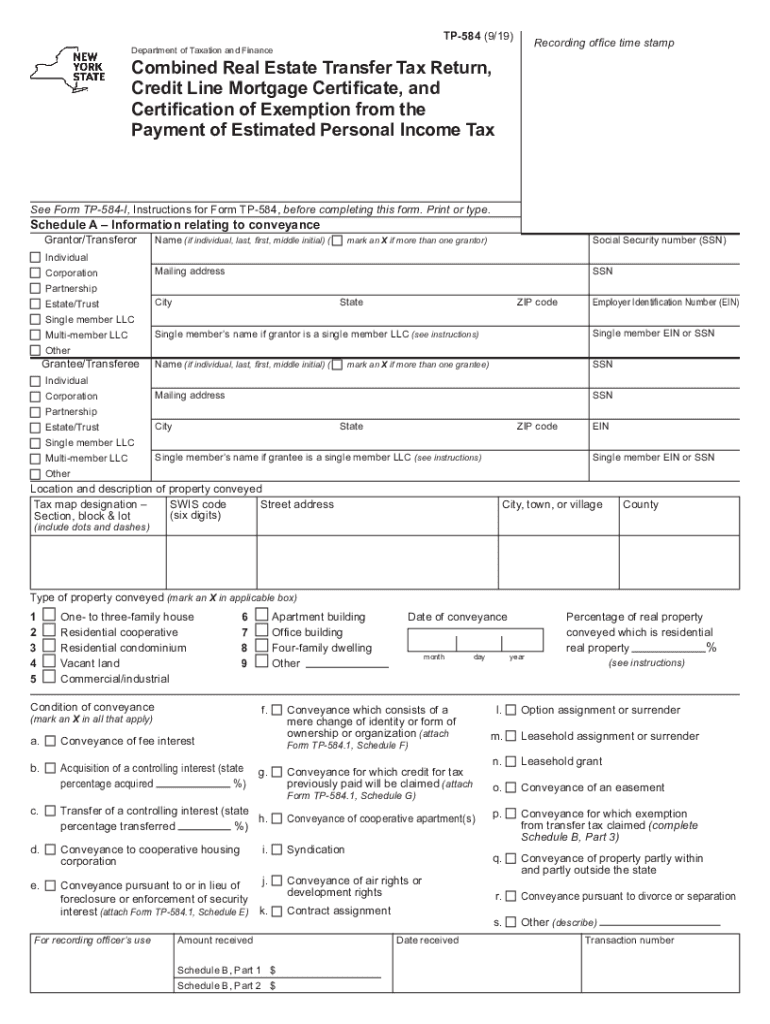
- Click ‘Get Form’ to open the TP-584 in the editor.
- Begin with Schedule A, providing information about the grantor and grantee. Select the appropriate entity type (individual, corporation, etc.) and fill in names, addresses, and identification numbers as required.
- Next, describe the property being conveyed. Enter the tax map designation, street address, and type of property. Ensure you mark all applicable boxes regarding the condition of conveyance.
- Proceed to Schedule B for tax computation. Input the amount of consideration for the conveyance and follow through with deductions and calculations as outlined in each line.
- Complete Schedule C if applicable by certifying any credit line mortgage details. Mark the appropriate boxes based on your situation.
- Finally, ensure all signatures are collected from grantors and grantees before submitting your form for processing.
Start using our platform today to streamline your TP-584 completion process for free!
Fill out tp584 online
It's free
It's free
See more tp584 versions
We've got more versions of the tp584 form. Select the right tp584 version from the list and start editing it straight away!
Security and compliance
At DocHub, your data security is our priority. We follow HIPAA, SOC2, GDPR, and other standards, so you can work on your documents with confidence.
Learn more


Related forms
Constitution vocabulary review fill in the blank
The document provides a comprehensive overview of key vocabulary related to the U.S. Constitution, including terms such ...

Skin Form for Infectious Disease - New York State Public High
The document outlines a physician release form developed by the NFHS Sports Medicine Advisory Committee for wrestlers wi ...

Elementary Withdrawal Form
The document is a Gwinnett County Public Schools Elementary Withdrawal Form used for officially withdrawing a student fr ...

Developing habits for relationship success
The document is an order form for a personalized book titled 'Developing Habits for Relationship Success,' which provide ...

Pool Fill JAN23
The document is a Pool Fill Credit Request Form for customers seeking a sewer adjustment due to filling a swimming pool. ...

Pool Fill MAY23
The document is a Pool Fill Credit Request Form for customers seeking a sewer adjustment due to filling a swimming pool. ...

Florida hoa email consent form
The document is an authorization form for the Nature Trail Homeowners Association, allowing residents and lot owners to ...
Baby Dedication, Sunday, August 14
The document is a Baby Dedication Form that collects essential information about a child, including their name, birth de ...