







Definition & Meaning
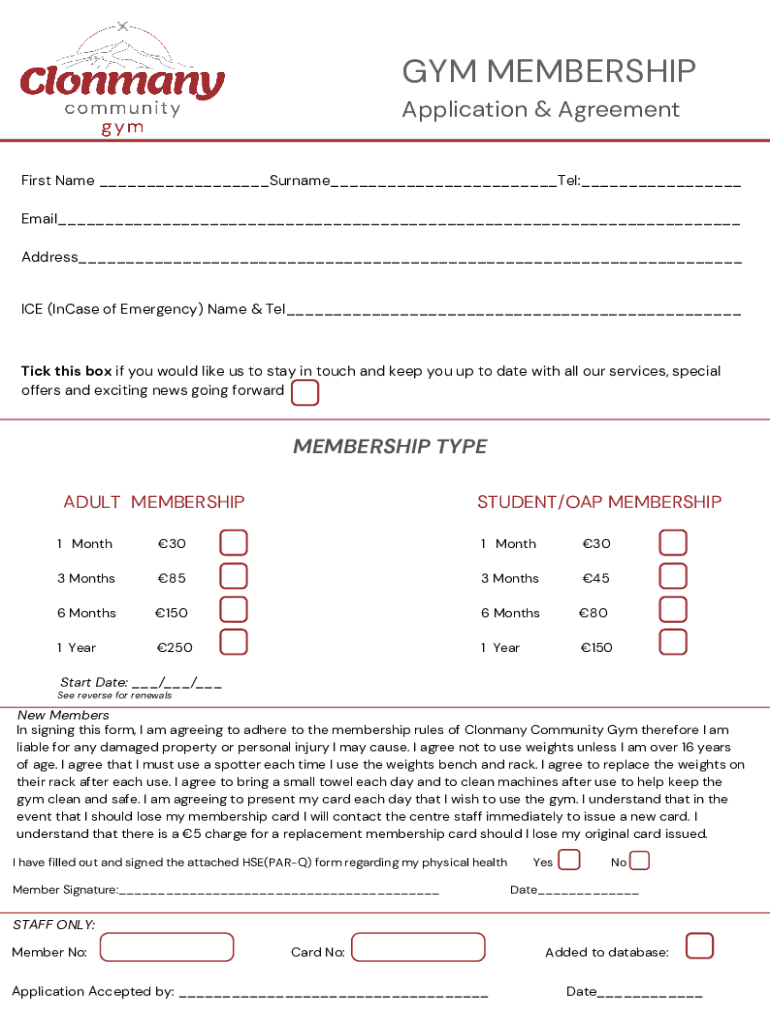
A Gym Membership Form Template is a document designed to streamline the process of enrolling new members into a fitness center or gym. It typically includes sections for personal information, membership types, and agreements, ensuring that all necessary data is collected efficiently. This standard form assists gym owners in managing member data, tracking agreements, and ensuring compliance with gym rules and legal requirements. In essence, it acts as both a contractual agreement between the gym and its members and an administrative tool for organized member management.
How to Use the Gym Membership Form Template - Forms App
Using a gym membership form template via a forms app is a straightforward process that requires minimal time and effort:
-
Select a Template: Choose a gym membership form template that meets your fitness center's needs. The form should include fields for essential information such as personal data, membership options, and health questionnaires.
-
Customize the Form: Modify the template to suit your gym’s specific requirements by adding or removing fields. Include amenities, services offered, membership levels, and any promotional details.
-
Collect Information: Once the form is ready, share it with potential members digitally through email or your website. The digital format allows for faster completion and submission.
-
Review Submissions: Use the forms app to collect and organize the data entered by members. Verify the information for any discrepancies and ensure that all required fields are completed.
-
Finalize Membership Agreements: After reviewing the application, finalize membership by confirming payment details and reviewing the terms and conditions with the member.
-
Maintain Records: Keep electronic versions of completed forms securely stored for future reference and compliance with legal obligations.
Key Elements of the Gym Membership Form Template
The gym membership form template includes several key elements that ensure comprehensive data collection and processing:
- Personal Information: Fields for name, address, contact information, and emergency contacts.
- Membership Options: Section to choose from different membership plans, including duration and benefits.
- Health Questionnaire: A Physical Activity Readiness Questionnaire (PAR-Q) to assess medical and health conditions.
- Terms and Conditions: Contractual agreement covering rules, guidelines, and member responsibilities.
- Signature Fields: Areas for electronic signatures confirming agreement to terms and participation.
Steps to Complete the Gym Membership Form Template - Forms App
-
Access the Form: Open the gym membership form template in the forms app interface.
-
Fill in Personal Details: Provide personal information accurately in the designated fields.
-
Select Membership Plan: Choose the desired membership option that best fits your needs in terms of duration and services.
-
Complete Health Questionnaire: Answer all questions in the PAR-Q section to highlight any potential health issues.
-
Agree to Terms: Review the gym's terms and conditions thoroughly and ensure understanding and acceptance.
-
Sign the Document: Use the electronic signature feature to sign the form, ensuring its legal binding status.
-
Submit the Form: Send the completed application through the forms app, initiating the membership process.
Legal Use of the Gym Membership Form Template
Gym membership form templates must comply with legal standards to ensure validity and enforceability:
- Legally Binding Agreements: Members must sign the form, either in traditional or electronic format, to accept terms and commit to gym regulations.
- Data Protection Compliance: Gym operators must comply with data protection laws, safeguarding member information collected during registration.
- Health & Safety Regulations: Includes a PAR-Q to assess member fitness levels, ensuring that gym facilities are used safely and without risk.
- Amendment Clauses: Must include clauses allowing changes to agreements under specific conditions, such as service alterations or rule updates.
Who Typically Uses the Gym Membership Form Template
The gym membership form template is commonly used by:
- Fitness Centers: Both large chains and small local gyms use these templates to streamline member registration.
- Community Recreation Centers: Centers offering fitness services to local residents utilize the form to manage membership efficiently.
- Specialty Fitness Studios: Studios focusing on particular disciplines like yoga or pilates use adapted forms to cater to their unique offerings.
- Corporate Wellness Programs: Companies offering gym memberships as part of employee wellness packages use the form to facilitate employee sign-ups.


Important Terms Related to Gym Membership Form Template
- PAR-Q: A standardized health questionnaire used to screen an individual's readiness for physical activity.
- Membership Duration: The time period for which the membership is valid, which can range from monthly to annually.
- Liability Waiver: Part of the agreement where members acknowledge the risks associated with using gym facilities and waive certain legal rights.
- Accepted Payment Methods: Specifications of how membership fees can be paid, such as credit cards, bank transfers, or direct debits.
Software Compatibility
The gym membership form template - forms app supports multiple software environments, ensuring seamless integration:
- Cloud Storage Services: Compatible with Google Drive, Dropbox, and OneDrive for easy sharing and storage.
- Document Editing Platforms: Works with DocHub for editing and signing, and easily imports formats such as DOC, XLS, and PDF.
- Mobile and Desktop: Designed for accessibility, the form can be completed on both desktop and mobile browsers without installing additional applications.
- Security Protocols: Equipped with SSL encryption and OAuth 2.0 for secure data handling during the form submission process.




