




01. Edit your form online
Type text, add images, blackout confidential details, add comments, highlights and more.

Type text, add images, blackout confidential details, add comments, highlights and more.

Draw your signature, type it, upload its image, or use your mobile device as a signature pad.

Send it via email, link, or fax. You can also download it, export it or print it out.
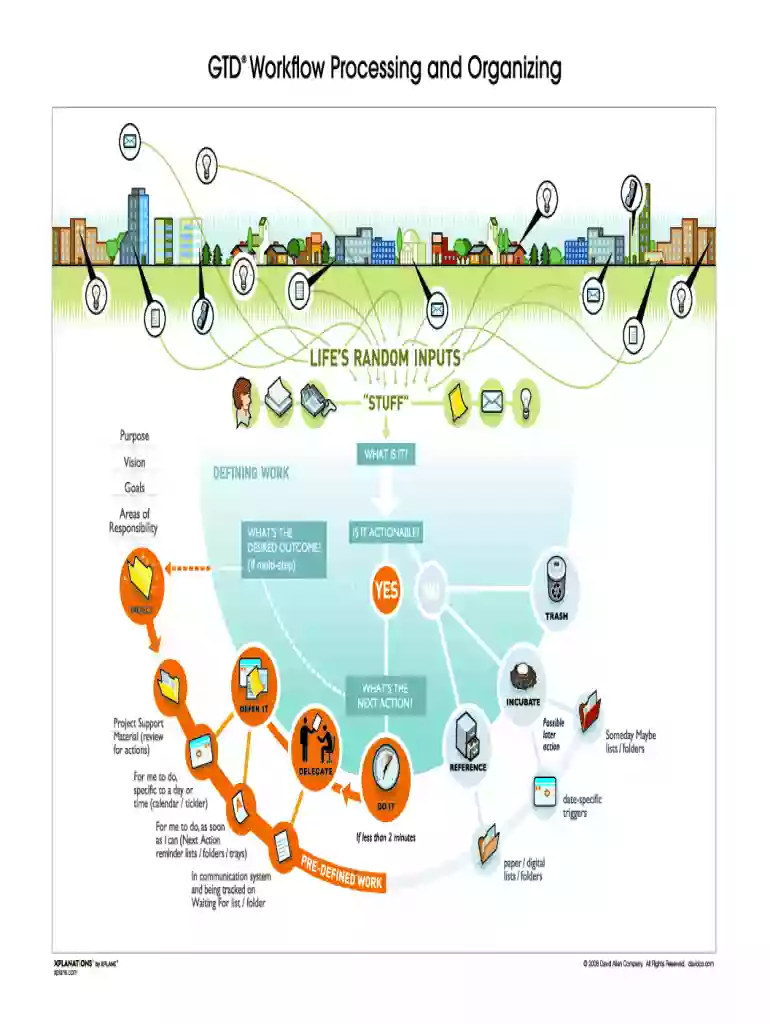
GTD ProcessingOrganizing, derived from the "Getting Things Done" method, is a productivity system designed by David Allen. It focuses on managing tasks and projects efficiently by organizing them into a structured framework. This system emphasizes capturing all tasks in a reliable system, clarifying next steps, and prioritizing actions based on context and urgency. The ultimate aim is to increase productivity by minimizing distractions and enhancing focus.
Implementing the GTD ProcessingOrganizing system involves transitioning tasks from an overwhelming list into a manageable structure. Users begin by gathering all input into an 'inbox' where every task and idea is collected. Next, each item is processed – is it actionable? If yes, it should be organized by next steps; if not, it can be deferred, delegated, or archived for reference.
Completing the GTD ProcessingOrganizing system involves a series of structured steps:
The benefits of GTD ProcessingOrganizing extend beyond simple task management. It offers clarity on what tasks demand immediate attention and which can be deferred, helping to reduce stress and cognitive overload. By practicing regular reviews and prioritizing tasks, users can maintain focus and productivity.
The GTD ProcessingOrganizing system attracts individuals who seek order and efficiency in their professional and personal lives. It is especially popular among executives, entrepreneurs, and professionals managing multiple projects simultaneously.


Integral to GTD ProcessingOrganizing is understanding its core elements, which form the foundation of task management within this system.
Consider a professional managing a year-end project. Under GTD ProcessingOrganizing, they would first capture all tasks related to the project, clarify and organize them based on urgency and allocate tasks to team members using contextual lists.
GTD ProcessingOrganizing can be optimized with various software tools that facilitate automation and real-time collaboration. Tools like Todoist and Trello, compatible across platforms, allow users to create structured task lists, set reminders, and organize workflows effectively.
This comprehensive outline of the "GTD ProcessingOrganizing - Getting Things Done" form highlights its significance, user base, components, execution process, and best practices to follow for an organized, efficient task management experience.
We've got more versions of the GTD ProcessingOrganizing - Getting Things Done form. Select the right GTD ProcessingOrganizing - Getting Things Done version from the list and start editing it straight away!
At DocHub, your data security is our priority. We follow HIPAA, SOC2, GDPR, and other standards, so you can work on your documents with confidence.


WHAT IS GTD Getting Things Done Getting Things Done GTD is a personal productivity methodology that redefines how you approach your life and work.
Getting Things Done by David Allen Summary Process Hacker Aug 24 2020. The Getting Things Done GTD method helps you organize your calendar tasks and.


