




01. Edit your form online
Type text, add images, blackout confidential details, add comments, highlights and more.

Type text, add images, blackout confidential details, add comments, highlights and more.

Draw your signature, type it, upload its image, or use your mobile device as a signature pad.

Send it via email, link, or fax. You can also download it, export it or print it out.
Understanding the concept of "form online" is crucial for individuals and businesses seeking to streamline their document processes. It refers to electronic forms that can be filled out, submitted, and processed over the internet without the need for physical paperwork. These forms are designed to facilitate various tasks such as registration, application, feedback collection, and data submission. Utilizing online forms can enhance efficiency, reduce errors related to manual data entry, and expedite response times.
The transition from traditional paper forms to online versions allows for greater flexibility in data management. Unlike paper forms, digital forms can easily incorporate features like drop-down menus, checkboxes, and interactive fields, making them more user-friendly and accessible. Online platforms, such as DocHub, provide comprehensive solutions for creating, editing, and managing these forms, helping users achieve their goals with minimal fuss.
Using a form online typically involves several straightforward steps, each designed to ensure ease of use and accuracy in data collection. Here's how the process generally works:
Access the Form: Users typically receive a link to the online form via email or find it hosted on a website. Clicking the link opens the form in a web browser.
Complete the Information: Online forms usually guide users through the process of entering data. Fields may include text boxes for names and addresses, drop-down menus for selecting options, and checkboxes for confirming agreements.
Review for Accuracy: Before submission, it's essential to review the completed form for any errors or omissions. Most online forms highlight mandatory fields that the user must fill out.
Submit the Form: After verifying the information, the user can submit the form by pressing the "Submit" button, which sends the data to the form owner for processing.
Confirmation: A confirmation message or email often follows, indicating that the form has been successfully submitted.
Completing an online form involves following a sequence of well-defined steps to ensure all necessary information is provided accurately:
Preparation: Gather all required documents and information before starting. This might include identification documents, reference numbers, or specific data relevant to the form.
Filling Out the Form: Use the designated fields to provide the requested information. Fields might vary depending on the form's purpose but often include personal details or business information.
Utilizing Interactive Features: Leverage interactive tools such as date pickers, signature fields, and auto-complete functions that streamline the completion process.
Saving Progress: If the form is lengthy, some platforms allow users to save progress and return to complete the form at a later time, ensuring that there's no need to start over.
Final Review and Submission: Perform a final review of all entries for completeness and accuracy before clicking the submit button to finalize.
Receive Feedback: After submission, users may receive feedback or a status update regarding their submission, often via email or through the application platform.
An effective online form includes several critical components that ensure functionality and user engagement:
User-Friendly Interface: Clear instructions and intuitive navigation are essential to help users complete forms without confusion.
Validations and Alerts: Real-time validations help users correct data entry errors on-the-fly, leading to accurate submissions.
Responsive Design: Compatible with multiple devices, including desktops, tablets, and smartphones, thus users can fill out forms from any device.
Security Features: SSL encryption and authentication protocols protect sensitive data, complying with privacy laws.
Automated Responses: Instant notifications acknowledge submissions, providing users with confirmation and peace of mind.
Forms completed and submitted online can carry legal weight similar to their traditional counterparts. Key factors include:
Electronic Signature Acceptance: Many online forms now accommodate e-signatures, which are legally binding under the ESIGN Act.
Compliance with Standards: Online forms must comply with various regulations such as GDPR or equivalent local data protection laws, ensuring information privacy.
Audit Trails: Platforms often maintain detailed audit logs of form versions and submissions, serving as evidence of transaction history.
The applications for online forms are vast, serving numerous industries and purposes:
Tax Forms: The IRS provides online tax forms for faster processing and refunds.
Job Applications: Employers utilize online forms to simplify and expedite the recruitment process.
Customer Feedback: Businesses gather crucial consumer insights through online feedback forms.
Event Registration: Online forms streamline managing participants and logistics for events.
Each use case emphasizes the significant advantages and efficiencies gained through online forms, demonstrating their indispensability in modern processes.
When utilizing forms online, certain state-specific regulations may dictate how they can be used or structured:
Verification Requirements: Depending on the state, additional verification of identity or documentation may be required to validate a form submission.
Data Privacy Laws: States have varying data protection laws that impact how personal information can be collected and stored.
Legal Documentation Needs: Some forms may require notarization or additional legal documentation unique to specific state requirements.
Understanding these nuances ensures compliance and smooth processing of online forms across different jurisdictions.
Effective online form use also depends on compatibility with various software systems:
Document Management: Systems like DocHub integrate seamlessly with cloud storage services for easy form storage and retrieval.
Accounting Software: Forms may integrate with software like QuickBooks, facilitating automatic data entry and financial tracking.
API Access: Forms can often be implemented via API, allowing custom workflows and integrations with existing software suites.
Such integrations are vital for maintaining efficient operations and ensuring data collected is easy to access and use in broader organizational contexts.
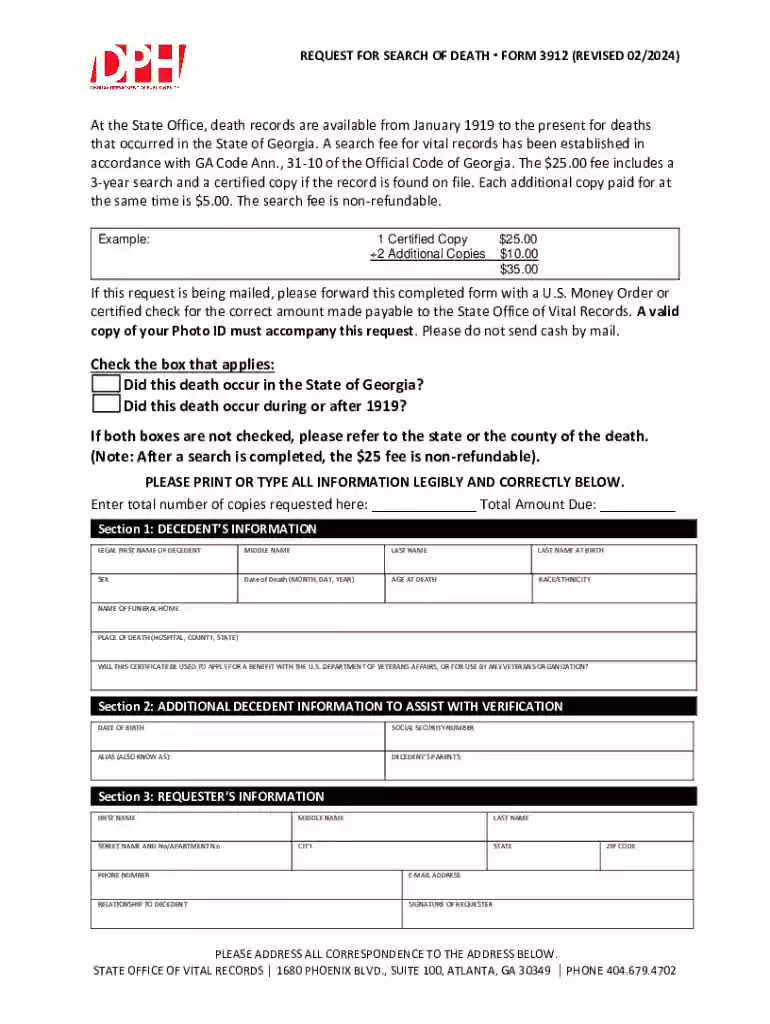
We've got more versions of the Georgia Death Record Request Form 3912 form. Select the right Georgia Death Record Request Form 3912 version from the list and start editing it straight away!
At DocHub, your data security is our priority. We follow HIPAA, SOC2, GDPR, and other standards, so you can work on your documents with confidence.





Typically, the person requesting a certified copy of a death record need only provide: 1. A completed and signed request form. 2. Provide the applicable feeRead more
This directory is compiled from listings furnished by state organizations and personnel on the C-4 form. Corrections Death Records .


