E-access Business Banking 2025

Get Form
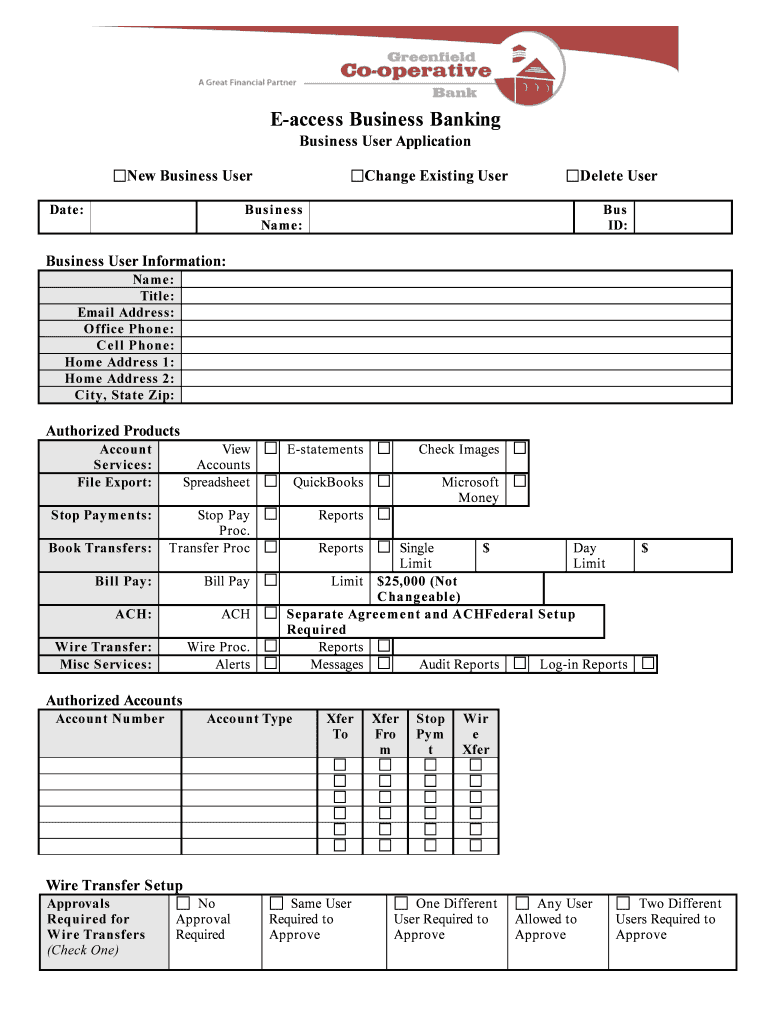
E-access Business Banking Preview on Page 1

Here's how it works

01. Edit your form online
Type text, add images, blackout confidential details, add comments, highlights and more.
02. Sign it in a few clicks
Draw your signature, type it, upload its image, or use your mobile device as a signature pad.
03. Share your form with others
Send it via email, link, or fax. You can also download it, export it or print it out.

How to use or fill out E-access Business Banking with our platform

Form edit decoration
9.5
Ease of Setup
DocHub User Ratings on G2
9.0
Ease of Use
DocHub User Ratings on G2
  1. Click ‘Get Form’ to open the E-access Business Banking application in the editor.
  2. Begin by entering the 'Business Name' and 'Business ID' at the top of the form. Ensure these details are accurate as they are essential for identification.
  3. Fill out the 'Business User Information' section, including your name, title, email address, office phone, cell phone, and home address. This information is crucial for communication and verification.
  4. In the 'Authorized Products' section, select the account services you wish to access by checking the appropriate boxes. Options include e-statements, check images, and various transfer services.
  5. Specify any authorized accounts by entering their account numbers and types in the designated fields. This will help streamline your banking processes.
  6. For wire transfer setups, choose your approval requirements from the options provided. This ensures proper authorization for transactions.
  7. Finally, review all entered information for accuracy before signing off on the application. Both business administrator and bank approval signatures are required at the bottom of the form.

Start using our platform today to complete your E-access Business Banking application effortlessly!

be ready to get more

Complete this form in 5 minutes or less

Get form

Got questions?

We have answers to the most popular questions from our customers. If you can't find an answer to your question, please contact us.
Contact us
E-banking, also known as electronic banking, revolutionises traditional banking by integrating technology into financial services. This digital evolution allows customers to conveniently use banking services through the internet using net banking or mobile apps.
Using your mobile device enter DIGIPASS for Business Banking in the search field of your smartphones app store. On your phone, tap Begin Activation in the app. The app uses your smartphones camera to scan the secure, multi- colored CRONTO image displayed on your computers Activate Token screen.
Best business online banking: overview Bank/ ProviderTrustpilot scoreBest known for Wise Business 4.3 Multi-currency accounts and international payments Starling Bank 4.3⁶ Fee-free everyday business banking Revolut Business 4.5⁹ Multi-currency accounts and international payments ANNA 4.2 Straightforward PAYG business banking1 more row
Account can be opened via contact center, website or in the branch.
Documentary evidence of address. 2 references. 2 Passport photographs. Valid ID of each signatory. Residence Permit (where applicable) Forms CO7 and CO2. Certificate of Incorporation / Business Registration. Memorandum and Article of Association.
be ready to get more

Complete this form in 5 minutes or less

Get form