






Definition and Purpose of the Terms Supplement Dated January 23, 2009
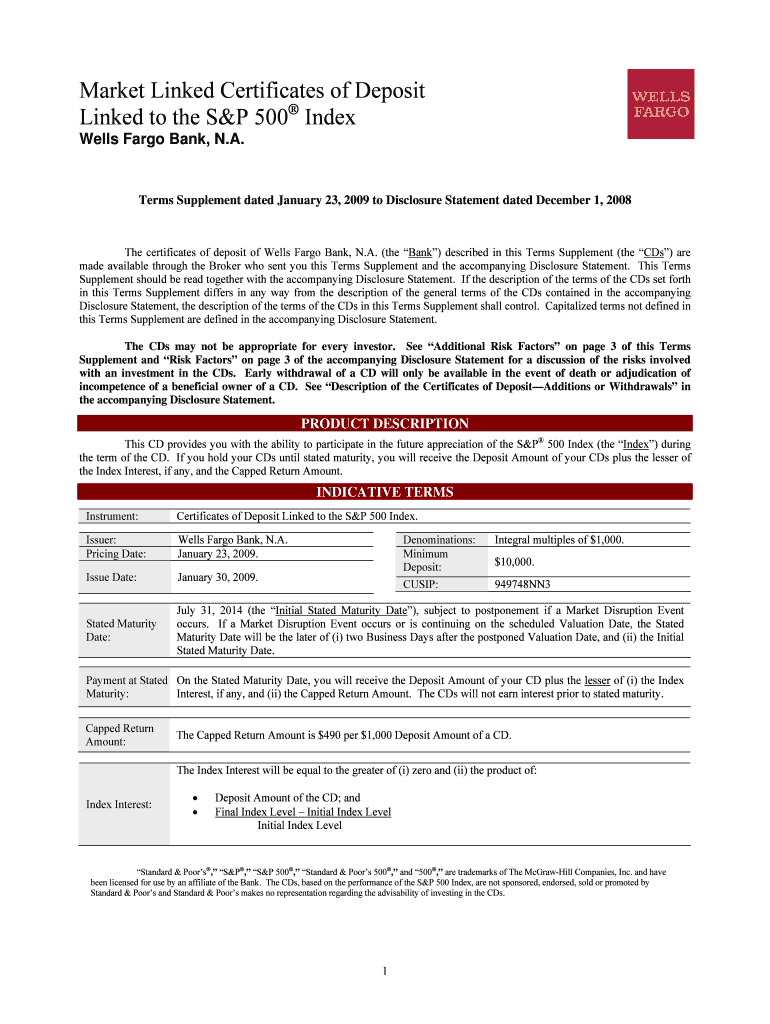
The "Terms Supplement dated January 23, 2009 to Disclosure Statement dated December 1, 2008" serves as an addendum to the existing disclosure document. It provides additional terms and conditions for market-linked certificates of deposit (CDs) issued by Wells Fargo Bank, N.A. These CDs are linked to the S&P 500 Index, allowing investors to participate in potential stock market gains. Key components include product descriptions, indicative terms, and an outline of risks and opportunities associated with the investment.
How to Utilize the Terms Supplement to Disclosure Statement
To effectively use the Terms Supplement, it's important to thoroughly review the document, focusing on how the terms affect your investment strategy. Start by reading the product description and indicative terms, paying close attention to the capped return amount, which can influence potential returns on your investment. Ensure you understand the payment structure and risk factors detailed within the supplement. Analyzing these sections helps in making informed investment decisions that align with your financial goals.
Acquisition of the Terms Supplement
The document can be accessed through several avenues. It is often provided by financial advisors or representatives at Wells Fargo Bank to potential investors considering market-linked CDs. For additional accessibility, it may also be found online through the bank's official website or via direct request at a local branch. Ensuring you have a copy is crucial for understanding the specific conditions applicable to your investment.
Risk Factors and Financial Considerations
The Terms Supplement outlines crucial risk factors associated with market-linked CDs, such as limited returns and potential principal loss. While the CDs are designed to offer a level of safety with a principal guarantee upon maturity, the return is capped. It is essential to digest these risks and the lack of liquidity before maturity. Understanding these financial implications allows investors to weigh potential gains against inherent risks intelligently.
Legal and Compliance Aspects
The supplement is legally binding, signifying a contractual understanding between the investor and Wells Fargo Bank. It adheres to financial regulations and compliance standards in the U.S., ensuring investment protections. This legal framework is vital for maintaining investor confidence and trust, safeguarding their interests throughout the term of the CDs.
Key Elements of the Terms Supplement
Understanding key elements is essential for utilizing the Terms Supplement effectively. These components include:
- Product Description: Defines the relationship between the CDs and the S&P 500 Index.
- Indicative Terms: Outlines the financial metrics and limits, such as the maximum return cap.
- Arbitration Clause: Details the dispute resolution process through arbitration.
- Tax Implications: Provides guidance on the tax treatment of the CDs.
Each of these elements plays a crucial role in forming a comprehensive investment strategy.
Important Dates and Filing Deadlines
While there is no formal filing required for the Terms Supplement, awareness of the key dates and deadlines associated with your investment is essential. Ensure that you understand the CD maturity dates and any early withdrawal penalties. Awareness of these timelines aids in managing your investment portfolio efficiently and minimizes financial missteps.
Eligibility Criteria and Investor Profile
Eligibility for investing in market-linked CDs typically includes a minimum investment threshold. Investors should assess their risk tolerance, understanding that while principal is guaranteed, returns depend on market performance. These criteria help in defining which investors can benefit most from this financial product, catering to those seeking a balance between potential equity market gains and principal protection.


Practical Examples and Case Studies
Several case studies elucidate the practical application of the Terms Supplement:
-
Scenario 1: An investor seeks to diversify their retirement portfolio with a low-risk component. Investing in market-linked CDs provides potential upside linked to the S&P 500 while ensuring principal safety.
-
Scenario 2: A conservative investor prioritizes capital preservation over aggressive market gains. By understanding the terms of limited returns, they can better gauge the product's fit within their investment strategy.
These examples provide context and illustrate how the terms operate within real-life investor scenarios.