







Definition & Meaning
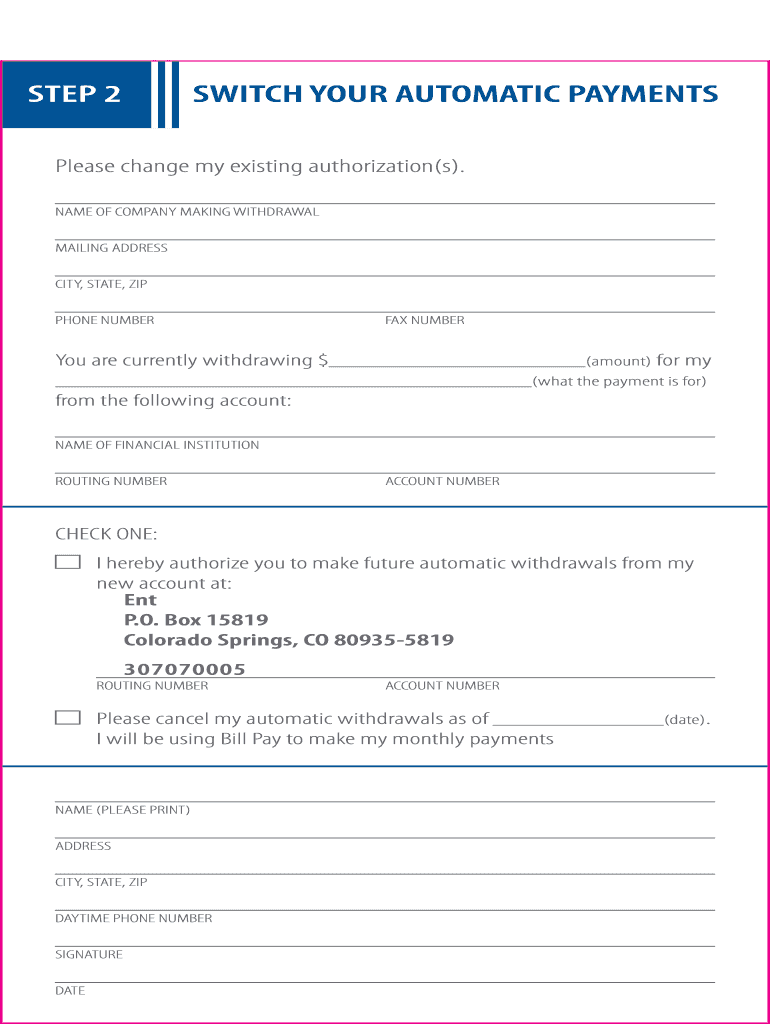
The Automatic Payment form is a standardized document used to authorize recurring payments from a financial account automatically. This form is significant for businesses and individuals who need to ensure that regular payments, such as utility bills or loan payments, are made on time without manual intervention. It typically involves setting up specific instructions for financial institutions to withdraw the designated sum at predetermined intervals. Automatic Payment forms streamline managing regular payments, avoiding late penalties, and ensuring consistency in financial transactions.
Key Concepts and Features
- Authorization: The form acts as a legal agreement between the payer and the financial institution, permitting the automatic deduction of funds.
- Transaction Details: It includes essential information such as the amount, frequency, and recipient of payments.
- Flexibility: Users can update the form to change payment information or terminate the service.
- Efficiency: Reduces the administrative burden by eliminating the need to remember payment dates and amounts.
Steps to Complete the Automatic Payment Form
Completing an Automatic Payment form involves several detailed steps to ensure accuracy and prevent future payment issues. These steps help both the payer and the recipient establish a clear and effective payment strategy. To effectively complete this form, consider the following:
- Gather Essential Information: Obtain details such as the account number, routing number, and the name of the financial institution where the account is held. Accurate recipient details are also crucial.
- Specify Payment Terms: Clearly indicate the payment amount, frequency (e.g., monthly, quarterly), and the purpose (e.g., rent, utilities).
- Review and Sign: Read through all the terms and conditions carefully, ensure all details are correct, and sign the form to authorize the agreement.
- Submit the Form: Depending on the organization, the submission could be via mail, fax, or electronically through a secure portal.
Practical Tips
- Double-check all entered information to prevent errors.
- Consult with financial advisors if unsure about any terms.
- Maintain a duplicate copy for personal records.
Key Elements of the Automatic Payment Form
An Automatic Payment form usually comprises several critical sections that are essential for its successful execution. Understanding these parts can help users navigate the form effectively and ensure compliance with financial procedures.
Fundamental Components
- Payer Information: Includes the payer's name, address, and contact details.
- Banking Details: Account and routing numbers necessary for initiating automatic withdrawals.
- Payment Specifications: Details about how much and how often payments will occur.
- Authorization and Consent: A written declaration that the payer agrees to the terms and conditions, allowing automatic deductions.
- Cancelation and Amendment Clauses: Sections detailing how the agreement can be modified or terminated.
How to Use the Automatic Payment Form
The use of an Automatic Payment form is straightforward yet requires attention to detail to ensure optimal functionality. Here’s how it can be utilized efficiently:
- Determine Payment Needs: Establish which payments can benefit from automation. Typically suited for fixed, recurring expenses.
- Set Up with Banking Institution: Use the data from the completed form to implement automatic payments within your bank's system.
- Monitor Payments: Regularly check account statements to confirm the accuracy of automatic payments.
- Update as Needed: If there's a change in bank details or payment terms, update the automatic payment settings accordingly.
Real-World Example
A utility company might require an Automatic Payment form for monthly bill payments. This approach ensures the bill is paid promptly each month, avoiding late fees and service disruptions.
Legal Use of the Automatic Payment Form
Understanding the legal context of Automatic Payment forms is crucial to ensure that all parties comply with relevant regulations. This form is governed largely by financial regulations that protect consumer rights and ensure commercial fairness.
Compliance Guidelines
- Regulatory Framework: Compliance with financial transaction laws and the ESIGN Act for electronic signatures.
- Consumer Rights: Ensures customers can easily terminate or update agreements without undue constraints.
- Data Security: Financial information must be handled with a high level of confidentiality and security to prevent fraud.
Required Documents
Obtaining the necessary documentation is essential when setting up an Automatic Payment form. Accurate record-keeping supports smooth transactions and ensures readiness if any verification is required.
Documentation Checklist
- Personal Identification: Valid ID such as a driver’s license or social security number.
- Bank Account Verification: A voided check or an official bank letter.
- Previous Payment Records: Supporting documents for establishing the payment history and ensuring consistency.
State-by-State Differences
Some aspects of Automatic Payment forms may vary depending on state-specific regulations. Awareness of these differences ensures full compliance and a trouble-free setup.
Regional Considerations
- Variation in Regulations: Different states may have particular rules about consumer rights concerning automatic payments.
- Notification Requirements: Some states mandate advanced notice for changes in payment amounts.
- Cancellation Policies: Legal stipulations on notice periods for stopping automatic payments can differ.
Examples of Using the Automatic Payment Form
Exploring how Automatic Payment forms are used in different sectors can provide insights into their versatility.
Diverse Use Cases
- Household Management: Used by families to manage utility and subscription service payments.
- Business Applications: Corporations set up automatic payroll and vendor payments to streamline financial operations.
- Educational Institutions: Schools might employ automatic payments for tuition fees from students’ bank accounts.
Understanding and utilizing an Automatic Payment form can significantly enhance financial management by ensuring timely payments and reducing administrative burdens. Through careful completion and continued oversight, these forms offer a structured means to manage recurring expenses with ease and reliability.




