






Definition and Purpose of the Security Deposit Authorization Form
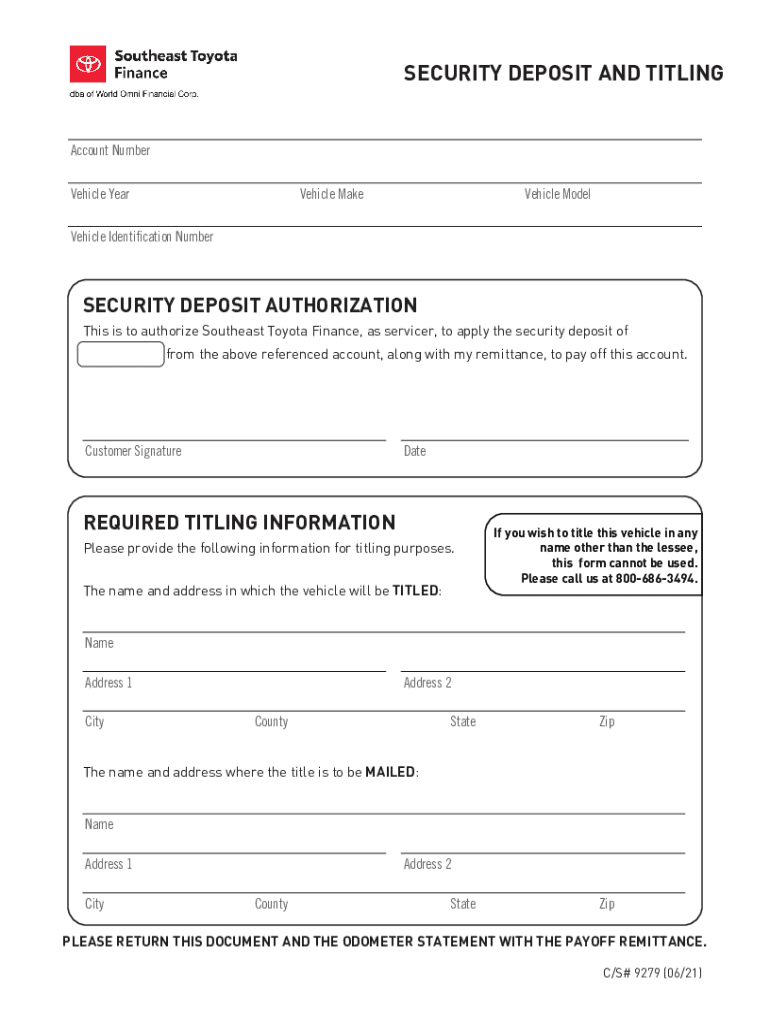
The Fillable Online Security Deposit Authorization Form - setf is a specialized document used primarily by individuals or organizations engaging with Southeast Toyota Finance. Its primary function is to facilitate the security deposit process, allowing these funds to be applied towards settling a vehicle account. This form not only authorizes the appropriation of the security deposit but also details required information pertinent to vehicle accounts.
The form typically includes sections for vehicle identification, security deposit details, and titling information. It's designed to streamline the administrative process for individuals looking to use a security deposit as a form of payment. This approach enhances efficiency and ensures that all required information is captured in one form, reducing delays and misunderstandings.
How to Use the Fillable Online Security Deposit Authorization Form - setf
Using the Fillable Online Security Deposit Authorization Form - setf involves several steps:
-
Download or Access the Form: Obtain the form from an authorized source such as Southeast Toyota Finance or DocHub. Ensure you are using the most recent version.
-
Fill in Vehicle Information: Accurately input the details of the vehicle associated with the account. This section typically requires vehicle identification numbers and model details.
-
Complete Security Deposit Authorization: Provide the necessary details to authorize the use of your security deposit for account settlement.
-
Include Titling Information: Specify the address and contact information for where the vehicle title should be sent once payment is processed.
-
Review and Submit: Carefully review all sections for accuracy before submitting the form along with any additional required documents like an odometer statement.
Steps to Complete the Form
A structured approach ensures the form is completed thoroughly:
-
Gather Necessary Documents: Having your vehicle documents, security deposit receipt, and personal identification on hand makes completing the form more efficient.
-
Fill in Sections Sequentially: Start with the vehicle information section, ensuring all fields are complete. Move on to the deposit authorization and then titling information.
-
Precision in Details: Double-check all numerical fields, such as vehicle identification and account numbers, to avoid errors that could delay processing.
-
Attach Supplementary Documents: Include all required statements, such as the odometer statement, as per the instructions on the form.
-
Save and Submit: If filling out online, ensure you save a copy for your records before submitting electronically or via mail.
Who Typically Uses the Form
The primary users of the Fillable Online Security Deposit Authorization Form - setf are:
- Individuals Financing Vehicles: Especially those who have utilized Southeast Toyota Finance for their automotive loans.
- Dealerships and Automotive Finance Departments: These entities may assist customers in processing these forms as part of managing their accounts.
- Financial Managers and Advisors: Professionals assisting clients with managing automotive finances and settlement processes might also use this form.


Legal Use of the Form
The legal implications of the Fillable Online Security Deposit Authorization Form - setf revolve around authorizing the allocation of funds. By filling out and submitting the form, individuals legally consent to the application of their security deposit towards their vehicle loan balance with Southeast Toyota Finance. This process must comply with applicable U.S. financial and consumer laws to safeguard both parties' rights and obligations.
Important Terms Related to the Form
Understanding key terms within the Fillable Online Security Deposit Authorization Form - setf enhances comprehension and proper completion:
- Security Deposit: Funds deposited as collateral against a potential future liability.
- Authorization: Permission granted to Southeast Toyota Finance to apply the security deposit.
- Vehicle Identification Number (VIN): A unique code used to identify individual motor vehicles.
- Odometer Statement: A declaration of the vehicle's mileage at the time of transaction.
Key Elements of the Form
The essential elements found within the Fillable Online Security Deposit Authorization Form - setf include:
- Vehicle Information Section: For detailed identification of the involved vehicle.
- Security Deposit Authorization Section: Where deposit details and permission are formally recorded.
- Titling Information Section: To ensure correct titling and address for vehicle registration.
- Signature Section: For the account holder's consent, validating the data provided and the authorization granted.
Who Issues the Form
The Fillable Online Security Deposit Authorization Form - setf is issued by Southeast Toyota Finance, a key player in automotive financing solutions within the U.S. This document is part of their customer service infrastructure, facilitating smoother processing of vehicle loan payments through deposit utilization.