HUD-92080-OHF Mortgage Record Change clean docx 2026

Get Form
HUD-92080-OHF Mortgage Record Change clean docx Preview on Page 1

Here's how it works

01. Edit your form online
Type text, add images, blackout confidential details, add comments, highlights and more.

02. Sign it in a few clicks
Draw your signature, type it, upload its image, or use your mobile device as a signature pad.

03. Share your form with others
Send it via email, link, or fax. You can also download it, export it or print it out.

Definition & Meaning

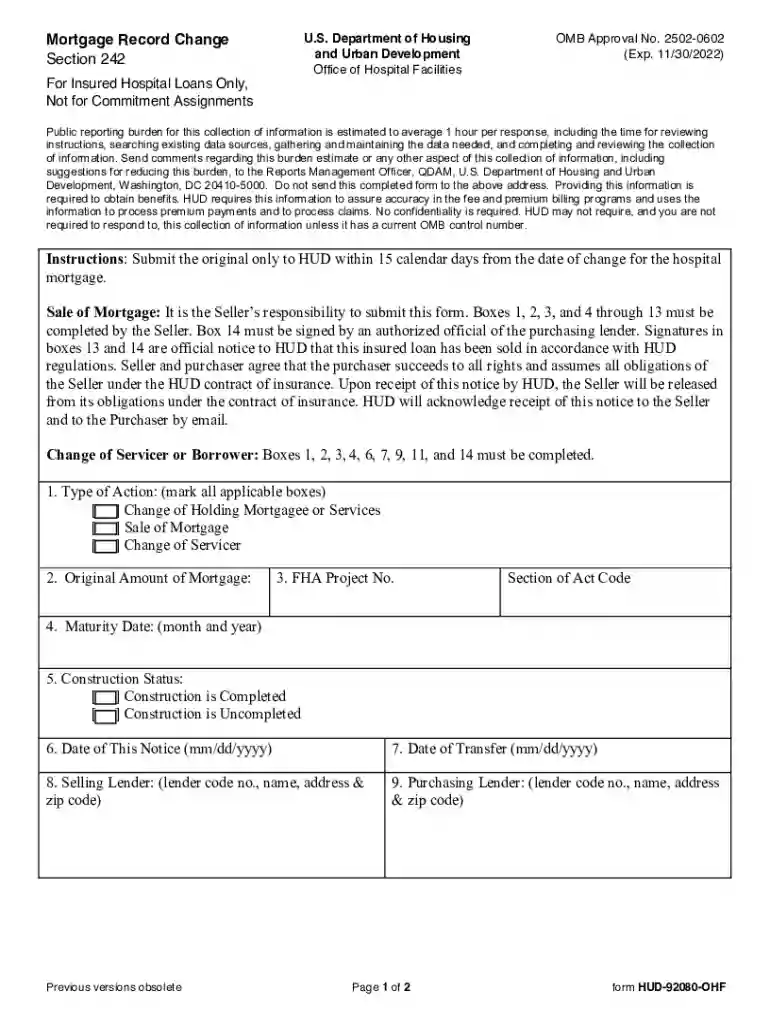
The HUD-92080-OHF Mortgage Record Change clean docx is a specialized form used to document changes in mortgage records specifically for insured hospital loans under Section 242 of the U.S. Department of Housing and Urban Development (HUD). This form plays a critical role in updating HUD with accurate and current information regarding mortgage transactions. It's crucial for parties involved in the sale or transfer of insured hospital mortgages to maintain compliance with the HUD guidelines through this form.

  • Mortgage Record Change: This feature of the form addresses alterations that need to be recorded in the official mortgage documents. Such changes might involve ownership transfers, changes in terms, or other significant details.
  • HUD Compliance: The form ensures adherence to specific federal housing laws and regulations, safeguarding the interests of the involved parties.

How to Use the HUD-92080-OHF Mortgage Record Change Clean Docx

Using the HUD-92080-OHF Mortgage Record Change clean docx involves a methodical approach to ensure accuracy and compliance. Here’s a structured guide on how to effectively utilize this form:

  1. Gather Required Information: Before beginning, collect all necessary data including borrower and lender details, loan specifics, and the nature of the mortgage record change.
  2. Complete Form Sections: Carefully fill out each section of the form, ensuring that all provided information is accurate and reflects the current status of the mortgage.
  3. Include Necessary Signatures: Obtain signatures from all relevant parties involved in the mortgage transaction. This often includes representatives from both the selling and purchasing entities.
  4. Review for Accuracy: Double-check all details to prevent errors that could lead to processing delays.
  5. Submit to HUD: Follow the instructions for submitting the completed form to the appropriate HUD office or address, whether it's via mail or electronically.

Steps to Complete the HUD-92080-OHF Mortgage Record Change Clean Docx

Completing the form requires careful attention to detail. Below is a step-by-step breakdown:

  1. Initiate the Form: Start by entering dates and reference numbers provided by HUD, ensuring they match existing records.
  2. Enter Borrower Information: Fill in the names, addresses, and contact details of the borrowers involved in the mortgage change.
  3. Detail Property and Loan Information: Accurately provide the details of the property in question, as well as specifics about the existing loan.
  4. Specify Change Details: Clearly describe the nature of the change to the mortgage record, such as adjustments in terms or transfer of ownership.
  5. Verify and Sign: Ensure all sections of the form are verified by the appropriate parties before signing.

Key Elements of the HUD-92080-OHF Mortgage Record Change Clean Docx

Identifying and understanding the key elements of the form are essential for effective completion. Key elements include:

  • Borrower Section: Captures detailed information about the borrower(s) involved, requiring precise entry of personal and contact details.
  • Loan Information Section: Includes fields for loan numbers, property addresses, and current mortgage terms.
  • Change Description: A critical area where users articulate the specific nature of the record change.
  • Signatory Section: Requires signatures from all parties to validate and authorize the information, ensuring compliance and legal enforceability.

Legal Use of the HUD-92080-OHF Mortgage Record Change Clean Docx

The proper legal use of this form is vital for maintaining compliance with HUD regulations:

  • Federal Compliance: It ensures that all changes in mortgages for federally insured hospital loans are correctly documented and communicated to HUD.
  • Document Updates: Legally updates mortgage records, thereby protecting the interests of both the lender and the borrower.
  • Time-Sensitive Submission: Adhering to specified timeframes for submission to remain compliant and avoid any potential penalties.

Required Documents

Several key documents typically accompany the HUD-92080-OHF Mortgage Record Change clean docx to ensure a comprehensive submission:

  • Current Mortgage Documents: Includes deeds and previous HUD forms related to the mortgagee.
  • Identification Documents: Valid IDs for all signing parties to verify authenticity.
  • Proof of Change: Documentation evidencing the rationale for the mortgage change (e.g., sale agreements, modification contracts).

Form Submission Methods (Online / Mail / In-Person)

Submitting your completed HUD-92080-OHF Mortgage Record Change form can be done through various channels:

  • Online Submission: Utilize HUD’s online portals if available for faster processing.
  • Mail Submission: Send the completed form along with any required documents to the designated HUD office address.
  • In-Person Submission: Direct submission at local HUD offices may be possible and provide immediate confirmation of receipt.

Penalties for Non-Compliance

Non-compliance with HUD submission protocols can result in several penalties:

  • Processing Delays: Incomplete or inaccurately completed forms result in significant delays.
  • Denial of Record Changes: Failure to meet submission deadlines or requirements can lead to denial of mortgage record changes.
  • Financial Penalties: Potential fines or fees imposed for failing to comply with federal guidelines.

Following proper procedures and timely submission will mitigate these risks and ensure compliance with HUD standards.

be ready to get more

Complete this form in 5 minutes or less

Get form

Got questions?

We have answers to the most popular questions from our customers. If you can't find an answer to your question, please contact us.
Contact us
HUD-1 is a standard form that closing agents give to mortgage loan borrowers on the date the real estate purchase closes, detailing all the costs associated with the closing.
For current information from HUD, visit .hud.gov. This archives website is where you will find content that was formerly found on .hud.gov. Here you will find information on budgets, programs, initiatives, and other documents from previous administrations.
WILL I NEED TO PRODUCE ANY DOCUMENTATION? Yes, the HA representative will request whatever documentation is needed (e.g., birth certificates, tax returns) to verify the information given on your application. The PHA will also rely on direct verification from your employer, etc.
When a mortgagor defaults on a loan insured by FHA, the mortgagee can assign the mortgage to HUD and receive the benefits of the FHA mortgage insurance. The mortgage then becomes a HUD-held mortgage and if the mortgage cannot be reinstated, HUD Multifamily Property Disposition forecloses on the property.
Where Can I Find My HUD-1 Settlement Statement? If your loan hasnt closed yet, you can get your HUD-1 from your lender. If youve already closed, you should be able to find your HUD-1 settlement statement with your closing documents.

Security and compliance

At DocHub, your data security is our priority. We follow HIPAA, SOC2, GDPR, and other standards, so you can work on your documents with confidence.
Learn more
ccpa2
pci-dss
gdpr-compliance
hipaa
soc-compliance

People also ask

The Mortgage Record Changes menu on the FHA Connection provides options for reporting a change in an FHA case to HUD, including a servicer and/or holder change, mortgage assumption (borrower change), FHA mortgage insurance termination, discontinuance of monthly mortgage insurance premium payments, or loan modification.

Related links