





Definition & Meaning
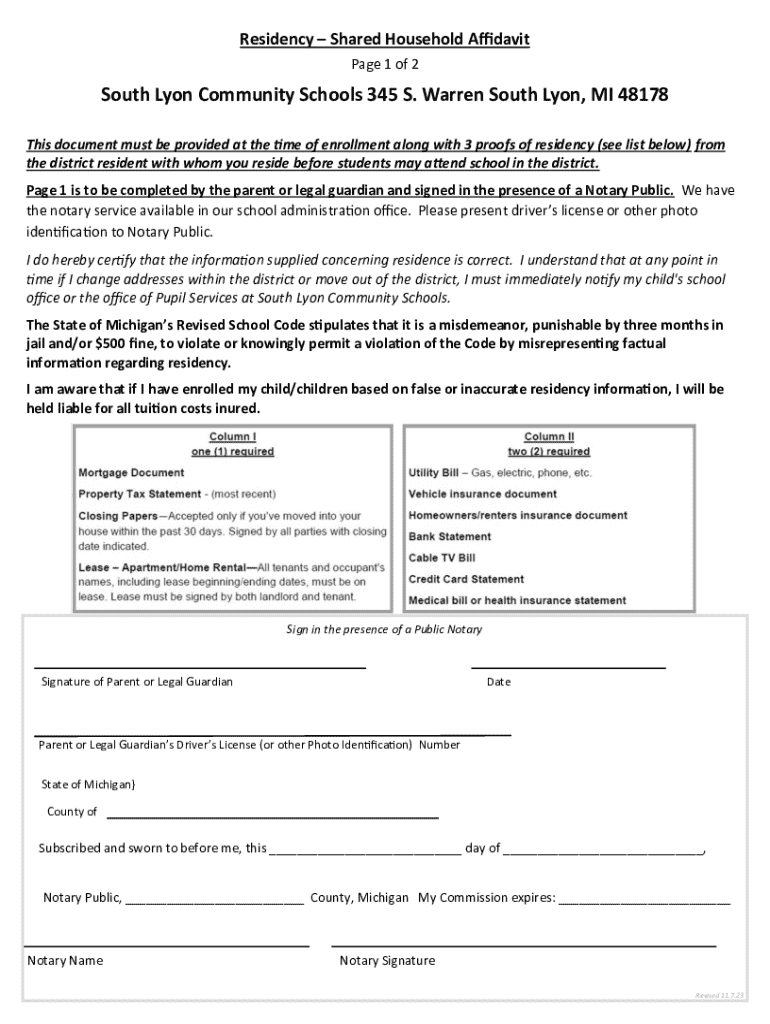
"Form online" refers to the digital version of traditional paper forms that can be completed and submitted via the internet. In a legal and administrative context, these forms streamline processes by allowing users to fill out information electronically without needing to print or mail documents. This approach enhances efficiency, accessibility, and convenience for both individuals and organizations.
Online forms are prevalent in various sectors such as tax, education, healthcare, and business, providing a secure and paperless way to gather data, process applications, and formalize agreements.
How to Use the Form Online
To use a form online, users typically start by accessing the associated website or platform offering the form. The process involves:
-
Accessing the Form: Navigate to the appropriate website, such as the IRS for tax forms or a state department for legal documents.
-
Entering Information: Carefully fill in all required fields. Most online forms include guidance or tooltips to help clarify what information is needed.
-
Reviewing Details: Before submission, review all entries for accuracy to avoid any potential issues or delays in processing.
-
Submitting the Form: Once all information is entered and confirmed, submit the form by clicking the “Submit” button. Some websites also offer options to save and resume later.
-
Confirmation and Follow-Up: After submission, a confirmation message or email typically follows, sometimes with instructions for further steps or required supplementary documents.
How to Obtain the Form Online
To obtain a form online, follow these steps:
-
Identify the Source: Determine the issuing body or organization responsible for the form. Common sources include government websites, educational institutions, or specialized platforms like DocHub.
-
Search for the Form: Use the search function on the website to find the specific form needed. Enter keywords or the form number for precision.
-
Download: Depending on the platform, you can either fill the form directly in your browser or download it for offline completion.
-
Access Requirements: Some forms may require an account or authentication to access, especially if they contain sensitive information.
-
Alternative Access: In cases where internet access is limited, public libraries or community centers can serve as resources for downloading and printing forms.
Steps to Complete the Form Online
Completing a form online typically involves the following steps:
-
Preparation: Gather all necessary information and documents required to fill the form accurately.
-
Creating an Account: For platforms that require user registration, set up an account to access or save progress on the form.
-
Filling Out Information:
- Text entries: Type directly into fields.
- Selections: Use dropdown menus or checkbox options.
- Electronic signatures: Apply your signature digitally if required.
-
Validation: Utilize any form-checking tools provided to ensure all necessary fields are completed correctly.
-
Submission: Follow the platform’s instructions to submit the completed form and keep a copy of the submission confirmation for records.
Why Should You Form Online
Filling forms online offers significant advantages:
-
Convenience: Accessible any time and from anywhere with internet access, reducing the need for physical appearances or handling paper documents.
-
Efficiency: Speeds up processes significantly, as forms are processed faster when submitted electronically.
-
Error Reduction: Built-in validators help minimize errors and omissions, reducing the risk of incomplete submissions.
-
Cost-Effectiveness: Eliminates printing and mailing costs associated with paper forms.
-
Environmentally Friendly: Supports sustainability by reducing paper usage.
Key Elements of the Form Online
Key elements found in most online forms include:
-
Form Fields:
- Text Boxes: For entering personal information such as name and address.
- Checkboxes: Options for selecting items or agreeing to terms.
- Dropdown Menus: For selecting from predefined lists.
- Signature Fields: For adding electronic signatures.
-
Instructional Text: Offers guidance for completing specific sections.
-
Validation Features: Ensures all necessary information is provided before submission.
-
Secure Submission Protocols: Protects sensitive data through encryption methods.
Legal Use of the Form Online
Forms completed online carry the same legal weight as their paper counterparts, provided they meet certain requirements:
-
Compliance with Regulations: Forms must adhere to legal standards, such as the ESIGN Act, to ensure legality and enforceability of electronic signatures.
-
Data Protection: Compliance with privacy laws, such as the GDPR or HIPAA, if applicable, is crucial for forms collecting personal data.
-
Audit Trails: Systems often maintain records of interactions and changes, providing evidence in legal scenarios.
Examples of Using the Form Online
Various scenarios illustrate the utility of online forms:
-
Tax Filings: Individuals and businesses complete and submit their tax returns through platforms like TurboTax, reducing errors and speeding refunds.
-
School Registrations: Parents use online forms to enroll children in educational institutions, condensing paperwork into a single digital entry.
-
Healthcare: Patients fill out intake forms online before appointments, minimizing wait times and paper clutter in clinics.
These examples demonstrate how diverse sectors leverage online forms to enhance operational efficiency and improve user experiences.