01. Edit your form online
Type text, add images, blackout confidential details, add comments, highlights and more.

Type text, add images, blackout confidential details, add comments, highlights and more.

Draw your signature, type it, upload its image, or use your mobile device as a signature pad.

Send it via email, link, or fax. You can also download it, export it or print it out.
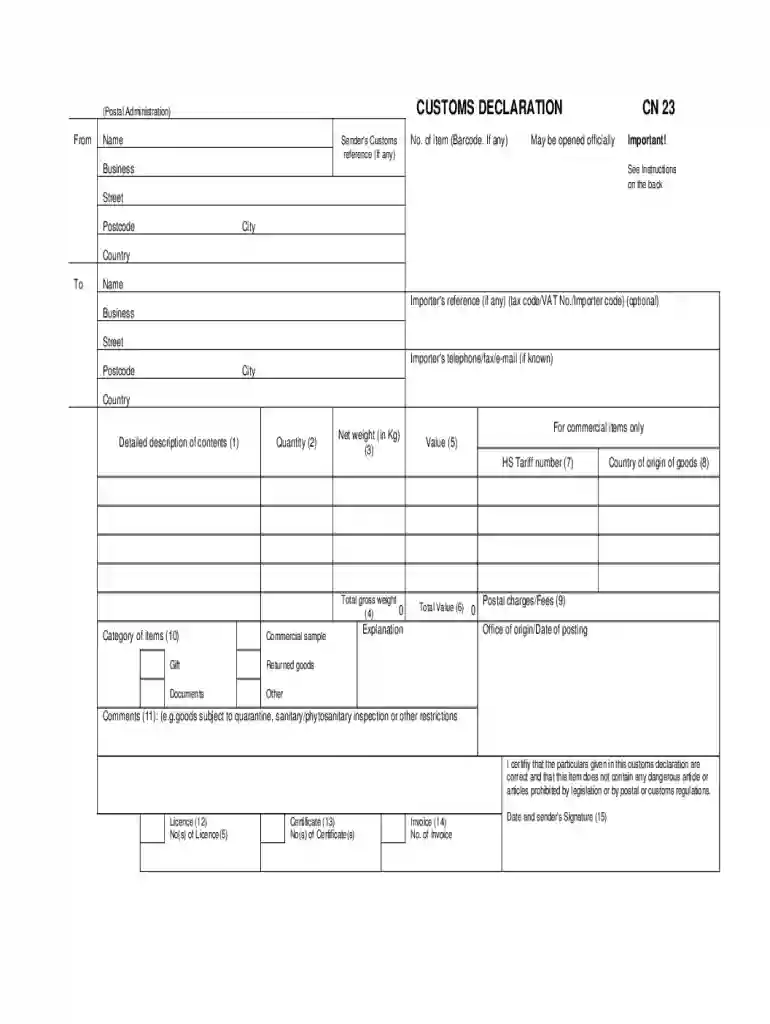
The CN23 Customs Form is a critical document for international postal shipments, designed to facilitate the smooth passage of goods through customs. It serves multiple functions, primarily to provide detailed information about the contents of a package. This includes descriptions, item quantities, weights, values, and necessary compliance certifications. Customs authorities use this information to assess duties and taxes and ensure compliance with import regulations.
The form features several sections, each dedicated to specific details, such as sender and recipient information, item categories, and any applicable licenses. It acts as both a declaration and a guide for customs officials, helping classify and value shipments appropriately. By accurately completing this form, the sender helps prevent delays and additional charges at customs checkpoints. Here's what you need to know about its structure and requirements.
Understanding the main parts of the CN23 Customs Form is crucial for accurate completion. Here are essential components:
Understanding and correctly entering these elements is integral to preventing shipping issues. Accurate input minimizes the risk of mistakes that could lead to delays or penalties.
Filling out the CN23 Customs Form requires attention to detail. Follow these steps for an accurate and efficient process:
By meticulously following these steps, you can enhance your shipment's chances of passing through customs smoothly.
Using a Fill and Sign Printable Template for the CN23 Customs Form streamlines the documentation process.
Utilizing a Fill and Sign Printable Template simplifies the form completion and signing process, particularly when paired with an integrated platform like DocHub.
Legal compliance is necessary when shipping goods internationally, and the CN23 Customs Form plays a pivotal role.
Failing to use the form correctly can lead to fines or legal action, emphasizing the need for diligence in form handling and data accuracy.
A range of entities and individuals use the CN23 Customs Form, primarily to ensure compliance in international shipping.
Businesses: Companies exporting goods often use the form to describe parcel contents, especially those dealing with high volumes of international trade.
Individuals: Private individuals sending packages overseas, particularly valuable or regulated items, require the form to ensure proper customs clearance.
Customs Brokers: Agents specializing in customs clearance complete and review forms to ensure regulatory compliance and smooth processing.
Understanding who commonly uses the form helps tailor the completion process to align with specific needs and regulations applicable to the shipment.


The CN23 Customs Form is crucial in various scenarios beyond standard shipments.
E-commerce Transactions: Online retailers often rely on the form to maintain continuity in international deliveries, ensuring products reach customers without customs hurdles.
Art and Artifacts Shipping: Art dealers and museums use the form to appropriately document and declare valuable or sensitive items being sent abroad.
Prototype or Sample Shipments: Manufacturers sending prototypes or samples globally use the form to ensure that customs have precise details, thus preventing delays.
Each scenario illustrates the form's flexibility and importance in international trade and shipping.
Adhering to the requirements of the CN23 Customs Form is crucial, as non-compliance can lead to penalties.
Fines and Delays: Incorrect or incomplete information can result in fines or delays at customs, affecting delivery times.
Seizure of Goods: Misleading declarations may lead to the seizure of goods, leading to financial losses and legal ramifications.
Legal Liability: Engaging in fraudulent declarations can expose the sender to severe legal consequences, including prosecution.
Understanding and avoiding these risks emphasize the importance of accuracy and compliance in form completion.
Compatibility with software platforms like DocHub enhances the utility of the CN23 Customs Form.
Edit and Sign Capabilities: Platforms that support file formats such as PDFs facilitate form completion and electronic signing.
Cloud Integration: Being able to store, share, and retrieve forms from services like Google Drive streamlines document management.
By leveraging such technologies, users can improve efficiency and ensure the accuracy of their customs documentation.
At DocHub, your data security is our priority. We follow HIPAA, SOC2, GDPR, and other standards, so you can work on your documents with confidence.