Definition and Meaning
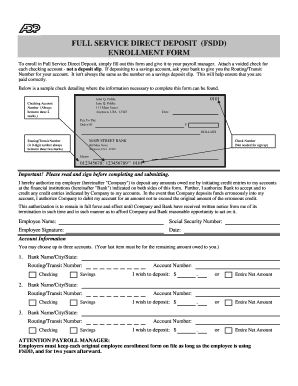
The "DOL Recurring Debit Form" is a financial document that facilitates automated, regular payments from an individual's or business's bank account. The form is commonly used to authorize and manage recurring transactions with entities such as the Department of Labor (DOL) or similar institutions. By setting up recurring debits, individuals or organizations can ensure consistent payment schedules, which can help in avoiding late fees and administrative hassles associated with manual processing.
How to Use the DOL Recurring Debit Form
To use the DOL Recurring Debit Form effectively, follow these steps:
- Obtain the Form: Access the form from the relevant institution’s official website or request it through their customer service line.
- Read Instructions Carefully: Each form may come with specific instructions tailored to the issuing organization.
- Provide Accurate Information: Fill in details such as personal or business identification, bank account information, and payment frequency.
- Review Bank Details: Ensure the bank account and routing numbers are correct to prevent transactional errors.
- Authorize and Sign: A signature may be required to authorize the recurring debit. Digital signatures are commonly accepted in line with electronic protocols.
How to Obtain the DOL Recurring Debit Form
The form can typically be obtained through the official website of the Department of Labor or the specific state’s labor department page. Alternatives include visiting the department's local offices or contacting their support services for mailed copies. Access through a financial institution that interacts with the DOL may also be available.
Steps to Complete the DOL Recurring Debit Form
Successfully completing the form involves the following steps:
- Download or Collect the Form: Start by ensuring you have the correct and most up-to-date version.
- Fill Personal or Business Information: Enter complete name, address, contact information, and applicable ID numbers.
- Enter Bank Account Details: Provide accurate bank account and routing numbers.
- Specify Payment Details: Indicate the amount to be debited and the frequency of payments, such as monthly or bi-weekly.
- Attach Required Documentation: Include any necessary supporting documents, such as proof of identity or bank verification.
- Sign and Date: Ensure the form is signed and dated to confirm authorization.
Why Use the DOL Recurring Debit Form
Using the DOL Recurring Debit Form provides several benefits:
- Efficiency: Automates payments, reducing the risk of missing due dates.
- Financial Management: Facilitates easier tracking of such payments for budgeting and accounting purposes.
- Convenience: Minimize manual intervention for regular transactions.
- Security: Modern encryption and verification procedures protect sensitive information.
Key Elements of the DOL Recurring Debit Form
The form contains several critical elements including:
- Authorization Statement: Provides clear consent for the entity to debit funds regularly.
- Account Information: Specifies the financial institution and account details for direct debits.
- Frequency of Payments: Outlines how often payments will be debited from the account.
- Amount Specification: Details the agreed amount to be deducted in each cycle.
Legal Use of the DOL Recurring Debit Form
Legally, the form serves as a contractual agreement between an individual or business and the Department of Labor, allowing the institution to debit the specified account. Its legality hinges on compliance with the Electronic Signatures in Global and National Commerce (ESIGN) Act, ensuring digital signatures are binding. Completing and submitting the form indicates agreement to its terms and conditions, which should be thoroughly reviewed by both parties.
State-Specific Rules for the DOL Recurring Debit Form
While the base form is standardized at a federal level, state-specific provisions may apply, influenced by local financial regulations and labor laws. It's essential to refer to the specific state’s Department of Labor for any variations or additional requirements, which might include particular compliance conditions, additional documentation, or procedural nuances for the recurring debit authorization.
Software Compatibility and Integration
The form can often be processed through various digital financial software solutions. Compatibility with platforms like QuickBooks or bespoke enterprise accounting systems should be verified to integrate and automate the submission and tracking processes effectively. This compatibility ensures that all transactions are recorded accurately within professional finance setups.