






Definition and Purpose of the Vermont Operators License and Vermont Voter Registration Application
The "Vermont Operators License and Vermont Voter Registration Application" serves a dual purpose. It is designed to streamline the process for Vermont residents to apply for an operator’s license while simultaneously providing an opportunity to register to vote. This single form offers a convenient way for individuals to fulfill these civic requirements without navigating multiple applications. It ensures that residents can easily integrate their voter registration with their driver’s license process, reflecting a commitment to accessible and efficient government services.
Steps to Use the Vermont Operators License and Voter Registration Application
-
Obtain the Form: The form can be acquired through various means, including online from the Vermont Department of Motor Vehicles (DMV) website, or in-person at a local DMV office.
-
Complete Personal Information: Begin by filling in personal details such as name, address, date of birth, and social security number. Ensure all information is accurate to avoid delays.
-
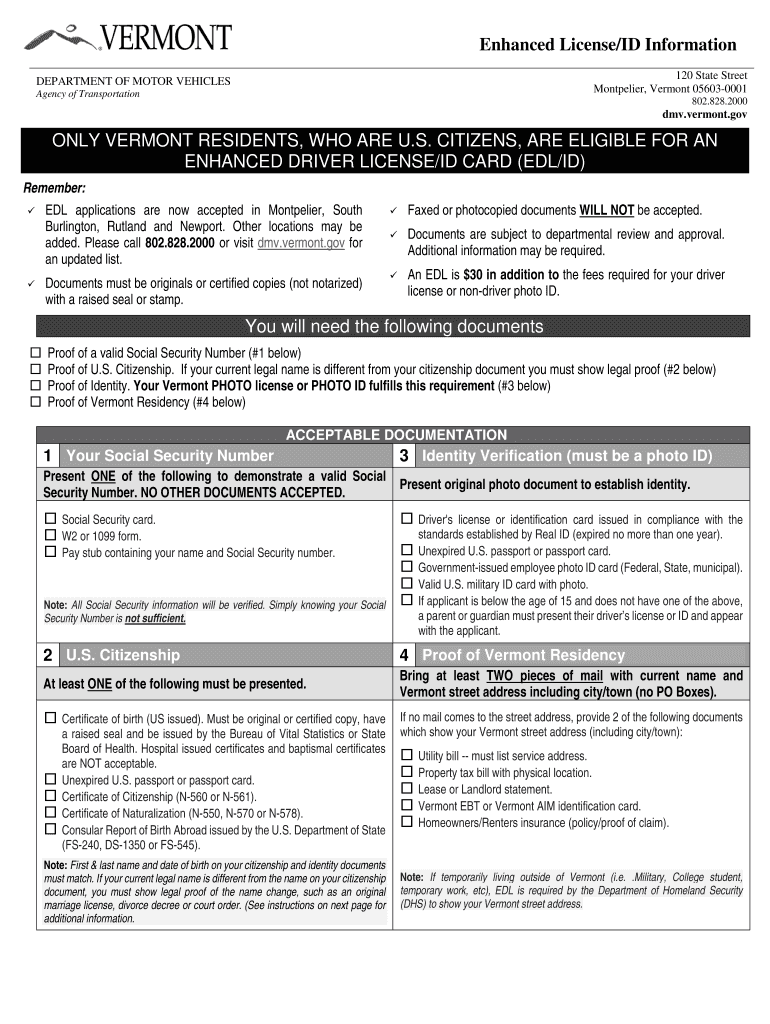
Choose License Type: Specify whether you are applying for a new operator's license, a renewal, or an enhanced ID, which may require additional documentation.
-
Voter Registration Sections: If you wish to register to vote, complete the voter registration part of the form. This includes confirming your eligibility and declaring any party affiliations if necessary.
-
Submit Required Documents: Attach necessary proofs of identity, residency, and Social Security number. This may include a certified birth certificate or a valid passport.
-
Payment and Submission: Pay any applicable fees with a certified method, then submit the form and documents either by mail or in person at a DMV office. Online submissions may be available for certain applications.
Key Elements of the Vermont Operators License and Voter Registration Application
- Dual Application Functionality: Simultaneously applies for a driver's license and voter registration.
- Identity Verification: Requires documentation proving identity, residency, and age.
- Eligibility Acknowledgment: Includes sections to confirm eligibility for voting and obtaining a license.
- Signature Section: Features a mandatory section for applicant signature, confirming the truthfulness of the information provided.
Eligibility Criteria for Application
- Residency Requirements: Applicants must be legal residents of Vermont.
- Age Limitations: There are age requirements differing for obtaining a voter registration versus a driver's license. Generally, you need to be at least 18 to vote, but you can apply for a learner’s permit at a younger age.
- Identification Standards: Proofs of identity and residency are mandatory. These must be original or certified copies as specified by the DMV.


Required Documents for Application
- Proof of Identity: Acceptable forms include a U.S. birth certificate, a valid passport, or a permanent resident card.
- Residency Proof: Examples include utility bills, lease agreements, or property tax statements.
- Social Security Number: Must be presented using an official document such as a Social Security card or equivalent.
Application Process and Approval Time
- Processing Time: Typically, processing the application takes a few weeks. However, this can differ based on the submission method and completeness of the application.
- Notification: Applicants will be notified by mail once their license is ready, or there will be instructions on further steps if additional verification is needed.
State-Specific Regulations for Vermont Applications
- Enhanced Driver’s License: Vermont offers enhanced licenses which can be used for certain travel purposes, including as identification for crossing U.S. borders via land or sea.
- Voter Accessibility Services: The form is part of Vermont's efforts to encourage greater voter participation, offering assistance such as language translation and accessibility services for those who need them.
Examples of Usage Scenarios
- Young Adults: A 17-year-old awaiting their 18th birthday can pre-register to vote while applying for their first operator's license, ensuring they are registered by the time they reach voting age.
- New Residents: Individuals moving to Vermont can handle both their need for a new local driver's license and their voter registration in one application.
Penalties for Non-Compliance
- Inaccurate Information: Submitting false information can result in denial of the application and legal consequences, including fines or other penalties.
- Unregistered Voting: Failing to update voter registration information may lead to issues when attempting to vote, such as being unable to cast a ballot or having to vote provisionally.
Thorough attention to the instructions and accurate submission of all relevant documents will ensure a smooth application process.