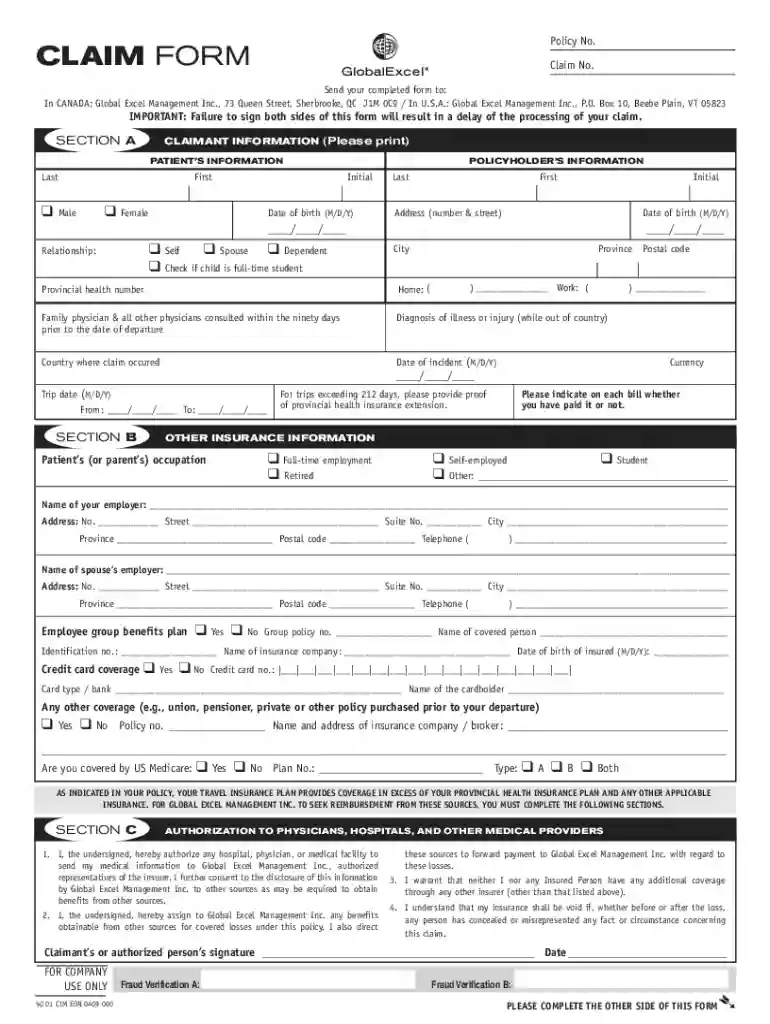
Claim Form Policy No : Claim No - Global Excel Management 2026

Get Form
Claim Form Policy No : Claim No - Global Excel Management Preview on Page 1

Here's how it works

01. Edit your form online
Type text, add images, blackout confidential details, add comments, highlights and more.

02. Sign it in a few clicks
Draw your signature, type it, upload its image, or use your mobile device as a signature pad.

03. Share your form with others
Send it via email, link, or fax. You can also download it, export it or print it out.

Definition & Meaning

The "Claim Form Policy No: Claim No - Global Excel Management" is a structured document used for processing travel insurance claims. It is crucial for providing all necessary information about the policyholder, the insured individual, and the claim details. The form ensures that claims are processed efficiently by mandating specific details and signatures to authorize medical information release and direct health service payments. The accuracy and completeness of this form are vital for timely claim processing.

How to Use the Claim Form

Using the "Claim Form Policy No: Claim No - Global Excel Management" involves a structured approach. Start by carefully filling out sections that pertain to the claimant's information, including personal details and policy numbers. Ensure the patient's information is correct if different from the policyholder. Complete sections related to the incurred costs and attach original bills or receipts to support the claim. Double-check that both sides are signed to avoid any delays in processing.

Steps to Complete the Claim Form

  1. Gather Required Information: Collect all necessary details about the policyholder, claimant, and patient.
  2. Complete Claimant Details: Enter personal information, including name, address, policy number, and contact details.
  3. Fill in Healthcare Service Information: List services received, dates, and associated costs.
  4. Attach Supporting Documents: Include original bills and receipts.
  5. Review Authorizations: Sign sections authorizing the release of medical information and direct payments.
  6. Finalize and Sign the Form: Ensure all mandatory fields are complete and sign both sides.

Required Documents

  • Original bills and receipts from the healthcare provider.
  • A copy of the travel insurance policy.
  • Identification proof, such as a passport or driver's license.
  • Any other relevant medical documentation supporting the claim.

Legal Use of the Claim Form

The form must be used in accordance with insurance policies and local regulations. Completing and submitting this form signifies the claimant's consent to disclose medical information for the purpose of processing the claim. It is a legally binding document, and any misinformation can lead to claim denial or legal repercussions.

Key Elements of the Form

  • Claimant Information: Details such as name, contact, and policy number.
  • Patient Information: Details of the person who received medical treatment.
  • Healthcare Services: Description and dates of services received.
  • Cost Breakdown: Detailed list of expenses incurred.
  • Signature and Authorization: Consent to process the claim and release of information.

Important Terms Related to the Claim Form

  • Policy Number: A unique identifier for the insurance policy.
  • Claim Number: A reference assigned by the insurer for each claim.
  • Authorization: Permitting the release of medical records and direct payment.
  • Deductible: The amount to be paid out of pocket by the policyholder before insurance covers expenses.

Software Compatibility

While this form can be filled out manually, platforms like DocHub allow for digital completion, facilitating the editing, signing, and submission processes. Integration with cloud services such as Google Drive ensures seamless document management.

State-Specific Rules for the Claim Form

State regulations may affect processing times or the required documents. For example, some states may require additional affidavits or notarized statements. Always check with local insurance guidelines to ensure compliance.

Who Issues the Form

The form is issued by Global Excel Management Inc., a company specializing in travel insurance claims management. It is responsible for ensuring the form meets all regulatory and policy-related requirements.

be ready to get more

Complete this form in 5 minutes or less

Get form

Got questions?

We have answers to the most popular questions from our customers. If you can't find an answer to your question, please contact us.
Contact us
Global Excel is a privately-owned company, servicing a wide range of clients in the insurance industry. Our clients are unique, so we realize the importance of developing authentic business relationships with them.
Step-by-Step: How to Write an Insurance Claim Letter for Reimbursement Begin with Your Contact Details and Date. Address the Letter Appropriately. State the Purpose Clearly with a Subject Line. Introduce Yourself and Reference Your Policy. Describe the Incident or Expense in Detail.
Fill out the medical reimbursement claim form, attach documents, and submit the file to the insurer within the stipulated time frame. Insurers specify the period during which you need to submit a claim after being discharged. Ensure that the claim request is submitted within that period.
HDFC Ergo Health Insurance offers a hassle-free claim process. Policyholders can easily submit their documents online or opt for offline options through the TPA.
Reimbursement claim: You must also fill out the claim form correctly and submit it at the TPA desk of the hospital for verification. If you are filing a reimbursement claim, you must attach original bills and receipts with the claim form. The insurer will verify the same before reimbursing your healthcare expenses.

Security and compliance

At DocHub, your data security is our priority. We follow HIPAA, SOC2, GDPR, and other standards, so you can work on your documents with confidence.

Learn more
ccpa2
pci-dss
gdpr-compliance
hipaa
soc-compliance
be ready to get more

Complete this form in 5 minutes or less

Get form

People also ask

Download the app today from the Apple App Store or Google Play. In case of a medical emergency call Global. Excel Management as soon as you can. Call toll-free from around the world* landlines. are preferred. Canada and the U.S.: 1-800-265-9977. International: Country code + 800-9221-9221.
Fee-for-service (FFS) is the most common reimbursement method. In many cases, a health insurer or government payor covers some or all of a patients healthcare costs. A patient is typically responsible for covering a portion of the cost as well.
How to Raise a Reimbursement Health Insurance Claim Intimate the Insurance Company. We understand that in times of medical crisis, you may find it difficult to docHub out to the insurance company right away. Pay Bills and Collect Documents. Submit the Claim Form and Documents. Let the Insurance Company Verify and Enquire.

Related links