01. Edit your form online
Type text, add images, blackout confidential details, add comments, highlights and more.

Type text, add images, blackout confidential details, add comments, highlights and more.

Draw your signature, type it, upload its image, or use your mobile device as a signature pad.

Send it via email, link, or fax. You can also download it, export it or print it out.
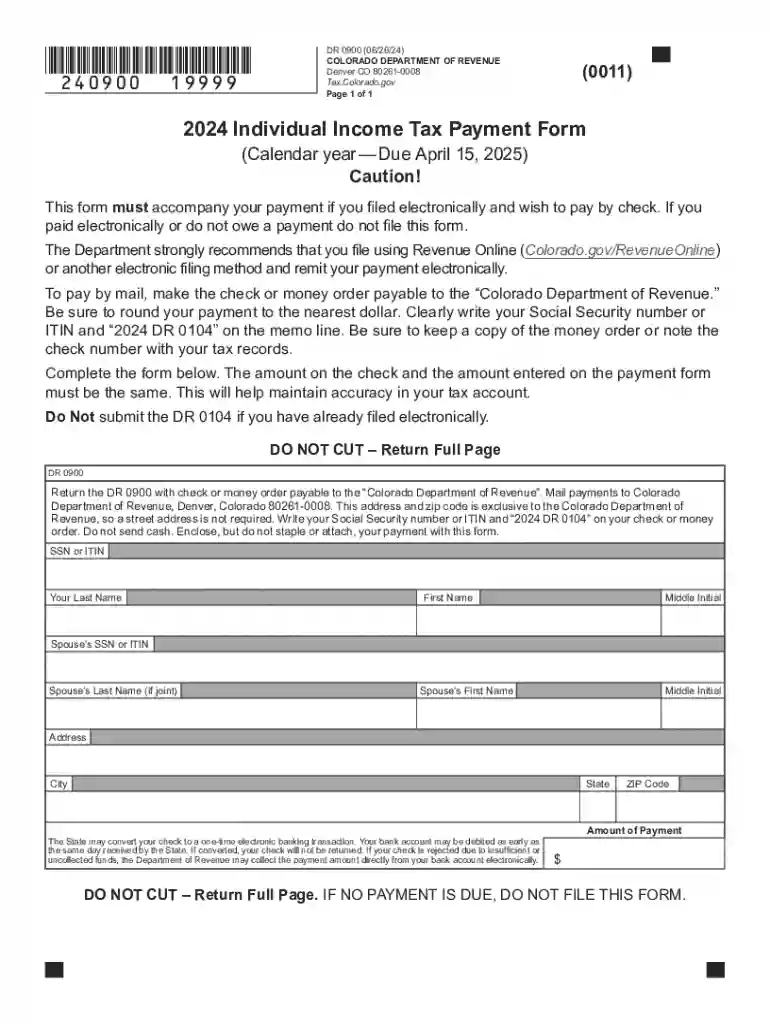
The Dr 0900 form is a specific document utilized for individual income tax payments within the state of Colorado. It serves as an essential component when taxpayers are required to submit payments alongside their electronic filing. This form represents a structured method for Colorado residents to accurately report and pay any outstanding state income taxes, ensuring compliance with state tax laws.
Understanding the significance of the Dr 0900 form is crucial for taxpayers in Colorado. It ensures that all tax payments are correctly accounted for and processed alongside electronic filings. By using the Dr 0900, taxpayers can prevent potential penalties and ensure their payments are officially documented by the Colorado Department of Revenue.
Taxpayers can acquire the Dr 0900 form through the Colorado Department of Revenue's website, where it is made available for download. The form can be printed and filled out manually, or it can be completed electronically, depending on the preferences and needs of the taxpayer.
In addition to the department's website, Dr 0900 forms may be included in tax preparation software like TurboTax or other platforms that assist in managing state tax obligations. Users of such software can often find the form integrated within the electronic filing process, which simplifies retrieval and submission.
The Dr 0900 form must adhere to Colorado's specific tax regulations, which may differ from federal tax rules. As such, it is essential for taxpayers to understand local directives regarding due dates and payment procedures to avoid discrepancies.
Colorado allows taxpayers to submit their payments either electronically or via mail, as detailed in the Dr 0900 instructions. Each method requires adherence to specific steps to ensure proper processing by the Department of Revenue.
Accurately completing each section of the Dr 0900 prevents processing delays and potential penalties for incorrect submissions. Taxpayers should double-check all fields to verify correctness before submission.
Failing to submit the Dr 0900 form by the deadline can incur penalties, including fines and interest on unpaid tax amounts. The Colorado Department of Revenue enforces these measures to encourage timely compliance.
Taxpayers can mitigate potential penalties by ensuring that they submit the Dr 0900 form in a timely manner, complete with accurate payment information and within the prescribed submission window.
A self-employed taxpayer in Colorado who owes state income tax following their tax assessment must use the Dr 0900 form to submit their payment. This ensures the Department of Revenue officially records their payment on time.
Taxpayers who file their state income tax returns electronically but need to submit payments separately will utilize the Dr 0900 form. This allows them to efficiently fulfill payment requirements alongside their electronic filing.
Taxpayers should be aware of the deadlines associated with submitting the Dr 0900 form. Colorado typically aligns these dates with federal tax deadlines, but taxpayers must verify specific state deadlines to ensure compliance.
By marking relevant tax dates and organizing financial records in advance, taxpayers can prevent last-minute rushes and ensure their Dr 0900 forms and associated payments are submitted promptly.
We've got more versions of the Dr 0900 form. Select the right Dr 0900 version from the list and start editing it straight away!
At DocHub, your data security is our priority. We follow HIPAA, SOC2, GDPR, and other standards, so you can work on your documents with confidence.