






Definition & Purpose of the SHOP DRAWING RECORD (Architectural) - GSA
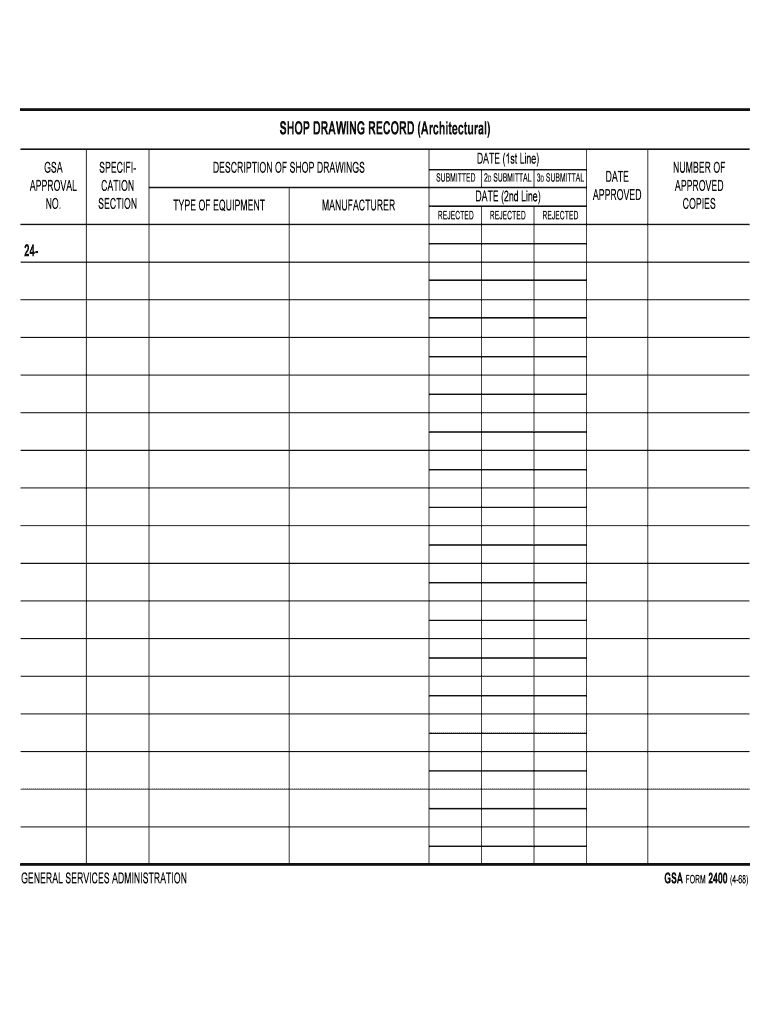
The SHOP DRAWING RECORD (Architectural) - GSA is a document utilized by the General Services Administration to manage and monitor the submission process of shop drawings specific to architectural projects. This record serves as a comprehensive tracking system, ensuring that all submissions meet the required architectural specifications. It includes crucial data such as equipment type, manufacturer details, submission timelines, and the approval status of each drawing.
Importance in Project Management
- Documentation: Provides a systematic method for documenting submissions, approvals, or rejections, aiding in effective project management.
- Communication: Facilitates communication between contractors, architects, and the GSA by providing a clear record of decisions.
- Compliance: Helps ensure compliance with GSA and architectural standards throughout the project lifecycle.
Steps to Use the SHOP DRAWING RECORD
- Gather Essential Information: Collect all necessary details, including equipment type, manufacturer, and specific architectural specifications.
- Complete Submission Sections: Fill out the sections detailing manufacturer information, equipment specs, and intended application.
- Track Submission Dates: Note the dates of initial submission and any subsequent revisions to maintain an accurate timeline.
- Monitor Approval Process: Keep detailed records of the approval status, including responsible official signatures and any required amendments.
Tips for Accurate Completion
- Detail Orientation: Ensure accuracy in manufacturer details and equipment types to avoid delays in approval.
- Timeliness: Submit within designated project timelines to avoid potential repercussions for project scheduling.
- Verification: Double-check all entries against initial specifications to ensure consistency and reduce errors.
Key Elements of the Form
- Equipment Type & Specifications: Lists the specific details of each equipment involved in the architectural blueprint, ensuring that all components meet project requirements.
- Manufacturer Details: Includes name, contact information, and any relevant certifications that validate their compliance with federal standards.
- Submission and Approval Dates: Tracks key dates related to drawing submissions and the subsequent process, providing a timeline for reference.
- Approval Status: The current status section indicates whether drawings are approved, pending, or rejected, along with any feedback or required modifications.
Why Should You Use the SHOP DRAWING RECORD?
The SHOP DRAWING RECORD is essential for maintaining high standards of quality and compliance within architectural projects managed under the GSA. The record ensures that all architectural elements are inspected, validated, and signed off by necessary parties:
- Quality Assurance: Maintains integrity of architectural specifications with well-documented records.
- Regulatory Compliance: Aligns with GSA regulations and architectural standards, avoiding potential fines or project delays.
- Efficient Issue Resolution: Provides a clear trail of documentation to quickly address and resolve any discrepancies or conflicts.
Who Typically Uses the SHOP DRAWING RECORD?


GSA and Contractors
- GSA Project Managers: Oversee the compliance and integrity of project specifications.
- Architectural Firms: Ensure drawings align with design intentions and technical standards.
- Construction Contractors: Implement the design in practical applications, ensuring components match approved specifications.
Collaborative Environment
- Facilitates a collaborative environment where multiple stakeholders—the GSA, contractors, and architects—align project goals with regulatory compliance and architectural integrity.
Legal Use and Compliance
Adherence to Standards
- Regulatory Requirements: Must adhere to all federal and state architectural standards, with emphasis on safety and compliance.
- Record Retention: Maintain records for necessary audit trails and historical reference, as stipulated by the GSA.
Consequences of Non-Compliance
- Project Delays: Revisions and resubmissions can result in costly project delays.
- Financial Penalties: Potential fines imposed by regulatory bodies for non-compliance with architectural standards.
Examples of Using the SHOP DRAWING RECORD
- Case Study: Federal Building Renovation: During a renovation, the SHOP DRAWING RECORD was essential in tracking revisions to HVAC systems to ensure they met the latest federal efficiency standards.
- Scenario: New Construction: In a new office complex project, the record was used to document and approve the custom curtain wall systems, aligning with aesthetic and functional requirements.
Practical Applications
- Modifications: Provides a basis for decision-making in adjusting project components to align with updated standards or changes in project scope.
State-Specific Rules and Guidelines
While the primary use of the SHOP DRAWING RECORD is standardized under federal oversight, certain state-specific regulations may influence how this document is utilized within projects:
- State Compliance: Guidelines may vary based on local architectural board regulations, necessitating tailored submissions for approval.
By understanding and leveraging the SHOP DRAWING RECORD, architectural projects managed under the GSA can achieve higher efficiency, compliance, and successful project outcomes.