01. Edit your form online
Type text, add images, blackout confidential details, add comments, highlights and more.

Type text, add images, blackout confidential details, add comments, highlights and more.

Draw your signature, type it, upload its image, or use your mobile device as a signature pad.

Send it via email, link, or fax. You can also download it, export it or print it out.
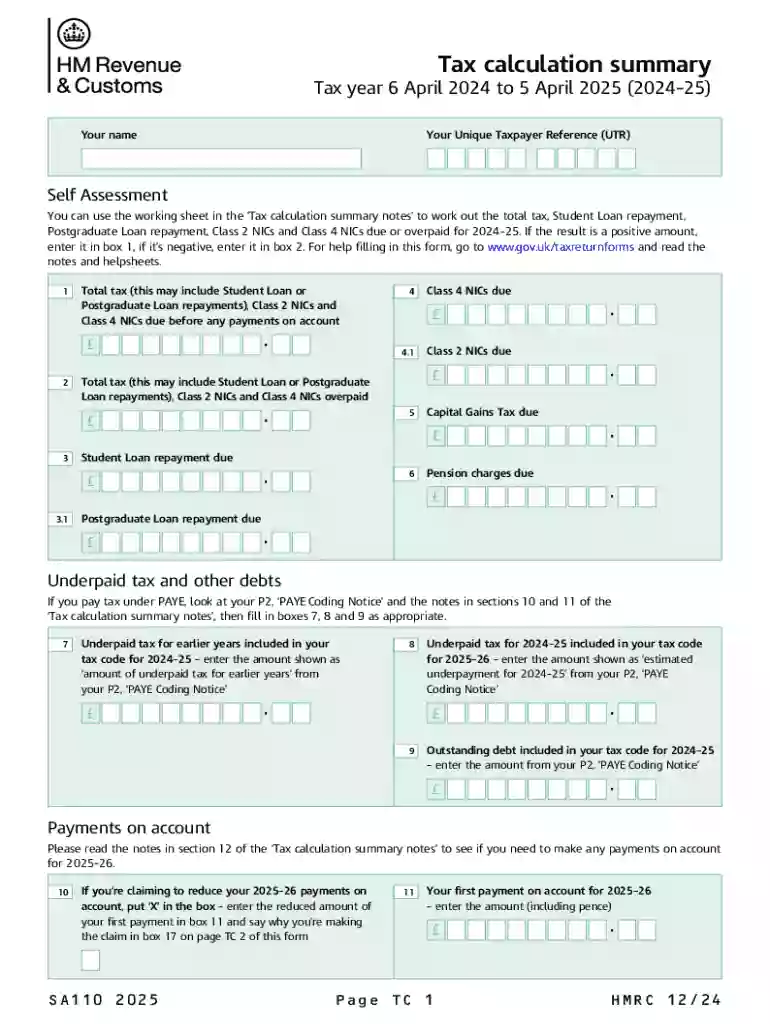
The Tax Calculation Summary is a detailed document utilized for calculating total tax liabilities for a specific tax year. It incorporates various components such as Student Loan and Postgraduate Loan repayments, Class 2 and Class 4 National Insurance Contributions (NICs), and corrections for any underpaid taxes. By providing explicit instructions for completing specific sections related to tax dues, overpayments, and adjustments, it guides taxpayers in providing the necessary information for accurate tax assessment.
The summary also takes into account allowances for individuals who qualify as blind persons or are part of married couples, ensuring they benefit from applicable tax reductions. It serves as a comprehensive tool for individuals to manage and understand their tax obligations, helping them organize and report their financial activities accurately.
To effectively use the Tax Calculation Summary, follow these steps:
Gather Financial Information: Begin by collecting all pertinent financial documents, such as income statements, loan details, and insurance contributions.
Identify Relevant Sections: Locate the sections on the form pertinent to your financial situation, including where to input details about student loans, insurance contributions, and any adjustments from prior years.
Input Accurate Details: Precisely enter your financial details into their respective sections. Proper completion ensures the summary accurately reflects your tax situation.
Calculate Total Liabilities: Utilize the summary to compute your total tax liabilities. Carefully verify each entry to confirm calculations are correct.
Review and Cross-Check Information: Before submission, review each section to ensure accuracy. Mistakes may lead to potential penalties or the need for future amendments.
Consult with Tax Professionals if Needed: For complex cases or uncertainties, consider consulting tax professionals who can offer tailored advice and assistance.
Collect Necessary Documents: Ensure you have all relevant documents on hand, including previous tax returns, income statements, and loan repayment schedules.
Understand the Form Structure: Familiarize yourself with the various sections of the form to understand where different pieces of information need to be entered.
Enter Personal Information: Start by filling out your personal details accurately to ensure consistency across all tax documentation.
Report Income: Provide a comprehensive tally of all income sources, ensuring every amount is listed accurately to assess tax liabilities correctly.
Document Loan Repayments and Contributions: Include any student or postgraduate loan repayments and Class 2 and Class 4 NICs to complete sections regarding deductions and payments made during the year.
Make Necessary Adjustments: If applicable, note any adjustments carried over from previous tax years in the relevant sections.
Verify Allowances: Confirm eligibility for allowances, such as for blindness or marriage, and complete these sections to take advantage of potential tax reductions.
Double-Check Entries: Revisit each section to verify that information is correct and matches your supporting documents.
Submit the Completed Summary: Depending on your submission preference, submit the form online, through mail, or in person, adhering to any applicable deadlines.
Each section requires precise input to ensure the summary accurately represents your financial situation, allowing for clear communication with tax authorities.
To successfully complete the Tax Calculation Summary, prepare the following documents:
Monetary Penalties: Late submissions or inaccuracies may result in financial penalties enforced by tax authorities.
Interest on Unpaid Taxes: Delayed payments can lead to accruing interest on any overdue tax amounts.
Potential Legal Action: Persistent non-compliance may escalate to legal proceedings, resulting in further liabilities.
Credit Impact: Outstanding tax issues can adversely affect your credit score, impacting future financial activities like loan applications or credit approvals.
Avoiding these penalties requires submitting accurate and complete information promptly.
These steps are vital for properly managing your tax responsibilities and ensuring compliance with federal laws.
Federal Tax Deadline: The deadline for most individuals' tax forms, including the Tax Calculation Summary, is April 15 of the following year. If this date falls on a weekend or holiday, the deadline may be extended.
Extension Requests: If unable to meet the standard deadline, submit an extension request using IRS Form 4868 by the original filing date. This grants additional time to file but not to pay any owed taxes.
Other Key Dates:
Awareness of these dates is crucial to avoid late submission penalties and interest charges.
We've got more versions of the Tax Calculation Summary form. Select the right Tax Calculation Summary version from the list and start editing it straight away!
At DocHub, your data security is our priority. We follow HIPAA, SOC2, GDPR, and other standards, so you can work on your documents with confidence.