
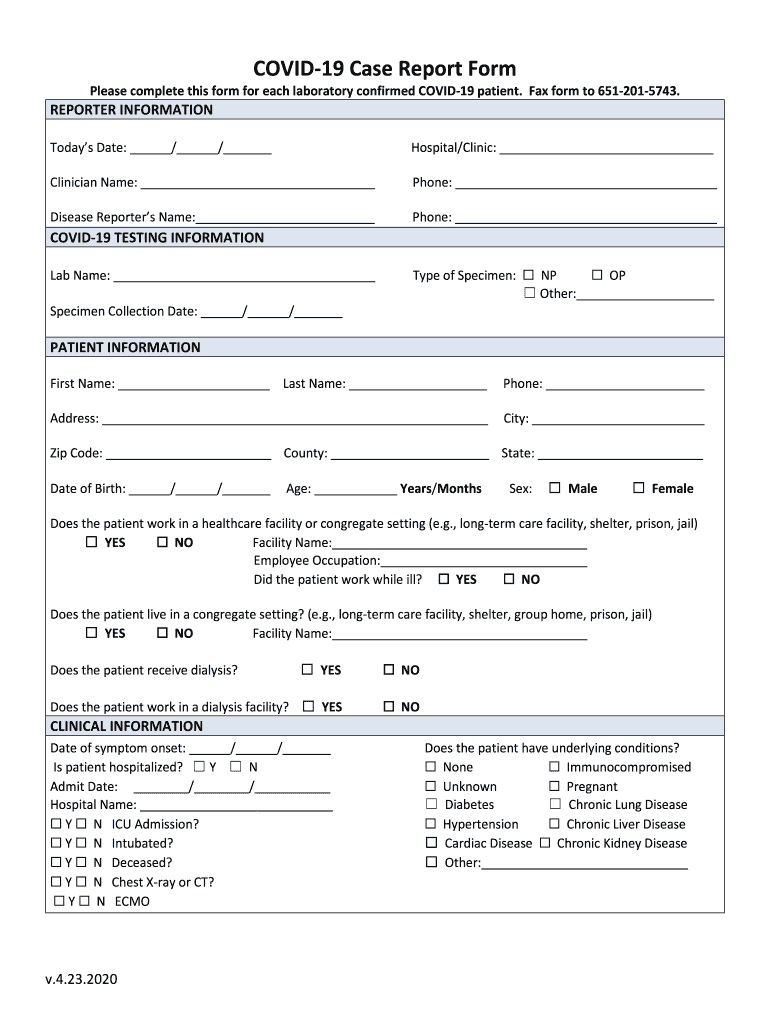







Definition and Purpose of the COVID-19 Case Report Form
The COVID-19 Case Report Form is a crucial document used by healthcare providers to report details about laboratory-confirmed COVID-19 patients. It serves as a standardized method to collect comprehensive patient data, which is essential for monitoring the spread of the virus and helping public health officials make informed decisions. This form includes vital sections such as reporter information, patient demographics, COVID-19 testing details, clinical information, and underlying health conditions. By systematically gathering this information, the form aids in understanding the epidemiology of COVID-19 and improving public health responses.
How to Use the COVID-19 Case Report Form
Using the COVID-19 Case Report Form involves several systematic steps:
-
Obtain the Form: Healthcare providers can typically obtain the form through official health department channels or organizational intranet portals. Many jurisdictions provide downloadable versions online.
-
Fill Out the Form: Complete all required sections, including the patient's personal information, medical history, and test results. Each section must be filled accurately to ensure the data's reliability.
-
Verification: Before submission, double-check the entries for accuracy. This is crucial for maintaining data integrity and ensuring that the information recorded reflects the patient's actual condition and test outcomes.
-
Submission: Submit the completed form via fax, email, or an electronic submission system as directed by the health department. Timely submission is essential for effective data handling and management.
-
Record Keeping: Keep a copy of the submitted form for record-keeping purposes and future reference if needed. This can be crucial for follow-up actions by the healthcare provider or public health authorities.
Steps to Complete the COVID-19 Case Report Form
Completing the COVID-19 Case Report Form requires a detailed approach:
-
Gather Information: Collect all necessary data, including patient demographics, testing results, and clinical details.
-
Fill Reporter Information: Provide your details as the healthcare provider or reporter, including your contact information, for any required follow-ups.
-
Complete Patient Demographic Section: Enter the patient's age, gender, ethnicity, and other personal details that may aid in assessing the risk and spreading patterns.
-
Record Testing Details: Include specifics about the COVID-19 test performed, such as test type, date, and results. This information helps verify diagnosis and track testing efficacy.
-
Clinical Information: Document the patient's symptoms, medical history, and any complications or underlying conditions. Accurate clinical information is essential for evaluating patient risk factors and potential treatment plans.
-
Final Review and Submission: Ensure all sections are completed and accurate before submitting the form through the required channels.
Key Elements of the COVID-19 Case Report Form
The COVID-19 Case Report Form encompasses several key elements:
- Reporter Information: Details of the individual or organization completing the form.
- Patient Identification: Includes name, contact information, and medical record number.
- Testing Information: Type of test conducted (PCR, antigen, etc.), laboratory details, and test results.
- Symptom Onset and Duration: Records when symptoms started and their progression.
- Clinical Presentation: Detailed documentation of symptoms and clinical findings.
- Comorbidities and Risk Factors: Information about existing health conditions that may influence COVID-19 severity.
- Vaccination Status: If applicable, records doses received and dates to assess the vaccine's role in disease presentation.
Who Typically Uses the COVID-19 Case Report Form
The form is predominantly used by:
- Healthcare Providers: Doctors, nurses, and laboratory technicians are often responsible for filling out the form based on patient interactions and test results.
- Public Health Officials: Utilize the collected data for surveillance, tracking case trends, and informing public health strategies.
- Disease Surveillance Analysts: Analyze trends and patterns to forecast outbreaks and allocate resources effectively.


Legal Use of the COVID-19 Case Report Form
The COVID-19 Case Report Form holds legal significance as it forms part of public health reporting requirements. Its data support legal mandates for disease surveillance and reporting to health authorities. Accurate completion and submission help meet obligations under health laws and regulations, which can be crucial during audits or investigations regarding how COVID-19 data is managed and used.
Penalties for Non-Compliance
Failure to comply with filling and submitting the COVID-19 Case Report Form may result in:
- Sanctions: Legal action or fines may be imposed on healthcare organizations that fail to report cases accurately.
- Reputational Damage: Lack of compliance can harm the reputation of health institutions, questioning their reliability in contributing to public health data.
- Operational Consequences: Inaccurate or missing data hamper response efforts, affecting public health strategies and potentially exacerbating the virus's spread.
Integration with Digital Platforms
With increasing digitalization, completing the COVID-19 Case Report Form online is streamlined with platforms like DocHub. DocHub simplifies form completion with:
- Edit and Sign Capabilities: Healthcare providers can edit, sign, and complete forms electronically, ensuring accuracy and ease of sharing.
- Cloud Integration: Integration with services like Google Drive allows seamless uploading and storing of completed forms.
- Security Features: High-level encryption safeguards sensitive patient data during the completion process, maintaining compliance with health data regulations.
Through platforms like DocHub, the process of managing and submitting COVID-19 Case Report Forms becomes more efficient and secure, facilitating better compliance and data management.




