







How to Obtain the Form Online
To access forms online effectively, it's important to select a reliable platform like DocHub, which simplifies document handling by enabling you to easily import forms from various sources. You can directly upload forms from your computer or access them through popular cloud storage services such as Google Drive, Dropbox, and OneDrive. DocHub's integration with these services ensures a seamless process without the need for additional software installation.
When accessing forms, make sure to check that the platform supports different file types such as PDF, DOC, or TXT, for ease of use. On DocHub, these formats are readily compatible, which eliminates the hassle of needing external converters. Moreover, DocHub’s online functionality means you can manage your forms through any standard web browser, ensuring flexibility and accessibility from any location, whether you're using a desktop or a mobile device.
Steps to Complete the Form Online
Filling out forms online involves a few straightforward steps. First, upload or select the form you wish to complete. Using DocHub, inserting text can be done by creating text boxes in designated areas, allowing for clean and organized input. If the form requires additional elements such as checkboxes or dropdown menus, these can easily be inserted using the Form Fields manager, enhancing the interactivity of your document.
Once you've added all necessary information, reviewing your entries is crucial. This ensures accuracy and completeness before finalizing the form. DocHub provides options for annotation, which allows you to highlight sections or add comments if further clarification is necessary. After confirming the document is ready, DocHub facilitates easy sharing or exporting, offering options such as email, Google Drive, or direct download.
Required Documents
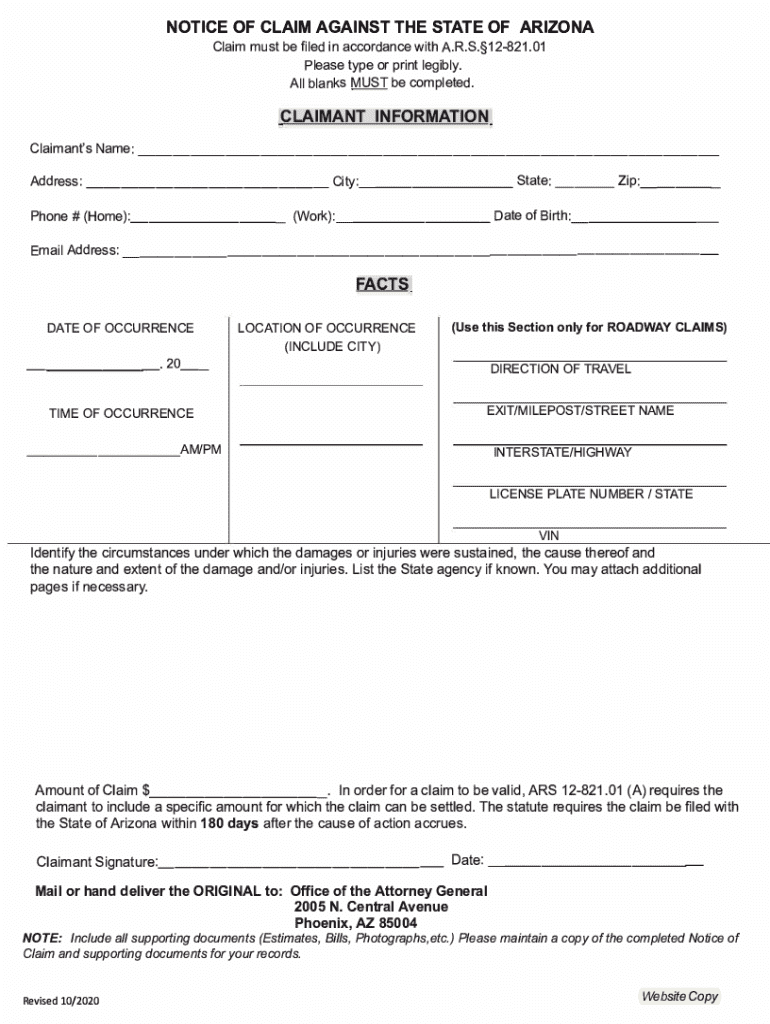
When completing forms online, having the right documents on hand expedites the process. For instance, when dealing with forms like a Notice of Claim against the State of Arizona, you need to be prepared to provide personal identification, incident-related details, and any required supporting documents within the specified timeframe.
It's wise to keep digital copies of necessary documents handy for quick uploading. Common documents may include identification, proof of residence, and any relevant certifications or authorization letters. Organizing these in advance ensures that the form completion process is smooth and uninterrupted, empowering you to focus on filling out the form correctly.
Legal Use of the Form Online
Understanding the legal implications of online forms is pivotal. Platforms like DocHub comply with legal standards, particularly for electronic signatures, which are recognized under laws such as the ESIGN Act in the United States. This ensures that electronic signatures hold the same legal weight as handwritten ones in contractual agreements.
For sensitive or official forms, check that the platform offers security measures like SSL encryption and authentication protocols to protect your data. With DocHub, additional layers of security—such as password protection for documents—add reassurance for legal compliance when sharing forms online.
Key Elements of the Form Online
Online forms often have specific key elements that need to be correctly understood and filled. These can include:
- Personal Information Fields: Capturing essential data such as name, address, and contact information.
- Interactive Fields: Components like text inputs, checkboxes, and dropdowns, managed effectively through DocHub's Form Fields manager.
- Signature Areas: Particularly important for legal documentation, where e-signatures validate the form.
Understanding these components ensures the online forms are completed accurately, mitigating the risk of rejection due to incomplete or incorrect entries.
Examples of Using the Form Online
Certain scenarios illustrate the practical application of online forms. For instance, an HR department might distribute performance review forms electronically using DocHub. Managers can receive and fill them out by entering performance metrics and comments directly online, then submitting them for HR review and processing, showcasing efficient internal workflow management.
Another example is educational institutions using online forms for student enrollment processes. Using DocHub, forms such as course registrations or permission slips can be filled, signed, and returned electronically, streamlining administrative tasks.
Benefits of Electronic Signature for the Form Online
The introduction of electronic signatures revolutionizes the way forms are completed online. With platforms like DocHub, signatures become legally binding, simplifying the authorization process for documents ranging from rental agreements to business contracts.
Options for creating signatures—such as drawing, typing, or uploading an image—provide flexibility. DocHub even allows mobile signature capture, adding authenticity to the signature process. This feature enhances convenience and speed, making electronic approvals a go-to choice in today’s digital landscape.
Software Compatibility
Ensuring software compatibility is crucial for seamless form handling online. The compatibility of DocHub with major cloud storage services like Google Drive and Gmail enhances productivity, as users can easily import and export forms without switching between applications.
For those already utilizing software like TurboTax or QuickBooks, ensuring that these programs can integrate with your online platform, like DocHub, ensures continuity in document handling. This ability to interface with existing software systems means less disruption and more efficient workflow management.




