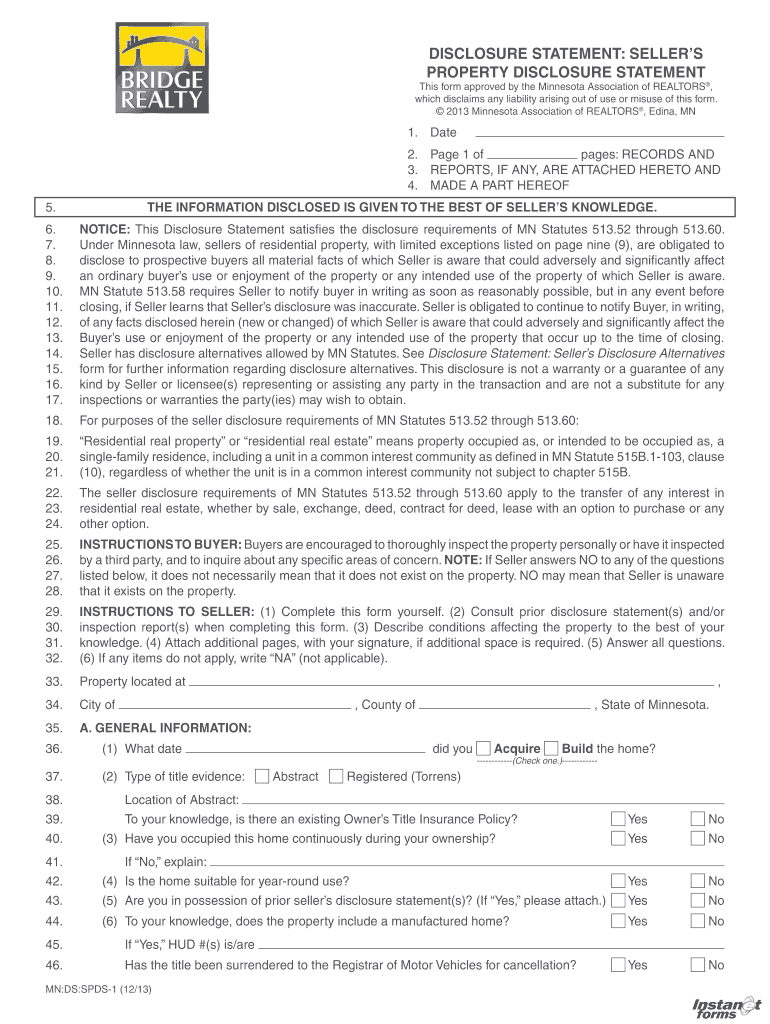
Seller's property disclosure statement - BuyandSellwithBill.com 2025

Get Form
Seller's property disclosure statement - BuyandSellwithBill.com Preview on Page 1

Here's how it works

01. Edit your form online
Type text, add images, blackout confidential details, add comments, highlights and more.
02. Sign it in a few clicks
Draw your signature, type it, upload its image, or use your mobile device as a signature pad.
03. Share your form with others
Send it via email, link, or fax. You can also download it, export it or print it out.

How to use or fill out Seller's property disclosure statement - BuyandSellwithBill.com

Form edit decoration
9.5
Ease of Setup
DocHub User Ratings on G2
9.0
Ease of Use
DocHub User Ratings on G2
  1. Click ‘Get Form’ to open it in the editor.
  2. Begin by entering the date at the top of the form. This is essential for record-keeping.
  3. In Section A, provide general information about the property, including acquisition date and type of title evidence.
  4. Answer all questions honestly, especially regarding occupancy and any prior seller disclosures. If a question does not apply, write 'NA'.
  5. Proceed to Section B to disclose any known damages or insurance claims related to the property. Be specific in your explanations.
  6. Continue through Sections C to M, addressing structural systems, appliances, environmental concerns, and radon disclosures as applicable.
  7. Once completed, review all entries for accuracy before saving or sharing the document with potential buyers.

Start using our platform today to effortlessly complete your Seller's Property Disclosure Statement!

be ready to get more

Complete this form in 5 minutes or less

Get form

Got questions?

We have answers to the most popular questions from our customers. If you can't find an answer to your question, please contact us.
Contact us

Managing your forms with DocHub this way is very simple after you have downloaded its extension for Google Chrome. Navigate to the Chrome Web Store and install DocHub - Sign PDF from Gmail to obtain it. Give our tool access to your Google account, and then open an email with the Seller's property disclosure statement - BuyandSellwithBill.com attached and point to the file with your cursor - the DocHub extension key will automatically show up there. Click on it to open your form in our editor. Make any required edits, fill out the blanks, and click Sign to create your legally-binding electronic signature.

You need only a web connection and a browser to complete your Seller's property disclosure statement - BuyandSellwithBill.com by using an iOS phone. Open the DocHub website and authenticate. Then, add your document or choose it from the list in your dashboard. Then use our editing instruments to complete your form and preserve all your changes. You may also send it to a specified recipient immediately.

be ready to get more

Complete this form in 5 minutes or less

Get form