Type text, add images, blackout confidential details, add comments, highlights and more.
02. Sign it in a few clicks
Draw your signature, type it, upload its image, or use your mobile device as a signature pad.
03. Share your form with others
Send it via email, link, or fax. You can also download it, export it or print it out.
How to use or fill out The Master's Degree (M.S.) Application with our platform
Ease of Setup
DocHub User Ratings on G2
Ease of Use
DocHub User Ratings on G2
Click ‘Get Form’ to open it in the editor.
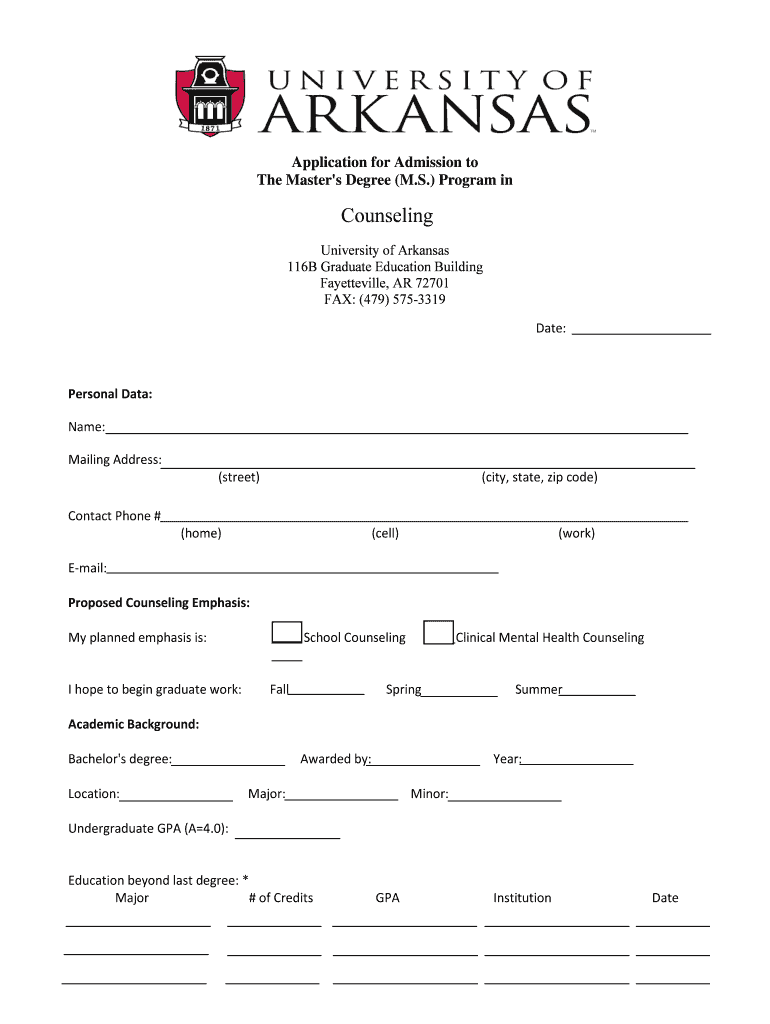
Begin by entering your personal data. Fill in your name, mailing address (including street, city, state, and zip code), and contact phone numbers (home, cell, work). Don’t forget to provide your email address.
Indicate your proposed counseling emphasis by selecting either School Counseling or Clinical Mental Health Counseling. Specify the term you hope to begin graduate work: Fall, Spring, or Summer.
In the Academic Background section, list your bachelor's degree details including location, awarding institution, year awarded, major, minor, and undergraduate GPA.
Document your work experience related to counseling. Start with the most recent position and include the institution name, location, position held, and dates of employment.
Repeat step 5 for non-counseling work experience if applicable.
Request three professional letters of recommendation. Provide names and addresses along with their relationship to you in the designated section.
Once completed, return this application via fax or as an email attachment using the provided submission instructions.
Start filling out The Master's Degree (M.S.) Application today for free on our platform!
The master's degree m meaningMaster degree yearsMaster's degree vs bachelor's degreeMaster's degree meaningMaster's degree abbreviationsMaster's degree exampleMaster degree courses listMaster degree means which class
Related links
Masters Degree Requirements - Graduate School
The Graduate School requires candidates for masters degrees to devote a minimum of 30 credit hours to their graduate courses.
Cookie consent notice
This site uses cookies to enhance site navigation and personalize your experience.
By using this site you agree to our use of cookies as described in our Privacy Notice.
You can modify your selections by visiting our Cookie and Advertising Notice.