




01. Edit your form online
Type text, add images, blackout confidential details, add comments, highlights and more.

Type text, add images, blackout confidential details, add comments, highlights and more.

Draw your signature, type it, upload its image, or use your mobile device as a signature pad.

Send it via email, link, or fax. You can also download it, export it or print it out.
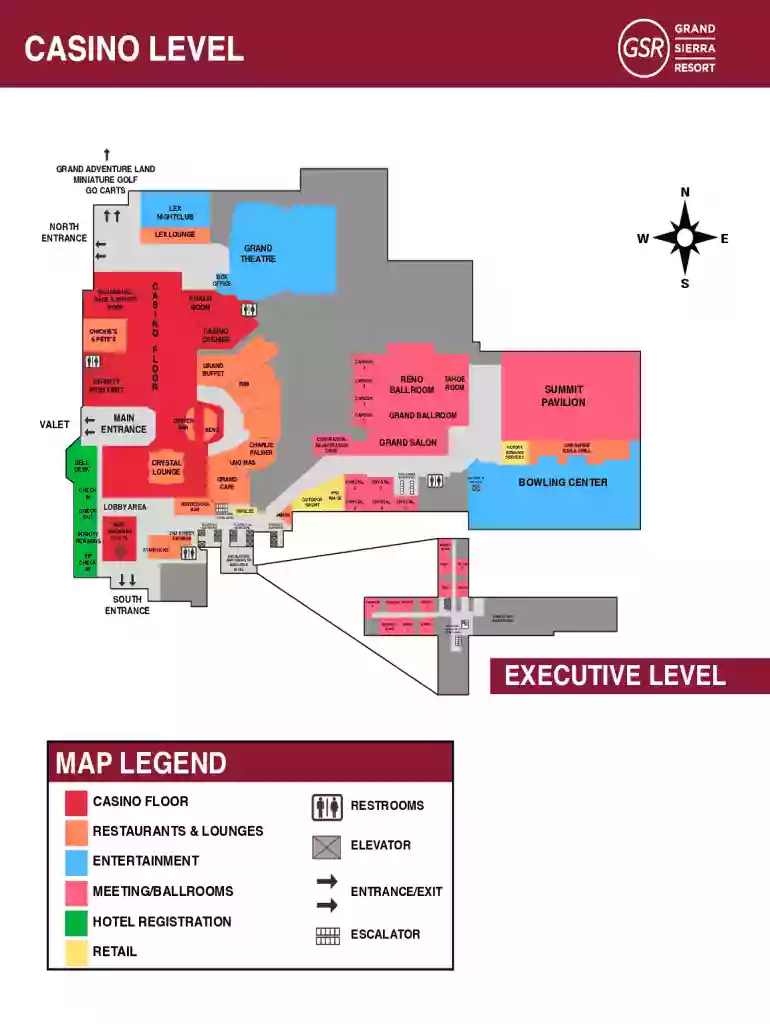
The GSR-Property-Map is a document designed to provide a comprehensive layout of a large entertainment complex. It serves as a navigational guide, offering detailed insights into the various facilities, including nightclubs, restaurants, gaming areas, meeting rooms, and recreational activities. The map highlights different levels of the venue, indicating the specific locations for guest services, dining options, and entertainment amenities, which is crucial for both visitors and management staff to optimize their experience and operations within the space.
Using the GSR-Property-Map begins with understanding the layout and key symbols that denote different areas within the entertainment complex. Users should familiarize themselves with the legend, usually found at the bottom or side of the map, which explains the icons representing different amenities such as restrooms, elevators, and exits. To efficiently navigate the venue, users can follow these steps:
Several terms are commonly associated with the GSR-Property-Map that enhance comprehension:
Understanding these terms allows users to effectively utilize the map and navigate the complex proficiently.
The GSR-Property-Map contains several crucial components that ensure its utility:
These elements ensure that the map is not only functional but also safe and accessible for diverse groups.
Users can leverage the GSR-Property-Map in numerous scenarios:
These examples highlight the versatility of the GSR-Property-Map for different operational needs.
The GSR-Property-Map is available in both digital and paper formats, each with distinct advantages:
The choice between digital and paper formats depends on user preference and context, with each option catering to different needs.
The digital version of the GSR-Property-Map benefits from compatibility with various software solutions:
Software compatibility expands the map's functionality, supporting advanced use cases and improved user experience.
While traditionally not associated directly with financial implications, the GSR-Property-Map can intersect with fiscal considerations indirectly:
Recognizing these fiscal aspects can guide venue administrators in budgeting and optimizing resource allocation for map-related functionalities.
We've got more versions of the GSR-Property-Map form. Select the right GSR-Property-Map version from the list and start editing it straight away!
At DocHub, your data security is our priority. We follow HIPAA, SOC2, GDPR, and other standards, so you can work on your documents with confidence.


