




01. Edit your form online
Type text, add images, blackout confidential details, add comments, highlights and more.

Type text, add images, blackout confidential details, add comments, highlights and more.

Draw your signature, type it, upload its image, or use your mobile device as a signature pad.

Send it via email, link, or fax. You can also download it, export it or print it out.
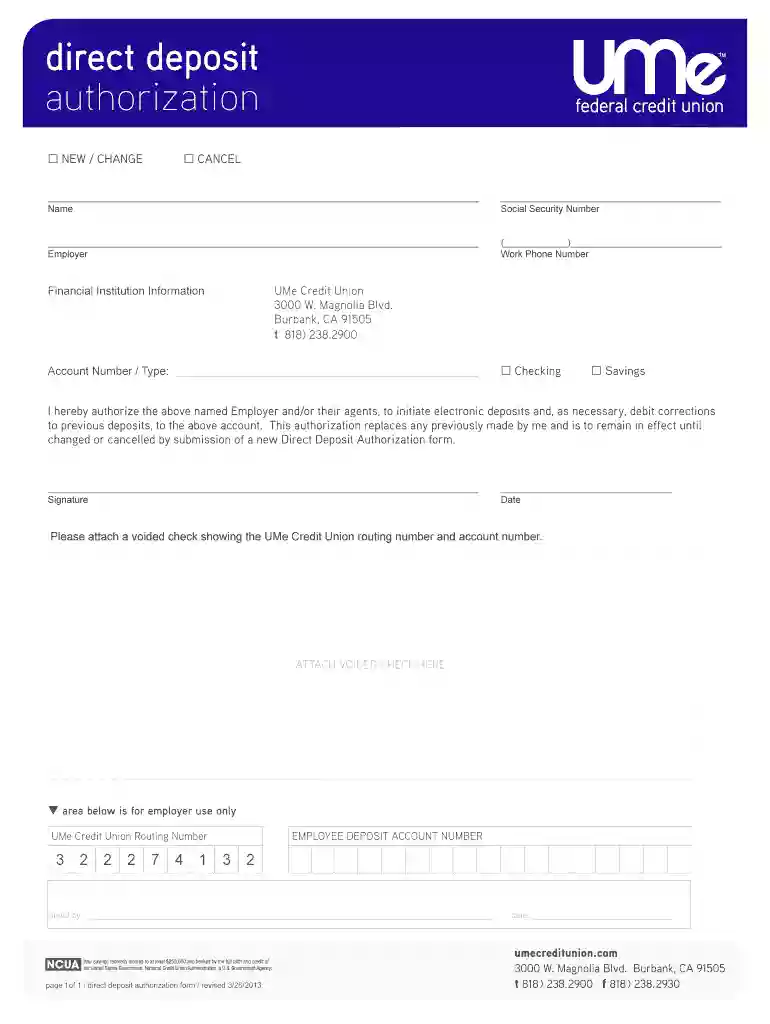
The UMe Direct Deposit Authorization Form 03-26-2013 is a financial document used by employees to authorize their employer to deposit funds directly into their personal bank account at UMe Credit Union. This form collects critical personal and banking information necessary for the setup, modification, or cancellation of direct deposit arrangements. It streamlines the payment process, ensuring timely and efficient transfers on payday.
To use the UMe Direct Deposit Authorization Form 03-26-2013 effectively, employees must follow a series of steps that ensure the form is filled out accurately and submitted in a timely manner. This will ensure a smooth transition to direct deposit.
Gather Required Information:
Complete the Form:
Attach Additional Documents:
Submit to Employer:
Acquiring the UMe Direct Deposit Authorization Form 03-26-2013 can be done through several methods, depending on the source and recipient's preference:
Completing the UMe Direct Deposit Authorization Form 03-26-2013 involves careful attention to detail to prevent processing delays or errors. Follow these detailed steps:
Fill Personal Information:
Enter Banking Details:
Sign and Date:
Verification and Attachments:
Submission:
The form is composed of several critical elements that gather necessary data for processing direct deposits accurately:
The use of the UMe Direct Deposit Authorization Form 03-26-2013 must comply with legal standards to ensure both the employee's and employer's actions are protected:
Various individuals and entities utilize this form based on their needs and circumstances:


Understanding the key terms associated with the UMe Direct Deposit Authorization Form is crucial for proper utilization:
While the form is standard, specific state laws may affect its execution:
There are various submission methods for the UMe Direct Deposit Authorization Form 03-26-2013, each offering unique advantages:
Online Submission: Many employers now accept digital forms via secure company portals.
Offline Submission: Traditional submission via mail or in-person delivery.
Understanding available options can help in selecting the appropriate form for regulatory and personal needs:
Selecting the proper method and using the most updated forms ensure efficiency and legality in establishing direct deposit arrangements.
We've got more versions of the UMe Direct Deposit Authorization Form 03-26-2013 form. Select the right UMe Direct Deposit Authorization Form 03-26-2013 version from the list and start editing it straight away!
At DocHub, your data security is our priority. We follow HIPAA, SOC2, GDPR, and other standards, so you can work on your documents with confidence.

contact the office of the City Clerk (951) 694-6444. financial interest, direct or indirect, Report Services Authorization: Sales Rep Authorization: -355-1093
by F Braggion 2023 Cited by 27 To see how marketplace credit can help elude LTV caps, suppose a borrower wants to take out a mortgage with a bank to purchase a house worth $100. Suppose.Read more


